Showing posts with label Dual Slot Reader. Show all posts

Saturday, August 25, 2018

REVIEW: Delkin CFast 2.0 Reader & Card


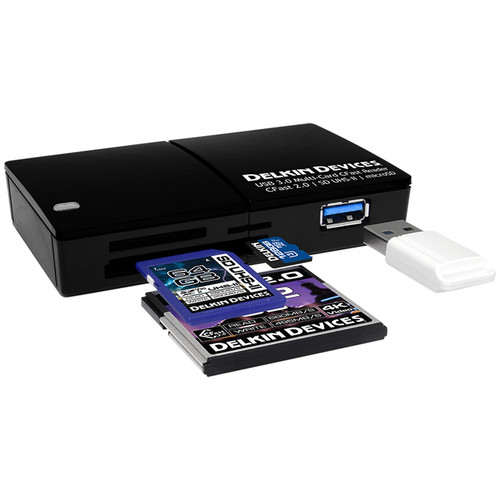
Delkin Devices USB 3.1 Gen 1 Multi-Slot Memory Card Reader

When I got my Canon 1D X Mark II I ordered the kit bundled with a Sandisk CFast 2.0 card and reader which turned out to be a wise move as the cards were very scare and the reader is still near impossible to find in-stock. Since that time people have asked me countless times if there's any other brand of CFast 2.0 card and/or readers that I recommend, but I didn't have anything to suggest.

As luck would have it, my friends at B&H reached out to ask me if I would be interested in reviewing Delkin's new CFast 2.0 card and reader and I was happy to oblige.

Now if you are like me there's pretty much only two questions you have about memory card readers and that is "how fast is it" and "will it last"?

Well I'll start with the second question first and say that I've only had this product for a couple weeks so obviously I can't speak to long term durability, but I've seen nothing to suggest that either one is externally much different than their Sandisk counterparts in my camera bag.

Performance
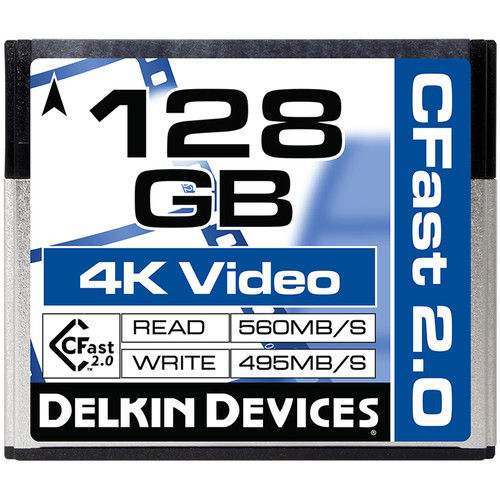

Delkin Devices 128GB Cinema CFast 2.0 Memory Card

To test performance, I transferred 58.6 GB (62,934,351,872 bytes on disk) from my combo of JPEG+CR2 RAW files taken on a recent shoot in South Korea from my Sandisk CFast 2.0 card to the Delkin card.

Test 1 - Sandisk Card Reader

Using my Sandisk Card CFast 2.0 Reader connected to a USB 3.1 slot on my WIndows 10 machine, I observed that the Delkin card took 3 minutes and 17.24 seconds to transfer the data to my new and and near empty Samsung 1TB 960 PRO M.2 Internal SSD at a transfer rate that averaged 297 MB/sec.

The SanDisk 64GB Extreme PRO CFast 2.0 Memory Card was faster at 3:07.27 and 313 MB/sec.

Test 2 - Delkin Card Reader

I repeated the same test using the Delkin card reader and with the Delkin card the transfer time was a little slower at 3:24.21. Once again the Sandisk card was faster at 3:16.68, but it was slower than with the Sandisk reader.

Conclusion

I repeated both tests 3 times and got near identical results, so I feel confident in saying that the Delkin card and reader were both a little slower, but both performed equally well in my Canon 1D X Mark II which seems to not take advantage of the improved performance of the Sandisk card.

Both cards were excellent 4K movies at the fastest FPS and bit rates possible.

In the end I did switch from using the Sandisk reader to the Delkin reader because its front USB 3.1 slot means that I don't lose a slot when I have my reader plugged in. Previously I always had to connect and disconnect my reader which was annoying.

I also preferred the Delkin reader because it took the microSD's for my DJI Phantom IV drone and the SD card I use for a variety of purposes and devices in my household. Now my desk loses two readers and doesn't lose any USB slots.

I also found that the Delkin didn't get hot and cook my cards like the Sandisk did, so if this was a problem you experienced too then the tradeoff of slightly slower performance might be worth the longer life you are likely to get out of your cards by not cooking them.

I'm happy to have had a chance to try these out and I'll definitely keep the Delkin card in my bag. What's more, with the Delkin cards offering 2x the space as the Sandisk, I'm likely to pick up a few more of them too!

Enjoy these and more on the Reviews tab as well as Ron's Recommendations.

Where to Buy?

CLICK HERE to learn more about the card reader and CLICK HERE to learn more about Delkin CFast Memory Cards.

Disclosure

If you make a purchase using links found in this article, I may make a commission. It doesn’t cost you a penny more, but it does help to support future articles like this. I was given a card and reader to keep as part of testing these devices for this review.

Friday, November 11, 2011

REVIEW: Lexar USB 3.0 Dual-Slot Reader–Speed up your file transfers for less than $40!

Lexar Professional USB 3.0 Dual-Slot ReaderLexar Professional USB 3.0 Dual-Slot Reader

Generally speaking I'm not a super impatient person (stop laughing honey). When I'm ready to download my files to my computer into Lightroom I generally just stick them in my SanDisk ImageMate (pictured below) and go about my business. However, when I travel I'm generally in a hurry so the delay to wait for my cards to download from my old reader has become a problem. In fact, I realized that my cameras are a lot faster than my once "blazing fast" ImageMate, so I don’t even take it with me to travel anymore.

When I was in New York recently at the Photo Plus Expo I ran into my friend DeMaris, who works at Lexar, and he flashed his pearly whites and said “I’ve got something I know you are going to like”. Now DeMaris and I had hung out at the Vancouver Olympics as our booths were next to each other at the Media Center, so I knew from that experience that when he says something like that then something cool was sure to follow.

In this case it was the Lexar Professional USB 3.0 Dual-Slot Reader which he had told me about via email when it was first released. I was busy with way too many photo shoots my first couple days in New York, so it wasn’t long before I got a chance to try out this new card reader.

The first thing I noticed and appreciated was that I could put the Compact Flash AND SD cards from my Canon 1D Mark IV (which uses both formats) in at the same time and both my Mac and PC would recognize it as two separate drives*. This allowed me to copy from both at the same time with very little observable dip in performance (according to Windows displayed transfer rates). On the Mac I didn’t have any numbers to look at, but what I noticed is that the files copied faster than from my camera. In fact, when I was done copying the files I tried it again from my camera, and it confirmed my suspicion – this reader was definitely faster.

I tried it with both my SanDisk Extreme 60mb/sec and Lexar Professional 600x (90mb/sec) cards as well as my SanDisk 30mb/sec SD cards, and I observed an improvement. This was a huge help for me because I was dumping my cards at 2:00 AM in the morning when I needed to be up again at 6:00 AM, so speed was of the essence. I was thrilled to be able to do both formats at the same time and I was able to dump 3 CF and 2 SD cards in the time it took me to get ready for bed. That’s exactly what I needed!

* = This device is inactive until you insert a card, so you’ll see one drive for each inserted card. I like this over my Image Mate which created 4 drive even if no card were inserted.

Conclusion

As Photography expenses go, this thing is dirt cheap at < $40 (as of the time of this writing). Even if you don’t’ have a 1D Mark IV, odds are you have a point and shoot that takes SD to go with with your DSLR that (usually) takes CF cards. The dual support over a fast USB connection to a fast hard drive (critical) makes this a no brainer purchase (or a great holiday gift). However, that’s nothing new or revolutionary. What’s great about this device is its USB 3.0 support and fast transfer speed.

NOTE: I found the performance was typically limited by my hard drive performance (i.e., my DroboPro was 4x faster than my slow laptop drive) with both USB 2.0 and 3.0. Copying to a super fast SSD drive is where things really get fun as you can see the real performance of this device.

I also loved the small compact size (you can toss it in your pocket).

I tested it with my Windows 7 64-bit Lenovo ThinkPad W510 (replaced by the W520) as well as my 17” MacBook Pro running Lion and it worked fine.

Click here to learn more or to buy yours. See the sale below (limited time) to pick up some new cards while you are at it.

Lexar Two Pack Sale

Click here to save on Lexar cards right now. The Lexar Professional 600x (90mb/sec) is my preferred compact flash card right now, but you can get sufficient performance out of the 400x (60mb/sec) cards too. See my article entitled “Is a faster Compact Flash card worth the extra money?” to learn more. Based on my experience, cards that can do 30mb/sec or faster have been fine for HD video on my Canon 5D Mark II and 1D Mark IV.

Disclosure

I was given a copy of this device along with a Lexar Professional 600x CF card for testing.