Showing posts with label SiteWelder. Show all posts

Wednesday, February 9, 2011

Zenfolio–The Self-Fulfillment Photographers Dream Hosting Site


http://ronmart.zenfolio.com

I have been a hard core Smugmug fan every since I did my web hosting series against some well respected photo hosting services and it turned out to be the clear winner for my needs. In May 2009 when that series ended Zenfolio was a nice service that had some basic offerings, but it simply wasn’t in the same league as the services featured in my reviews.

Fast-forward to 2011 and my how times have changed! My big complaint about Zenfolio that ultimately had it dropped from the web hosting series was its lack of support for customization. liveBooks had a wonderful editSuite solution, folioSnap and SiteWelder offered great templates to get you going quick, and Smugmug was the king of advanced customization. However, at that time Zenfolio allowed little more than some basic color and layout changes, so it wasn’t a solution for “real” photographers.

Video Tour of my Zenfolio Site


Click here to play in HD (RECOMMENDED)
Video Tour of http://ronmart.zenfolio.com

There’s so much goodness in this site after all of the customization I did, I decided to do a simple walkthrough video so you wouldn’t miss some of the goodies. It helps you to understand very quickly how powerful this product is, and web programmers will be amazed to see that it was done without writing a line of CSS or HTML!

Customization is the Name of the Game
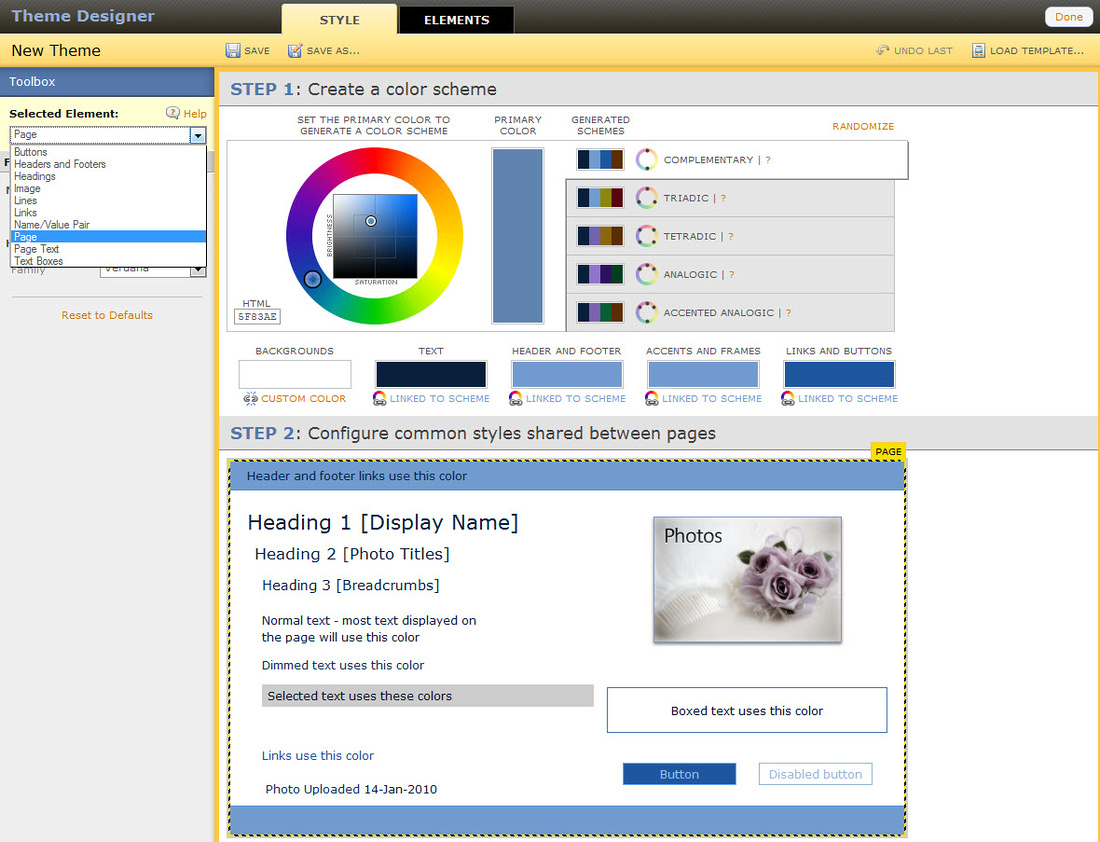

Endless Customizations with No CSS or HTML Coding Required
are Zenfolio’s Greatest Strength


I was blown away as to how much could be modified
They literally have thought of everything!

I hold a patent in feature of Microsoft’s Internet Explorer and I have more patents pending. I know web technology and until now I’ve never found a visual system that has satisfied my desire to customize without having to resort to writing CSS or HTML code. I also have worked on user-interfaces for most of my last 20 years as a programmer, so I usually have a lot to complain about when I see a cutesy user-interface that tries to solve complex problems.

I’m please to report that Zenfolio has literally blown me away and left me with my jaw wide open. They have done something that I think every web hosting site in the industry should have done ages ago – they’ve encapsulated a lot of complex concepts into a simple to user interface that eliminates the need for custom code to get some wonder designs.


Layouts are okay, but customization here is what the hardcore web programmers
will have on their wish list

All isn’t perfect as there are a variety of places where you are forced to choose a layout template as shown above for galleries or here for the home page. I found something I can use and am very happy overall, but the tinkerer in me wishes I could do more than the template offers. Given all of the customization available everywhere else I can’t help/hope but think that this feature will come one day.

Search Engine Optimizations (SEO)
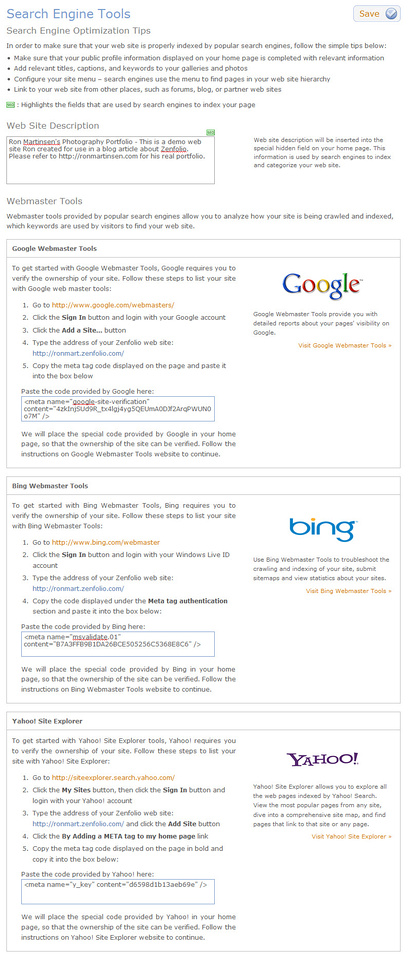

Built-in SEO Tools are very well done

Unless you are from another planet or a cave, you know that the key to success on the web is via search engine optimizations that help the major search engines find your site so your customers can too. There are some basic things you can do and Zenfolio does a nice job (much like SiteWelder did way back in 2008) of making it very easy to get started.
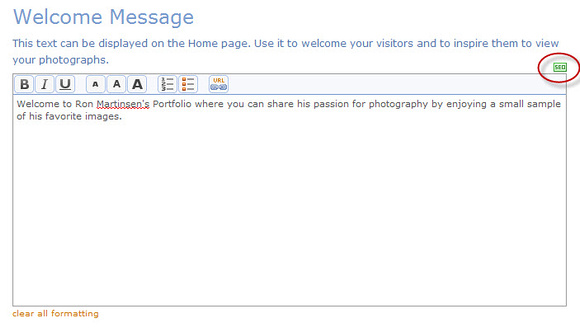

Text that will impact SEO is always highlighted with green SEO boxes
This is a brilliant and very nice touch!

There’s also great support for helping your clients to find your site as well as your social network pages.

iPhone Support

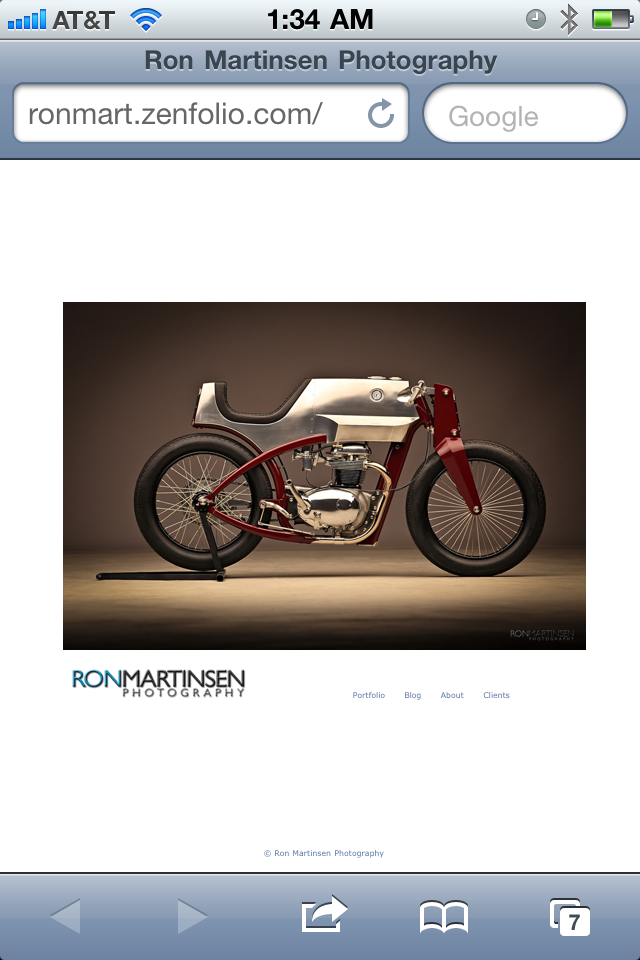
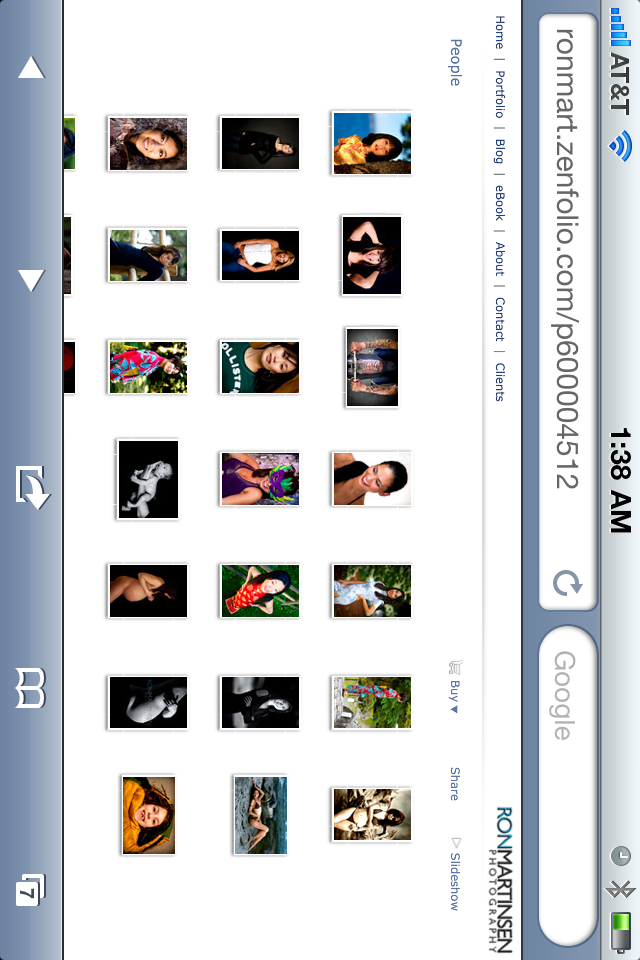
On my iPhone 4 there was no special “mobile” mode (which can be a blessing and a curse) for the normal views, but everything seemed to work well and the performance was good. As you can see from the screen shots above, it seemed to work quite nicely on the iPhone, but I did notice that the slideshows didn’t work very well. I presume the experience on the iPad would be as good as or better.


myZenfolio - Zenfolio, Inc.

The iPhone App had a 4.5 star rating in the App Store and was smoking fast, so I loved it. It was pretty no frills, but it was just like viewing the photos in your camera roll. Here’s some screen shots:
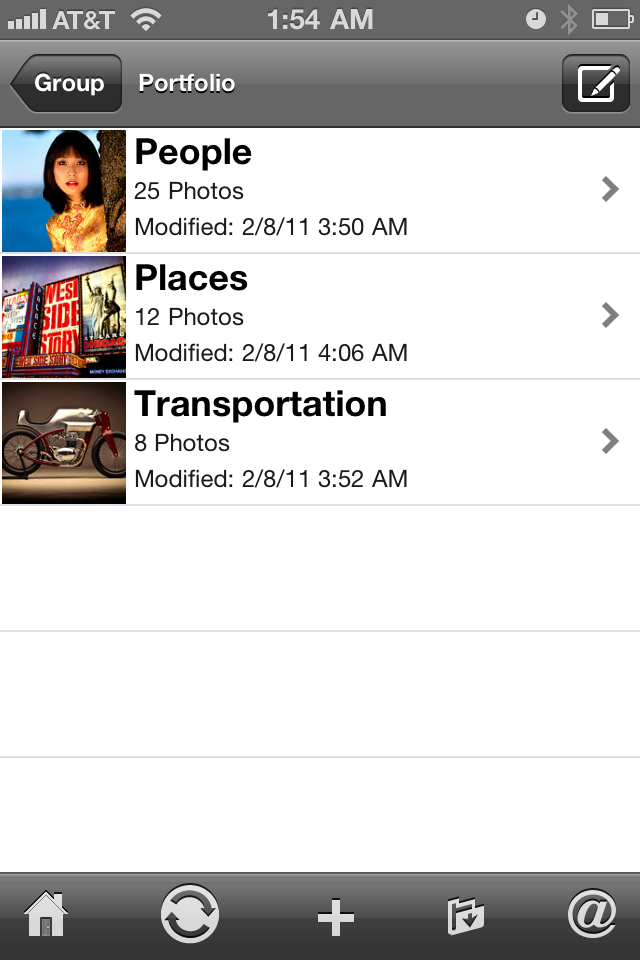
The only gripe I had about the app was that I didn’t immediately see a way to let third parties view my site through this app without having an administrator user experience. Beyond that it was pretty cool because you can even take photos, upload pictures, set wallpaper and more.

Comparing Zenfolio to other Web Hosting Services for Photographers

folioSnap sample site is down (Last Reviewed May 2009) – Full Review – This service was decent and pure HTML which I liked, but of the four I reviewed for the series I felt it was the weakest of the bunch. Sadly the folioSnap team didn’t like hearing that too much so they shut the site down and bid me good riddance. From what I see today on their current sites it doesn’t appear that much has changed. It’s a decent service, but in a 1 to 5 stack ranking in this group it still would come in dead last. It’s also super expensive when you compare it to the value you get from Zenfolio.

BlueMelon sample site (Novemeber 2010) – Full Review – This site is like the Zenfolio of old where there are bits and pieces that suggest it will be great one day, but currently it is lagging behind the remainder of the sites in this section that I’ll discuss. There’s actually a pretty powerful shopping cart and Smugmug like customization support, so in the right hands it can be very powerful, but the non-programmer will struggle to get a look that they are happy with. However, of all the other sites mentioned in this article I think it is the only one that has the potential to be the next Zenfolio as the core pieces are in place.

SiteWelder sample site (May 2009) – Full Review – As far as template sites go, SiteWelder was a pretty solid performer so I liked it when I reviewed it. These days it has mostly the same back end look and feel with some improvements made for mobile and minor updates here and there. Overall I think my review is still accurate (bugs have been addressed though) so Zenfolio blows it away in terms of the control you have over the look and feel, and the ease of use of Zenfolio is as good as or better in every way.

liveBooks sample site (May 2009) – Full Review – It’s added support for vimeo video, it’s much less expensive now and apparently there’s much better template options available at a cheaper cost but behind the scenes it looks very similar to my review. I liked the editSuite tool which was quite good when it came out, but compared to Zenfolio it feels very ridged and lacks the flexibility that you get spoiled with in Zenfolio.

Smugmug sample site (My Current Portfolio Site) – Full Review – If you are a HTML/CSS guru there’s little you can’t do to this site, but once you go down that path the Easy Customizer feature becomes less useful. Easy Customizer is great, but it’s like comparing a Tonka toy to a Ferrari when discussing what Zenfolio has to offer now. Unless you are a web programmer, you won’t be able to get the level of customization out of smugmug that is possible with Zenfolio.

Conclusion

I was so excited doing this review that I ended up taking 56 screenshots all of which are posted at http://ronmart.zenfolio.com/screenshots for your enjoyment. I’d love to talk about every one of them in depth, but I simply don’t have the time. I do encourage you to scan through them (slideshow feature is great) to see some of the customizations I did (don’t forget to pause or use the arrow keys to go back if you missed something).

If you do your own order fulfillment (i.e., you are a print master or work directly with a print master) then honestly I can’t say that there is anything else out there that I have seen that can compete with Zenfolio. From great Coupon, PayPal, and custom product support to custom shipping delivery methods it really does have it all!

For those that will rely on the partner labs like MPix.com, you have a much better system for setting your own prices using the pricing formula feature, much needed custom packages, great control over product choices, and brilliant price list design. Really there is so much here for those who sell their work even if you use a third party service that Zenfolio really seems to be the working photographers best solution for ecommerce.

Smugmug, liveBooks and others still have the advantage of doing video which is very important today. Currently Zenfolio doesn’t support video (which actually surprises me quite a bit) so that is going to be a show stopper for some people. If you fall into that camp then Smugmug is back at the top of my recommendation list again. However, if you are just doing photography – especially if you intend to sell your work – Zenfolio is the way to go right now.

I’d like to commend Alex Peyzner, founder of Zenfolio, for hanging in there and giving the customers what they really wanted and need. I urge Zenfolio to get on the video bandwagon and hopefully add custom layout support as those are the only flaws I could find in the service right now. The premium service is a steal for what you get, and the Premium Business account is still a great bargain for the features offered – especially when you consider what you’d have to pay a web programmer to get this level of customization and ecommerce on most other services. Click here to learn more about pricing and be sure to visit my link below to save 10% (as of the time of this article).

Special Offer

Save 10% off when you follow the instructions in this article.

Disclosure

I’ve had a free account on Zenfolio since my original web hosting series in 2009. Alex Peyzner the founder was kind enough to keep it open the entire time so I could stay abreast of their improvements as well as do another comprehensive review now. I may get a commission if you sign up for an account with some of the services listed in this article (currently Smugmug and Zenfolio at the time this article was written).

Sunday, July 5, 2009

Professional Photography Web Hosting Roundup: Search Engine Optimizations Follow-up

As promised in my Professional Photography Web Hosting Roundup- Conclusion (6 of 6) article back on May 16th, I promised I would follow up with longer-term search engine optimization results.

As of July 5th, 2009 at 11:29 PM PST, the search results for the sites created in this article with the big three search engines were as follows:

Google.com

Bing.com

Yahoo.com

  1. Smugmug (Page 1 - #4)
  2. SiteWelder (Page 1 - #6)
  3. liveBooks (Page 2 - #12)
  4. FolioSnap – not found
  1. Smugmug (Page 1 - #2)
  2. SiteWelder - not found
  3. liveBooks - not found
  4. FolioSnap - not found
  1. Smugmug (Page 1 - #1)
  2. SiteWelder (Page 1 - #3)
  3. liveBooks (Page 1 - #4)
  4. FolioSnap – not found

Foliosnap wasn’t found on any of the sites because my trial membership expired and the site was deleted. The other sites remain live, so if the results change in the future I may post another follow up.

One interesting note is that for liveBooks and SiteWelder my home page wasn’t the page referenced, but rather a link to my People portfolio (liveBooks liveBooks link & SiteWelder link). Apparently I did something special to that photo/category to cause it to perform better than the others.

UPDATE (July 6, 09 @ 11:16 AM PST)

It has been reported to me by SiteWelder that they are now #1 on Bing.com, so I ran a query and confirmed they are first, liveBooks was third, and Smugmug was fourth. This is totally different than my results from last night, so I’m going to ask that people click on the links above for Google.com, Bing.com and Yahoo.com and note the search results that they get (feel free to report your results as a comment to this blog). Here’s a map of which domain name belongs to which company:

Smugmug http://ronmartinsen.com
liveBooks http://ronmartphotography.com
SiteWelder http://ronmartphoto.com

Saturday, May 16, 2009

Professional Photography Web Hosting Roundup: Conclusion (6 of 6)–RETIRED


**** WARNING ****  **** WARNING ****  **** WARNING ****  **** WARNING ****

THIS ARTICLE HAS BECOME TOO OLD AND OUTDATED. I now use Zenfolio exclusively for my personal portfolio and http://ronmartinsen.com now only points to my Zenfolio site. Click here to read my Zenfolio review and learn why I feel it’s the best service available now.

**** WARNING **** **** WARNING **** **** WARNING **** **** WARNING ****


Ron Martinsen Photography - liveBooks
liveBooks on ronmart.blogspot.com
Through the end of May ‘09 when you mention this blog
you can save $600 off the Unlimited Package
and $300 off the Select Package when you sign up.
Ron Martinsen Photography - FolioSnap
FolioSnap on ronmart.blogspot.com
Extend your trial to 30 days
Ron Martinsen Photography - SiteWelder
SiteWelder on ronmart.blogspot.com
$75 off your setup fee - special code RMART
Ron Martinsen Photography - Smugmug Pro
Smugmug Pro on ronmart.blogspot.com
Discount: 20% off first year

After two months of evaluating the services featured in this series, I’ve reached my conclusion about which service is right for me. However, I encourage you to recognize that what is right for me may not necessarily be right for you. Read on to see what I recommend and how a different service might be just what you are looking for.

Article Recap

If you missed any of the articles in this series, I encourage you to go back and read them before you continue to read this article. Here’s a complete list of previous articles:

  1. Professional Photography Web Hosting Roundup: Intro
  2. liveBooks Review
  3. FolioSnap Review
  4. SiteWelder Review
  5. Smugmug Review
  6. Conclusion

Ron’s Opinion Of What Service Might Be Right For You

The cool thing about this series is that there’s no real loser, because all of these services are very good. There is something I really like about every one that I wish the other services offered, so you’re takeaway should be that you match your needs to the appropriate service that best suites those needs. With that in mind, here’s a quick rundown of each:

Ron Martinsen Photography on liveBooks

liveBooks – The Best in Presentation

If you want a site that looks like you are a world class photographer, then liveBooks will deliver on that. If you look at the sites of their top clients you see some unique and fantastic presentations, so I believe their design team is without equal. I also loved the level of control that editSuite offered as well as the way their thumbnails work. If you can afford it, I highly recommend liveBooks for a world class Internet presence. If I had the money to do it, I know I would. To help with the cost liveBooks has release a special offer through the end of May ‘09 - when you mention this blog you can save $600 off the Unlimited Package and $300 off the Select Package when you sign up.

 Ron Martinsen Photography on FolioSnap

FolioSnap – Fast Setup without Flash

Of the four sites I created, none was working faster than FolioSnap. I literally got it up and going in about 20 minutes. What’s more, it worked brilliantly with my iPhone using the same site design that non-mobile users would see. I liked that A LOT. If you are in a hurry to get your site online or you need a solution that avoids the use of flash, then I highly recommend FolioSnap. I encourage you to try it out and extend your trial to 30 days just by entering the promo code RONMART when you sign up.

Ron Martinsen Photography on SiteWelder

SiteWelder – Excellent Template Layouts with a Can Do Attitude

Of the sites reviewed, nobody offered the volume of custom template layouts like SiteWelder. Once you choose your template layout you aren’t done because their “Can Do” attitude will serve you well to create a custom experience that goes beyond the initial template layout to create something unique from other SiteWelder users. I loved the fact that the template was only a starting point and that they were willing to make reasonable changes at no additional cost. In addition, they were the only site advertising that they would migrate your existing site from another service which could be useful for those stuck paying to much for their current solution. Get $75 off your setup fee when you use the special code RMART.

Ron Martinsen Photography on Smugmug Pro

Smugmug Pro – The Value and Customization Leader with Best in Class Support

$59.95 to $149.95 per year for all of this??? – WOW! Smugmug Pro offers many features the others in this series haven’t even began to think about yet, and its customer support doesn’t seem to have the word “no” in its vocabulary. In addition, it offers access to its CSS which means you can do a tremendous amount of customization. However, the key word here is YOU. If you aren’t the type that can learn how to program for the web, then its Easy Customizer will give you nice results for local photographer work but not for the big leagues. It’s private gallery support is definitely the best – bar none – for wedding and portrait photographers, and if you don’t do your own printing then its shopping cart integration with third parties is the only game in town. Smugmug used to be compared to rival Zenfolio for general purpose to prosumer photo sharing, but its now in the big leagues and certainly competent enough for pro web hosting. Get a discount of 20% off first year when you use the coupon code SmugRon.

And the new hosting service for http://RonMartinsen.com is:

Smugmug Pro on ronmart.blogspot.com

I chose Smugmug Pro because I’m comfortable doing web programming to tweak my site to get the exact results I want and because it offers a value that meets my current budget. I don’t do self-fulfillment, so the shopping carts integration with EzPrints and BayPhoto really met my order fulfillment needs. In addition, I love how quickly I can get my photos online and share them with clients. I wish it had a better thumbnail presentation like liveBooks, and I really wish it would take a cue from FolioSnap and do a non-Flash slideshow. However, Smugmug surprised me here and offered something that I never thought was possible at the beginning of this series.

Runner Up

liveBooks on ronmart.blogspot.com

I wish I could have gone through the entire design process and created a compelling site with liveBooks like a normal customer would do. I felt like this service offers a very professional presentation that results in a world class presentation, albeit for the highest cost in this series. It truly is the Porsche of professional photography web hosting services, so if you can afford it then I’m fairly confident you won’t be disappointed.

SEO Follow Up Article

As of May 16th, 2009 at 10:54 PM, the search results for the sites created in this article with the big three search engines were as follows:

Google.com

Live.com

Yahoo.com

  1. SiteWelder
  2. Smugmug
  3. liveBooks – not found
  4. FolioSnap – not found
  1. SiteWelder
  2. FolioSnap
  3. liveBooks – not found
  4. Smugmug – not found
  • No sites found

I continue to monitor this, and if the results change in a month I’ll be sure to post a follow up article that shows who is winning in search engine results. Right now it appears that SiteWelder is the big winner. This is something to consider when choosing your hosting service because your site is useless if nobody can find you!

UPDATE: Here’s the follow up article on SEO and Smugmug wins big again!

Thoughts from the Pros Follow Up

At the conclusion of this series I had hoped to include the opinions of some top photographers as to their thoughts of the sites created for this series. Unfortunately busy schedules precluded that from happening, so I will try to write a follow up article at some point should I get enough responses back. In the meantime, here’s what two pros had to say:

Scott Robinson
Gary Parker

Sunday, May 10, 2009

Professional Photography Web Hosting Roundup: SiteWelder Review


**** WARNING ****  **** WARNING ****  **** WARNING ****  **** WARNING ****

THIS ARTICLE HAS BECOME TOO OLD AND OUTDATED. I now use Zenfolio exclusively for my personal portfolio and http://ronmartinsen.com now only points to my Zenfolio site. Click here to read my Zenfolio review and learn why I feel it’s the best service available now.

**** WARNING **** **** WARNING **** **** WARNING **** **** WARNING ****


Sitewelder

Introduction

SiteWelder offers a rich set of features, and unlike others in this series it welcomes photographers from other services so it can convert your existing website to SiteWelder.

During my test period, I found Mason Miller (Chief Technical Officer & managing partner) willing to bend over backwards to help me and his other customers. In fact, it was one of his customers that insisted I include SiteWelder in this series and that I interact with Mason. It’s design director and former photographer, Alan Dorow, was more hands off during my evaluation period but apparently was a driving force behind some of the great design templates offered by this service.

Site Tour

Ron Martinsen Photography People Gallery

Visit http://ronmartphoto.com or view the the site walkthrough to see just what SiteWelder offers for this $450/yr (plus $250 setup fee) service. You can play with the shopping cart feature by clicking on the Purchase Info button in the People gallery shown above, and be sure to use the slideshow link as well.

What I liked about SiteWelder is that it doesn’t have the annoying auto-scrolling thumbnails, but rather a simple scrollbar (which can feature custom colors upon request to SW support at no charge). This site was simple, but effective. In addition, it offers a Client Access area (Gallery Code: Private) as shown below:

It doesn’t appear to offer liveBook’s support for the auto generation of PDF images for clients (which some may not want anyway), nor was their an obvious way to add files for download from the site. Lastly, I saw no existing mechanism in its user interface for adding video as offered by liveBooks and Smugmug. While I don’t think these are mainstream features right now, it’s something to consider in the future especially if you are a Canon 5D Mark II or Nikon D90 shooter delivering video to your customers.

Behind the Scenes: Administering your site

SiteWelder Site Manager

SiteWelder’s sites are fairly easy to maintain. It’s actually very similar to FolioSnap, only better. View the behind the scenes images to see how to configure the site. I found everything to be fairly straightforward and it worked flawlessly. I also never experienced any performance issues or problems that I couldn’t overcome either myself or with a little assistance from the ever willing to please Mason Miller.

SiteWelder’s behind the scenes management isn’t as elegant or as feature rich as liveBooks in some ways (i.e., shopping cart), but it did offer the ability to do custom pages not possible with liveBooks (well, you can get it for a fee). In addition, it doesn’t take the path of FolioSnap by offering just one template in a bunch of different colors, but rather it offers a selection of 20 unique templates with numerous optional color themes for each one.

It’s shopping cart is a bit crude and insufficient compared to the stellar offerings by liveBooks and Smugmug, but again it was still superior to the FolioSnap offering.

HTML/CSS Customization

Site Welder Site Manager Page Editor

SiteWelder offers an excellent Page Editor for customizations to your info pages and the home page, but I didn’t see anything that allowed me to customize the site template or anything else. I did observe that the SiteWelder support staff is happy to make these changes (some for a fee, but not always), so it’s obvious they are willing to work with you to build a unique experience (as seen at http://www.catdogphotography.com).

iPhone Support

As of the time of this writing the SiteWelder test site I built using its Reston template was unusable on the iPhone, but that might be addressed by the time you read this article. Mason Miller stated that:

We are actively working on an iPhone interface. Ultimately we are going to let users pick from multiple desktop and iPhone interfaces. We will have then iPhone interface available to all users this week.

I encourage you to check the test site using your iPhone to see how it works. From the early preview I did, it seems like it should be similar to Smugmug’s and quite good.

Key Customers

Famous photographer Gary Parker (#9 on my favorite photographers list), hosts both his commercial photography site and his Cats & Dogs site as well as plenty others like Mark Mann, Brian Smith, Paula Lerner and more. They also have an impressive collection of testimonials from happy customers.

Search Engine Performance

While not as impressive as liveBooks, its clear that this service is starting to get serious about Search Engine Optimizations (SEO). Here’s a sample of search wins from SiteWelder customers: 

Google Search Topic URL of SiteWelder Customer

Charlotte Architectural Photography

http://www.ciarlante.com

Chicago Architectural Photography

http://www.crewsphotography.com

Seattle Editorial Photographer

http://www.frishphoto.com

Miami Advertising Photographer http://www.dgmfoto.com
http://www.briansmithphoto.com
http://www.briansmithmiami.com

Celebrity Photographer

http://www.briansmithphoto.com

Dallas Photographer

http://www.markoristano-photographer.com

Cat and Dog Photography http://www.catdogphotography.com
Dwarfism Photography http://www.garyparker.com

After about 5+ weeks a query for “Ron Martinsen Photography” on Google resulted in my SiteWelder site, http://ronmartphoto.com, showing up on the first page results. 

Cost

With a $250 setup fee and then $450 annually, the startup cost for SiteWelder is similar to the basic account for liveBooks, but you get more for your money. However, the maintenance cost of SiteWelder means that in two years you could easily spend more for SiteWelder than you do for liveBooks. However, if you like to keep your site fresh and make big changes, then liveBooks cost will run up quickly making SiteWelder the cheaper option. It’s prices are also are on par with FolioSnap’s FolioPro/FolioSuite offerings when you compare the services offered.

Pros / Cons

What I love about SiteWelder is:

  1. Fantastic customer support – Simply put, Mason rocks. I got the impression that no request would be dismissed and that simple things that might cost $195 on liveBooks would simply be done for free or for a modest fee.
  2. Good selection of templates – 20 unique templates with roughly 20 well designed themes for each plus the ability to do rich custom intro and info pages means that it is quite possible to build a very unique experience on SiteWelder.
  3. HTML Based – Unlike liveBooks, SiteWelder seems to be primarily HTML based. There does appear to be some flash for the slideshows, but otherwise this is a flash-free site.
  4. Fast, Easy to Use, and Functional Design – Simply put, this site just works well. It’s clean, fast and looks great in my opinion. What’s more, its design is flexible enough that you can make a template change to your site and have a fresh new experience as often as you like.
  5. Everything’s included – Free domain name registration, email, slideshows, paypal, and lots of storage space.

Areas for SiteWelder improvement:

  1. No iPhone support – This is something that is being actively addressed, so hopefully by the time you read this article it will no longer apply.
  2. Annual fee is rather steep – While I think the setup fee is fair, especially given their great support, the annual cost can quickly make the total cost of ownership (TCO) over two years to be greater than liveBooks, without the Search Engine Optimization performance that liveBooks boasts. However, SiteWelder doesn’t really nickel and dime you for every little change, so the real TCO might still favor SiteWelder. In addition, you get tons storage space, something that would cost you $3200 with liveBooks. Lastly, SiteWelder offers half off for a second site which is a great value for those catering two different markets / client bases.
  3. External Site Linking isn’t Intuitive – If there’s one thing FolioSnap does very well, is make it easy to add nice links to external sites. However, the Build Informational Pages section doesn’t make this process simple or intuitive. What’s more, it doesn’t allow for easy reordering so if you make an ordering mistake you going to have to contact support or do some heavy lifting yourself.

Conclusion

I consider SiteWelder to be a viable alternative to liveBooks and superior to FolioSnap. While it is similar to FolioSnap in that it offers templates, SiteWelder offers a much larger selection and is willing to work with its customers to come up with a customized experience that results in a unique web presence. It’s shopping cart isn’t as robust as Smugmug or liveBooks, but this is a company that I’m convinced will listen to its customers and respond to their needs. Overall I have no issues with recommending this photography web hosting service provider.

Special Offer

SiteWelder has been kind enough to offer my blog readers a discount of $75 off your setup fee when you use the special code RMART when signing up for the demo. This offer expires on July 14th, so start your free trial today!

Other articles in this series:

  1. Professional Web Hosting Roundup: Intro
  2. liveBooks Review
  3. FolioSnap Review
  4. SiteWelder Review
  5. Smugmug Review
  6. Conclusion - pending
Photography websites and professional digital photo web sites service and custom photographer websites designs and templates, affordable and cost-effective professional photographer websites, portfolio websites by SiteWelder, with web site creation tools for wedding photographers, illustrators, artists, designers, merchants and image-based businesses. Flash websites, Flash photography website, Flash photographer website designs, wedding photography web site, wedding photographer web sites Websites for photographers, professional photography websites, artist websites, wedding photography web sites, digital photographer web site, photography template websites, professional wedding photography websites template

Thursday, April 30, 2009

Professional Photography Web Hosting Roundup: Intro (Part 1 of 6)


**** WARNING ****  **** WARNING ****  **** WARNING ****  **** WARNING ****

THIS ARTICLE HAS BECOME TOO OLD AND OUTDATED. I now use Zenfolio exclusively for my personal portfolio and http://ronmartinsen.com now only points to my Zenfolio site. Click here to read my Zenfolio review and learn why I feel it’s the best service available now.

**** WARNING **** **** WARNING **** **** WARNING **** **** WARNING ****


Home

There comes a time in a photographer’s life where you get enough positive feedback that you have the thought that you might actually make some money with this hobby that has done nothing more than go through your money faster than a <censored part about Vegas>. While any real pro will tell you not to quit your day job and that there’s no money in Photography anymore, that doesn’t keep people like you and me from wanting to hang our shingle out to the world and announce that we are real photographers. However, to do that we need to look and act professional, and a good place to start is a proper presentation of our photos in a professional looking online portfolio.

Now some of  you may be thinking, but I already have a Flickr Pro account. Well, I suppose if you are good enough that might be fine, but I would suspect that your odds are better at being treated as a professional if you look professional which means building a proper professional web site.

The purpose of this blog is to offer some choices on how you can get that pro look based on your commitment level. To some of us we’d rather commit time to save money, and others would rather commit money so we can dedicate our time to photography. This article will address both and simply present some choices I researched in my own quest to build a professional online portfolio.

In this 6 part series, I’ll examine the following portfolio hosting sites:

liveBooks Sitewelder
image
  • liveBooks – Name your top 5 most respected photographers, now go visit their web site. Odds are, you’ll notice somewhere on one or more of their sites a powered by liveBooks logo. These guys are the industry leaders. liveBooks offers a Flash based web-site that focuses on building anything you want – for a fee. (examples)
  • FolioSnap – The best way I can describe FolioSnap is as the anti-liveBooks, but I mean that in a good way. They avoid using Flash which means there code will run on just about anything that can render HTML, and even on my iPhone I was able to get a live slideshow – something no other site reviewed here could offer. (examples)
  • SiteWelder – One of my top favorite 20 photographers first told me about SiteWelder and the great customer service they offer. As I spoke with the great folks at SiteWelder I quickly learned why pros trust SiteWelder for their online portfolio needs. Their site offers a huge selection of templates with a reasonable amount of customization without you ever knowing anything about HTML or Flash. (examples)
  • Smugmug – This is where I currently host my personal portfolio as well as many of my blog photos. I’ve written about Smugmug before, and I’m a huge fan. However, they have the reputation for being a personal web site, not a pro web site, despite some compelling features and a great price. In this review I’ll try to determine if Smugmug can hang with the big boys, or if it’s out of its league. (examples)

Preparing yourself for the big time

While this article won’t be a “how to go pro” article, there are a few things that you should consider if you are about to begin this process:

  1. Only show the best - Your pro portfolio should only contain your best shots. If you can get a pro mentor to help you select photos, great, but if not then try to solicit opinions from other DSLR photographers because it’s easy to get wrapped up in a photo that might not be worthy of a pro portfolio.
  2. Focus on what you do best and be brief - Your site should focus on what you do best, and then show the best of the best. You shouldn’t plan to have 10 galleries with 50 photos because no potential customer will ever look at all of those photos. In fact, you might only get a few minutes of a prospective customers attention so you need to show your best and be brief. Consider a dozen or less of your best photos in approximately 3 galleries when you get started.
  3. Simple is good – Your photos, not some fancy flash animation, should be the center of attention on your site. Keep it simple, clean and fast.
  4. If they can’t reach you they, can’t hire you – These days people might find your site on a PC, Mac, iPhone, SmartPhone, or some other device. Your site shouldn’t exclude these different platforms or only target specific browsers. In addition your customer may find you on the web, but they still might want to talk to you on the phone. Be sure to not only include an email address but also a phone number where you can be reached quickly.
  5. Know that millions of others are doing the same thing – Everyone that has a digital camera occasionally gets a good shot, and those who get a collection of good shots that are admired by their Mom, wife, and friends sometimes begin to think that they can make it in the Photography business. Well the reality is that the competition is fierce, so simply having a photo published on the National Geographic web site isn’t going to make you a shoe in to make a good living off of Photography. Do your research, and understand the business.

I look forward to having you join me next week as I roll out an article on each of the sites featured. In the end, I’ll publish a final article that discusses which service I chose to host my site and why. In the meantime, you can see what Scott Kelby went through when he decided to build his own site in this article as well as the follow up article which featured reader feedback. I think it is very informative to see how people responded to his fancy flash site.

Other articles in this series:

  1. Professional Web Hosting Roundup: Intro
  2. liveBooks Review
  3. FolioSnap Review
  4. SiteWelder Review
  5. Smugmug Review
  6. Conclusion