Showing posts with label Memories. Show all posts

Friday, August 7, 2020

Printing Your Memories with the EPSON SureLab D870

Click to see the EPSON SureLab D870 at B&H

Want to print a large number of photos blazingly fast at a price that doesn’t break the bank, yet has a professional look and feel? I did, so I wrote this review to see if the EPSON SureLab D870 lived up to its promises and my very high standards as a professional print master, print book author and Senior Program Manager of the Microsoft Windows print team for 3 years.

If you are here just for the review of this printer designed for professional photographers then you can skip the next section. If you are a photography hobbyist or someone with a lot of photos that you wish you had time to print, then you may enjoy the background story below about why I am writing this article.

Background Story

According to my photo library management software, Mylio, I have roughly 450,000 photos saved on my NAS and for my phones I have 100,000+ in Google Photos plus 22,000 in iCloud. Now out of those roughly 572k photos I’ve made about 30k public and shown my family about another 10k or so on top of that. Let’s assume I’m being too conservative though and say that the total number of photos seen by eyes other than mine is really 72,000 photos. That means I have a half million photos that have never been seen by others, and that’s from someone who is internationally known for photography AND printing!!!!

Now I will admit that because I shoot in burst mode, there’s probably plenty of photos that my eyes have only glanced at once or twice. However, this past March I had a lot of time to think as I drove from Seattle to Texas (and back) to bury my Dad. While I was at his place in a rural Texas town I found myself enjoying old family prints from the time before digital photography. It kinda hit me like a ton of bricks that I wasn’t judging these photos for their composition, sharpness, color, etc… – I was just enjoying the walk down memory lane.This reminded me of a common complaint from my wife who tells me “you have all those photos, but they are useless because I can’t even see any of them”.

Now we do enjoy plenty of photos on our Meural digital frames as well as the fantastic photo frame experience of the Google Nest Hub Max, so if you aren’t doing that I still highly recommend that. My wife enjoys printing her cell phone photos with her Epson PictureMate, and I’m a heavy user of my EPSON P800 and P5000 printers for my fine art photography work. However, there’s a decade of digital photos that live on my redundant NAS storage devices that really need to be combed through so I can print those memories to be enjoyed the good old fashioned way – by holding them in a hand – long after me and my NAS devices, digital frames and phones are long gone. More importantly, they need to be enjoyed by my kids and future grandkids (hopefully) as I have enjoyed the print photos my parents and generations before them took.

As I was driving through beautiful places like Moab, Utah during my long drive I got to thinking about how sad it would be if my family couldn’t enjoy the experience of seeing my photos because they got lost due to some digital tragedy after I was gone. Sure I have lots of digital backups, but what if those after me just simply stopped tracking all of that data and ultimately it was lost? What would be left? Just the prints – and most likely just the ones in good old fashion photo albums or printed photo books.

Now my success with this blog has given me a benefit many of you don’t have, so my cost at trying photo print services, printing photo books, archiving photos digitally, making professional prints, etc… is usually $0.00. With the cost excuse out of the way, I still have my wife complaining that she doesn’t know happened for most of the years we were dating and the first 10 years of my sons life outside of what you see on the blog (which is also what’s on our digital frames). Why is that? I have no excuses, right?

Well, it turns out that I still work 60+ hour weeks despite the fact that I’m not blogging like I used to. I’m also the father of 4 children which includes active 11 and 4 year old kids who need to spend time with Dad when he stops his workaholic days, so my free time usually begins around 10:00 PM at night (which was the start of my blogging work day years ago). Weekends end up being family time as well, so I’m lucky to get 20 minutes here, 30 minutes there to do activities that I enjoy – like editing or printing personal photos. With these constraints, I find myself getting deeper in the hole each month as I still shoot photos regularly, but I fail to find to edit or print photos that aren’t for my clients or blog. Simply put, my cherished personal photos don’t get prioritized – sound familiar?

Sure, I occasionally tell myself I’m going to do it and then I find myself falling into the second trap – I end up going through a few dozen photos and then spending all my personal time editing one or two of these photos. At this pace it would take me a few centuries to accomplish my goal of leaving prints that memorialize my wonderful life for generations that come after me.

When I had this discussion with my wife she challenged me – why don’t you just identify the best family photos and JUST PRINT THEM. She insisted – don’t waste your time editing them because its better to leave the memories behind than it is to have them lost because you couldn’t let the professional photographer inside you forgive yourself for not making professional images. She even went so far to remind me about my strict policy of publishing photos on the blog for camera and lens reviews that are 100% unedited (all are in-camera JPEG), so why couldn’t I do the same for my digital memories and “just print the damn things”.

Again, is any of this ringing a bell with you?

Well, its my own love of photo editing and desire to have my important pictures that have been a mental block keeping me from doing what I needed to do, so I made a pact with her and myself that I’d finally address this problem. My objective – to print my collection – but obviously not all 500k+ photos – just the memories through the years.

I started with my 2007 photos collection – the year I got serious about digital photography (after years of “thankfully” being a film photographer with prints – albeit very bad ones). After 3 months of pouring through – just that one years worth of photos – I identified about 460 images that seemed to be worth printing. I took 22,271 photos that year, so roughly 2% were what I’d consider “family classics” that I’d want to hand down to generations after me. They also represent just over an hour of printing by the amazing SureLab D870.

Wow – after the long battle of pouring through all of these photos – and admittedly probably spending too long in Lightroom doing minor tweaks on some of them – it took me 3 months to pinpoint the photos and a little over an hour to have a big stack of 4x6 prints to put in a photo album or at least a shoebox (guess what I actually did :). I didn’t have to then upload them to some service and fight with its UI, I didn’t have to deal with a ROES system for a service built for volume printing, I didn’t have to fight the crappy tools to build photo albums that never preserve my desired aspect ratios so I end up spending weeks to build a simply 20 page “book”.

No, this was much easier – I just dumped all of the files out as Full Size JPEG’s, went to the folder in Windows Explorer, selected all of the photos then did a right-click and Print (which launches the native Windows Photo Print Wizard). 

REVIEW: Epson SureLab D870

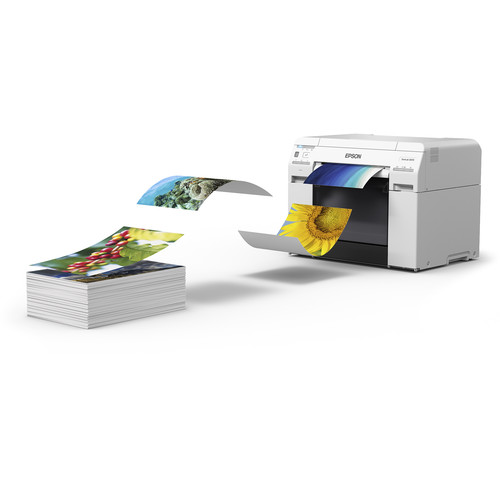
EPSON describes this printer as “The fast minilab printer for demanding small-format photo production”, and I’d say that actually hits the nail on the head. This six ink dye-based ink printer is optimized to print 4" x 6" prints in as fast as 8.3 seconds (using 720 x 360 dpi) and up to 430 4" x 6" prints, 275 5" x 7" prints, or 140 8" x 10" prints per hour – that’s screaming fast!!!

This means if you are a school, event or wedding portrait photographer you can print the bulk of your photos on this printer very quickly even if you have a huge amount of photos to print. What’s more, the Epson SureLab Luster Photo Inkjet roll paper and Epson UltraChrome D6r-S Light Ink Cartridges are extremely affordable, so you will not only save time but your cost per print will be peanuts compared to SureColor professional printers – yet they will have that same high-quality professional feel same in the hand to your clients. While its true you will sacrifice the archival and tonal range characteristics of the UltraChrome® inks, it does allow you to have more competitive pricing for the time and money you’ll save with this solution. You can also still use your professional pigment ink printers for the larger prints sold at a premium price.

Simply put, if you print a lot of prints for your business – this is a no-brainer purchase that will quickly yield a return on your investment as you enjoyed with your 70-200 f/2.8 lens! However, I’m not and many of my readers aren’t either.

I decided to review this printer with a slightly different intention – does this printer make sense for the hobbyist to print their collection and can it produce results that are better than the typical low budget print services (e.g., Costco, Walgreens, Shutterfly, etc…).

How I Printed 495 Photo Print Jobs

I identified the photos I wanted to print in Lightroom and then exported out all of my pics as full-size sRGB JPEG files to the same folder. I would then select all, right click and choose print. This launches the Print Pictures wizard whereby I set the settings as shown above and then then clicked options to modify the printer driver as follows:


Don't forget to change the Color Management setting to ICM for best results!!!!

This gave perfect borderless prints, but the prints were dark. This was easily corrected by changing the Color Management to ICM with no other changes necessary in the Advanced… settings.

Like all borderless printing, if your aspect ratio of your images don’t match the output you are going to lose quite a bit of picture detail. As a result, you may choose to NOT do borderless to avoid that. If you go down that route some 4x6 prints taken from 3:2 aspect ratio source images may have a small white line on one edge of the photo but its not bothersome to me.

Sorry Mac users, I only tested on Windows 10 1909 over USB, so I have no comments about using this printer from a Mac.

I did successfully print to this printer from Lightroom and Photoshop, but this method was by far the fastest and recommended to me by my friends at EPSON. After much experimentation, I agreed and stuck to this method throughout my time with this printer.

Oh and if you are wondering why I had 495 photos – well that was just the limit I gave myself for each year worth of photos.

Actual Observed Performance

When printing 4x6 borderless prints I observed it took an average of 7.2 seconds per print which excludes the nearly 2 minutes it took for the Windows Print Wizard to create the print job and then another 4 minutes it took Windows to spool the 6GB print jobs (495 photos) I would throw at it. I excluded that as my Windows system is getting a little old so a faster performing system might be much quicker.

Conclusion

Pouring through tons of photos to identify the ones you want to print is really the big time sync. I completely underestimated how long this task would take – especially given my crazy busy work schedule. I could have been less picky when pouring through 20,000+ photos per year, but 500 pics creates a pile of photos over 6 inches tall that then need to be dealt with later (e.g., put in a photo album, or even organized in a shoebox). Sadly when printing this any when the photos pile up they don’t end up in a meaningful order, they just get mixed all together out of order. This means I ended up with a huge pile of photos that needed to be sorted once again by hand.

I definitely think the quality of the luster prints I got was very good but obviously not as good as I can get from my SureColor printers with a complete color managed workflow in Lightroom/Photoshop or with Epson Print Layout.

For a consumer who can afford a large format printer or $2000+ lens, I think this is definitely a great investment to print your own 4x6, 5x7, 8x10 or letter size prints at home – especially now during COVID-19. I’d much prefer to do my own than send them off to a service – especially with the hassle of having to upload all of the photos and configure the settings for the photos (or god forbid dealing with horrible ROES systems).

Obviously if you are the budget conscious type or one who thinks Costco / Walgreens / Shutterfly prints are just fine, then go for it. I’m not that type as I’m pretty picky and I don’t like a big pile of prints that don’t look even close to color accurate to me.

If you are a wedding, event, portrait photographer, etc.. – this is a no brainer investment. Yes, you’ll still want a SureColor printer for your large prints and the Bride’s wedding album, but for everything else these prints are going to look very professional and make your clients happy.

The only knocks I really have against this printer is that the lack of pigment means these prints aren’t going to last as long, which I care about for archival purposes. That said, I think they’ll look significant better in 40 years than the prints my parents took of me and had developed at the drug store, so really its more of an academic discussion than anything else. If a photo was so important that it needed a 200+ year archival lifespan then I’d print it on the SureColor anyway – and it won’t be hundreds of prints!

So, if you can afford it – get it. Its a big upfront investment that will pay off quickly thanks to super inexpensive ink and paper. The performance will give you back valuable time and you'll avoid being the most hated family member for sucking all your household bandwidth uploading photos to print services.

Where to Buy?

CLICK HERE to learn more or buy today.

Other articles you may enjoy

If you enjoyed this article, you may also enjoy these:

Enjoy these and more on the Reviews tab as well as Ron's Recommendations.

Sales Tax Reimbursement with Payboo

Don’t forget, with the B&H Payboo card most buyers can get the sales tax reimbursed. Click here to learn more.

Disclosure

If you make a purchase using links found in this article, I may make a commission. It doesn’t cost you a penny more, but it does help to support future articles like this.

Friday, June 12, 2015

REVIEW: Mylio–Your Life’s Memories Protected on All Your Devices

If you read this blog then odds are you love photography, so that means you most likely have photos scattered all over a variety of devices. We have images everywhere from our phone, our significant others phone, desktop computers at home & work, laptops, tablets, and backup devices. It’s a big mess trying to keep track of them all, so usually you don’t realize what a poor job you are doing of backing things up until a device crashes.

Even a geek like me who has over 25 years of software development experience – including data protection products – has faced that sinking feeling that photos were lost when a phone was stolen or Drobo crashes (see my story on Scott Kelby’s blog).

Apple’s iCloud, Google Photos, Microsoft’s OneDrive, Adobe Lightroom Mobile and others all make the promise that they are going to protect your photos, but let’s get real for a moment.

Many real photographers don’t just have photos measured in gigabytes – they have terrabytes of photos. Even in the most optimistic case where you have the fastest internet service known to mankind and they won’t shut you down for uploading all your photos to the cloud, how long will that really take? What’s more, we’ve seen how secure iCloud can be, so do you really want your unencrypted photos in the cloud for hackers to access?

I’ve also got countless images that I’ve taken that the world has never seen, and in some cases I’ve never seen since I took them off my memory card. My wife has images on her phone of the kids that were taken while I was working that I’ve never seen either. These are memories, and they exist only on digital devices in ways that aren’t easy to view.

Wouldn’t it be great to solve the chaos that exists with images scattered everywhere and lost for years or even decades? I’ve been wanting to build a product that solved that problem for years, but until now it didn’t exist.

Bear with me in this long article as I introduce you to the first product to solve the headache that plagues every person who takes photos.

Photo Synchronization Done Right

Mylio is a product that runs on computers and mobile devices that syncs ALL of your photos between ALL devices of them ALL of the time.

When I first heard that statement at WPPI 2015 in Las Vegas, I thought – I don’t’ want that!!!!!! The reason why is because I thought that my storage strapped mobile devices didn’t have the space to store all of the photos, and what a pain it would be to navigate all of that mess on them. Over the last 3 months that I’ve been using Mylio, I’ve learned how this product really works and how that vision is indeed possible, but there’s also ways to only share what you want between devices too.

For starters, Mylio only shares small thumbnails with your mobile devices by default. As of today, I’ve got 247,564 images in my Mylio catalog synchronized across two iPhones, one iPad (3rd Gen - 16GB), two laptops and one desktop computer. My iPhone reports that Mylio is using 8.7GB, which is a lot, but I’ve got instant access to all 250k photos!!!

What’s more, I don’t have to sync everything to my phone if I want – I can choose to sync as little or as much as I like. I’ve also gotten in the habit of dumping old originals from my phone and only keeping the latest on the phone, so Mylio lets me keep the ones I’ve moved off. I also use Apple iMatch for Music so I only keep a small set of music so I went from someone who always had a full 64GB iPhone before iMatch & Mylio to someone who is only using 32GB now – with every photo instantly accessible!

Backup Nightmare Solved

The best part of about the sync feature is that it can backup your originals from all of your devices to a computer that has the space to hold them all. If your computer doesn’t have enough storage space to do that then you can add hard drives (both internal and external) or consider getting a ioSafe or Synology NAS (which is what I use).

You can also ingest photos from Flickr and Facebook to have copies both backed and readily accessible should you ever decide to cancel your social media accounts (like if they get hacked). I say ingest because there’s no sync for social media, but you can re-import at anytime and it will only add what’s new since the last time you imported.

For the first time since I got my 2nd device capable of taking digital photos, I can now honestly say that I have EVERY photo I’ve ever taken since 2007 backed up (minus the ones I lost along the way due to a lack of a reliable backup scheme). This one feature makes me a very happy and loyal Mylio owner, as NO software I’ve ever used up til now has made this process so easy.

Hey Mylio Team, can we get this for every thing on all of my computers? I’d love to have the same level of data protection for all my systems that I now have for all of my photos!

Is it secure?

In is most basic form, Mylio just synchronizes photos between your devices on your home network. At that point it’s only as secure as your home network and devices themselves – but there is no requirement to use cloud storage.

If you decide to use Mylio cloud, then I’m told that all of the data in the cloud is encrypted and can only be decrypted on your devices. This means that you can’t view what’s in Mylio cloud (like you can with all of the other services) because your web browser doesn’t have a key to decrypt the data. As a result, the data OPTIONALLY stored in the Mylio cloud would only be usable on your devices as they are the only ones that can decrypt that data.

But there is a catch…

One limitation of Mylio, which is primarily a iOS limitation that has been carried over to all versions, is that Mylio must be running in order to do its synchronization. On desktop computers this is no problem because it can run in the background, but on iOS it requires Mylio to be open and active so that means you can’t use other apps while it syncs. To deal with this it means you need to just let it run overnight on your charger and it’ll take care of the rest.

Mylio will make sure your phone doesn’t fall asleep so your screen will be on until it is done syncing. This can be annoying if you put it by the bed like I do, so I had to put my phone in spot where I couldn’t see the LCD glowing. Hopefully iOS’s smart display feature will fix that problem.

The good news is that on my PC version I can just minimize it and keep my PC running and it will run just fine. The bad news is that my wife isn’t going to run Mylio unless she wants to view pictures, so I’m on the hook for running it in the evenings to make sure her phone stays sync’d up. It is my understanding that this is an iOS limitation, so sadly there’s no good fix for this problem at this time.

Once one source has the images from a Mylio client then other clients can pull images, so it’s a lot like how BitTorrent works. There’s also something cool about Mylio cloud that you need to know about, so see the Subscription Services section to learn more.

Worried about Cellular Data Usage?

In case you are wondering, YES Mylio features an option (turned on by default) to avoid doing sync unless its on WiFi. If you have unlimited data like me, then you can disable that feature to make sure you are always running sync whenever Mylio is running (and active on iOS devices).

What about Video, RAW, and PSD?

Yes, all video, RAW and PSD are supported – but very much like how Lightroom and iPhoto do it. Free updates are required to support the latest RAW formats. At this time, PSD’s can be viewed in thumbnail format, but they can’t be edited or printed. Video can also be sync’d – but only to devices that are syncing originals of those video so that means you won’t see them on your mobile devices that are doing thumbnail sync only.

Yeah, but I don’t’ want to sync some of my photos

Shoot boudoir shots or have photos that you definitely don’t want sync’d on every device? No worries, Mylio gives you control at both the file and folder level to include or exclude files from sync. At this time I find it is much more practical to put all of the off limit content into its own folder structure and exclude that root folder from sync than to do it on a file by file bases – but that’s because I have a lot that fall into this camp that my wife doesn’t want on her phone which she’s looking for an old funny photo of our son Kai.

TIP: The calendar, people and location features can accidentally expose photos that you don’t want high level thumbnails of (in my case a boudoir shoot from Valentines Day). To avoid any surprises you should take care about what you sync.

How long does it take to sync everything?

This is a tough question to answer because it all depends on how much data and the speed of your devices, but for my testing it took about a week before I had all of my devices synced up with over 200,000 images and videos – including RAW and PSD files. It should be noted that I was diligent about making sure all my devices were actively syncing when I was at home in the evenings and before I went to bed, and I did not use Mylio cloud, duplicate search or the shuttle feature while performing this sync. I should also note that the PC was sync’d pretty fast, but the mobile devices are what took the longest.

Wouldn’t browsing all of my images be slow?

That’s what I thought, but Mylio does an incredible job of allowing super fast scrolling of hundreds of thousands of photos. It’s been tested with well over 500,000 photos and to date performance hasn’t been one of its shortcomings.

You have to see this in action to fully appreciate it, so be sure to check out the videos on this page to see it in action.

Mylio is a Game Changer

Over the past 30 years I’ve been incredibly lucky to have been an early adopter of dozens products that would be industry game changers in the computer industry. For all of these game changes I had a gut feeling that “this is it – this is a game changing product that’s going to be wildly successful”. All had flaws at first that caused some people to see a rock when I knew it was a diamond that just needed polishing.

I think Mylio is one of those game changing diamonds, so I hope my enthusiasm isn’t misunderstood. However, I’m not alone in thinking that this is the next great product in the computer industry – others are too so I’d encourage you to take a moment to watch this short video to see what other noteworthy industry leaders are saying about it:


X-Rite & Mylio Integration

One of the cool features of Mylio is the ability to do photo editing on your mobile devices, but editing without a color managed workflow is a recipe for disaster. Wouldn’t it be great if all your devices could be color calibrated to the same standard so the way colors appears on one is the same on all of the others?

Sadly, before now color accuracy on mobile devices has not been possible unless you use X-Rite’s own ColorTRUE software. Mylio is built by a group of people who are extremely passionate about photography and color accuracy, so they’ve have implemented ColorTRUE directly in Mylio.

With accurate colors across all of your Mylio devices, you can edit on one and be sure that it looks the same on the others. It sounds simple, but guess what – you can’t do that with Lightroom Mobile!

Fun Tip: Think your eyes are good enough to detect color inaccuracies? Try the ColorIQ test here and see if you can get 100%! After this test, you’ll see why ColorTRUE support is so important!

Aperture Users Rejoice

If you’ve done a lot of work in Apple Aperture and haven’t been too happy about it being discontinued on April 8, 2015, you’ll be happy to know that Mylio 1.3 has you covered. Watch the video above to learn about the new support for Apple Aperture – including accessing of your photo edits!

Lightroom Integration

Mylio Support Video #10 features Matt Kloskowski doing a video that shows off how to do a complete Lightroom Workflow. I strongly advise you to check it out to see how it works.

In practice it is really the one thing that I wish Mylio did better, but sadly Lightroom has a closed architecture for its database where you import your images so the trick using XMP files is the only way to make this work. In theory, some may find that after they use Mylio they no longer care to use Lightroom, but diehards will probably still want some advanced features of the develop module before they kiss it goodbye.

If you are wondering how fast Mylio is at loading images compared to Lightroom 6, the answer is that Mylio is blazing fast (even on the phone). In fact, it seems strange that Mylio is so fast and Lightroom was so slow (in all versions before 6), but once Mylio is released with this feature Adobe finally comes out with a version that addresses the long-term thumbnail performance problem. Hum…

Mylio isn’t just about photos, it’s about memories

Mylio has more features than I can fit in a single article, so visit their website for the feature lists. However, it isn’t the feature list that will cause you to fall in love with Mylio.

Of all the people I’ve talked to about Mylio, we all have something in common – that moment that you realize that Mylio is more than just a digital asset management tool.It’s a product that brings your whole world of images together on all your devices, so you inevitably find yourself browsing them on your phone. Inevitably that moment comes when you start to walk down memory lane and find images that you forgot you had or you haven’t seen a very long time.

My Mylio moment was when I found images of my children that were taken before my divorce. My ex-wife hasn’t been especially cooperative, so I thought I had lost access to all but a handful of photos on the web. However late one night I found myself looking at images I haven’t seen since 2006 and I started to have an unmanly moment.

As I’ve talked with other Mylio users, they too have found themselves having such a moment for photos of treasured memories that have been buried on a hard drive for a long time. My wife rejoiced at seeing years worth of photos that I’ve taken but never printed or shared because I hadn’t got around to editing them yet. She didn’t care that I hadn’t edited them – she was just glad to see memories like Kai’s first bites of solid food, and his first birthday party.

When you have that Mylio moment, you quickly realize that is why this product is so special, that is why it is different, and that’s why you’ll love it. Even if you don’t have kids or pets, its ease of use pouring through tons of images will stop you in your tracks when you discover that awesome photo you took that you never got around to editing. It’s like unlocking a safe and discovering treasure that has been lost for years, and that’s why I love Mylio.

Subscription Services – Facts and Fiction

Mylio Pricing Info as of June 2015
Try before you commit

The Mylio is trial free, so try it out and see how you like it. However, if you want to do anything interesting you are going to need to get at least a basic subscription. The subscription DOES NOT require that you use Mylio cloud, so if you don’t like the idea of your photos in the cloud then you can use it to just synchronize images between your devices on your home network.

Remember that comment I made earlier about your devices always having to be on? Well, that wasn’t entirely true – your device has to be on long enough to sync up with one other source, Once that happens then other devices can get the files from any available Mylio source, so this is where Mylio cloud comes in handy. If you are taking photos on vacation and let your phone sync with Mylio cloud as you take photos then your other devices can start getting those images as soon as they come online (similar to BitTorrent).

Conclusion

Normally when I do a review I include lots of photos and for something like this I’d typically do a video. However, Mylio hired Matt Kloskowski to do a great job talking about how everything works on the support page. I can’t top that, so I advise you to check out the videos and come back here if you want a discount to sign up.

I love Mylio and I use it on all of my devices, but it’s not without fault. I definitely would like to see features like access control so I can decide what photos I see versus what my wife and kids see (and they think the same thing). I’d also love to see some user interface improvements on importing and synchronization because it’s a little confusing to new users. The good news is that they have great support, so if you are confused then just check out the web site or email them as they cleared things up for me in a hurry.

This product is so cool that once you get things setup you’ll have an endless number of things you wished it had. The cool thing is that it is in its infancy, so I think a lot of good things will come in the future. While I doubt we’ll ever see it match all of the Lightroom features, some people may consider that a good thing. What’s more, what it does well – device synchronization – doesn’t exist with Lightroom (even using Lightroom mobile).

However, none of that really matters. As I said earlier, the reason you’ll love Mylio is when you have those moments of discovery with images lost or forgotten. We take a lot of photos these days, but we fail to go back and look at them like we used to with printed photo albums. Mylio brings that back in a way no other product does. It is for this reason alone, that I give it my highest recommendation.

Free Trial

Click here to learn more or get a FREE 30 day trial of Mylio. If you decide you like it then you can sign up and take advantage of the special offer below if you’d like to continue using it.

Other articles you may enjoy

If you enjoyed this article, you may also enjoy these:

Disclosure

If you make a purchase using links found in this article, I may make a commission. It doesn’t cost you a penny more, but it does help to support future articles like this.

While I have not been paid to do this article, I have been given a tour of the Mylio headquarters and an advanced subscription so I can test this product. It is also a product that I have such an intense passion for, that I have been in discussions with them about ways I can get more involved with helping this product to succeed. As of the time of this article, that has not included any compensation or agreements of any type.