Showing posts with label 11-24mm. Show all posts

Thursday, January 15, 2026

Canon R6 Mark II Review: Killer AF, Amazing High-ISO JPEGs & Legacy Lens Love (2026 Update)

Camera ReviewRonMartBlog

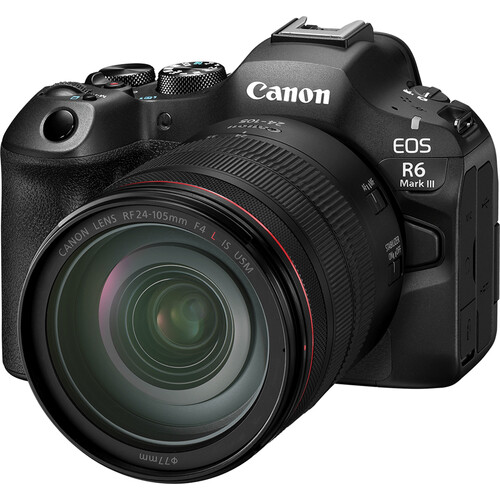
REVIEW: Canon R6 Mark II & RF 24-105 f/4L IS USM

Phenomenal autofocus, outstanding in-camera JPEGs at high ISOs, and great support for legacy EF lenses and flashes makes this a nice upgrade for those sitting on the fence.

REVIEW: Canon R6 Mark II & RF 24-105 f/4L IS USM product photo
REVIEW: Canon R6 Mark II & RF 24-105 f/4L IS USM — click to check current price / availability

✅ Pros

  • Excellent in-camera JPEG quality especially at high ISO (up to ISO 20,000+ with impressive detail retention)
  • Fast, reliable autofocus that rarely hunts—even with legacy EF lenses—and outperforms older pro bodies like the 1DX Mark II
  • Pivoting LCD is very handy for macros in difficult shots, great for screen protection, and perfect for awkward angles
  • Strong IBIS (In-Body Image Stabilization) + lens stabilization for sharp handheld low-light shots

⛔ Cons

  • In 2026, it trails newer bodies (e.g., Nikon Z6 III, Sony a7 V, Canon R6 Mark III) in buffer depth, rolling shutter, and burst rates for fast action
  • Even at street prices around $1,999 body-only new (or $1,800 used/refurb), it's pricey compared to aggressive competition in a shrinking market
  • DPP 4 is painfully slow for raw processing, despite being optimized for Canon files
  • Limited 4K 60p recording time due to potential overheating in extended clips (common for the model; external fan helps if video is priority)
  • ⚖️RAW shadow recovery / dynamic range isn’t class-leading if you push files hard (vs. some Sony a7 and Nikon Z bodies)

TL;DR ⚡

For dedicated Canon shooters, the R6 Mark II delivers outstanding high ISO performance. Combined with IBIS and lens stabilization, it enables slower shutter speeds for still subjects, reducing ISO for cleaner images. See my full review for more info on how it compares to the new Mark III.

R6 Mark II: Pro-level performance and stabilization—without the Mark III price tag.

Table of Contents

  1. Who it’s for and who should skip
  2. Video review
  3. Real World Shots
  4. Sample Video Recorded on R6 Mark III
  5. Observations
  6. Difference between the R6 Mark II and Mark III
  7. Recommended products
  8. Closing thoughts
  9. Related articles

Test Context

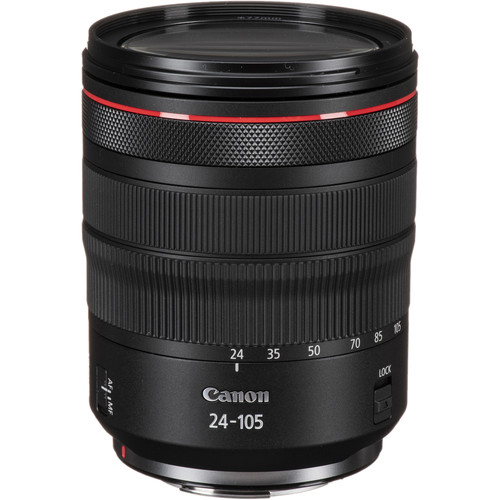
  • Main lens: RF 24–105mm f/4L IS USM
  • Legacy EF lenses used: EF 70–200mm f/2.8L IS II, EF 11–24mm f/4L, EF 100mm f/2.8 Macro USM
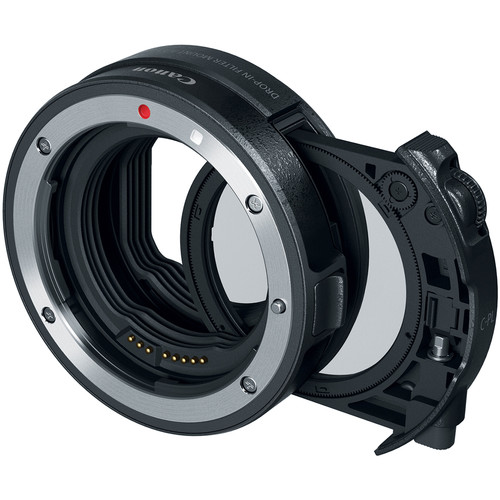
  • Adapter: Canon Drop-In Filter Mount Adapter EF–EOS R (circular polarizer)
  • Scenes Reviewed: Everyday life, macro + close focus, long exposures, low-light indoor, and a "distraction torture test”
  • Files: JPEG + RAW (CR3) + HEIF (.HIF) & MOV
  • Firmware Version: 1.5.0 (Lens 2.0.6)
  • Lightroom Classic Version (for triaging RAW): 15.1 (Camera Raw 18.1)
  • Digital Photo Professional: 4.20.11.0
  • Photos Taken: 1770 (3549 files)

Who it’s for

  • Parents looking to get great shots of their kids in difficult sports conditions
  • Events photographers who often have lots of low-light handheld shots
  • Canon EF lens owners looking to upgrade to a newer camera body (while keeping their existing glass)

Who should skip

  • Those who have to have the latest and greatest gear
  • Studio and landscape photographers who prioritize pixels over autofocus performance
  • If you already invested in Sony, Fujifilm or Nikon, there's not enough here to warrant a platform switch

Video Review 🎥

If the player doesn’t load here, watch on YouTube.

Real World Shots 📷

The photos below are real-world samples. Click any photo to open the original size.

Click here to view the entire gallery of images taken for this review.

The 24-105 minimum focus distance was quite usable.

Real-world shot 1
f/5 for 1/100 sec at 70 mm ISO 320 [0 EV, Pattern metering, No flash, Aperture priority with RF24-105mm F4 L IS USM]

However, I found myself wishing this was a f/2.8 lens quite often to get more bokeh in the background. Click the photo to open the original size 👆

Manual focus peaking was needed to get sharp focus for this shot, but it worked great.

Real-world shot 2
f/4.5 for 1/320 sec at 98 mm ISO 640 [0 EV, Pattern metering, No flash, Shutter priority with RF24-105mm F4 L IS USM]

The wind really gave the autofocus its only fits during my testing, so the focus peaking made it easy to see when the wind was calm enough to take the shot. Click the photo to open the original size 👆

The Canon Drop-In Filter Mount Adapter EF-EOS R with Circular Polarizer Filter worked great with my legacy Canon EF70-200mm f/2.8L IS II USM lens.

Real-world shot 3
f/7.1 for 1/125 sec at 120 mm ISO 8000 [0 EV, Pattern metering, No flash, Aperture priority with EF70-200mm f/2.8L IS II USM]

I rotated the circular polarizer to eliminate the reflections on the leaves and stump to make a more vibrant image. I quickly became a fan of having filters on the camera side of the lens instead of on the end of the lens. Click the photo to open the original size 👆

The in-camera JPEG processing of ISO 20,000 is awesome

Real-world shot 4
f/13 for 1/160 sec at 130 mm ISO 20000 [-0.33 EV, Pattern metering, No flash, Aperture priority with EF70-200mm f/2.8L IS II USM]

I quickly fell in love with the fact that I don't need to worry about hitting high ISOs with this camera. The noise reduction is impressive while still maintaining plenty of details as shown in this low-light shot. Click the photo to open the original size 👆

My very old EF100mm f/2.8 Macro USM lens worked great with the Canon Drop-In Filter Mount Adapter EF-EOS R with Circular Polarizer Filter

Real-world shot 5
f/13 for 1/125 sec at 100 mm ISO 6400 [0 EV, Pattern metering, No flash, Aperture priority with EF100mm f/2.8 Macro USM]

I had no issues with both auto and manual focus with this super sharp but very outdated lens Click the photo to open the original size 👆

I was happy to see my legacy Canon EF11-24mm f/4L USM, one of my most expensive lenses, worked great with the R6 Mark II's autofocus system!

Real-world shot 6
f/20 for 2.5 sec at 24 mm ISO 100 [-1 EV, Pattern metering, No flash, Manual with EF11-24mm f/4L USM]

The circular polarizer came in handy on this long exposure shot as did the articulating LCD which kept me from having to get into funny positions. I just rotated the LCD so I could see it easily no matter what position my camera was in! Click the photo to open the original size 👆

Another long-exposure shot that highlights the sharpness of this lens even at f/14

Real-world shot 7
f/14 for 1/2 sec at 63 mm ISO 100 [-1 EV, Pattern metering, No flash, Manual with RF24-105mm F4 L IS USM]

I currently own a legacy 24-70 and two variants of the 24-105 lens, but this new RF made me want to get rid of all of them as it performed very well with super crisp images worthy of the L designation. Click the photo to open the original size 👆

Cigar lounges are a visual treat in person, but they give cameras fits

Real-world shot 8
f/4.5 for 1/60 sec at 50 mm ISO 12800 [0 EV, Pattern metering, No flash, Aperture priority with RF24-105mm F4 L IS USM]

I was pleased that the autofocus never had any problems and didn't hunt for something to lock onto. The in-camera JPG was great and the off colors accurately reflect what I saw in person as well, so it nailed the color even with the AWB setting. Click the photo to open the original size 👆

In-camera color accuracy was fantastic

Real-world shot 9
f/9 for 1/80 sec at 32 mm ISO 12800 [0 EV, Pattern metering, No flash, Aperture priority with RF24-105mm F4 L IS USM]

I might be sounding like a broken record, but Canon's strength has always been its in-camera color quality and this was no different. It's an exact replica of what my eyes were seeing at the time. Click the photo to open the original size 👆

Even at ISO 8000, the textures of the cigars were excellent.

Real-world shot 10
f/6.3 for 1/80 sec at 70 mm ISO 8000 [0 EV, Pattern metering, No flash, Aperture priority with RF24-105mm F4 L IS USM]

I've been so happy with my iPhone over the past few years that I'm not breaking out the big camera anymore, but the resolution and crispness especially at high ISO with this camera has me rethinking that decision. Click the photo to open the original size 👆

This was my token f/22 shot that is more about having a lot of things to look at than it is photography. Overall, the wind hurt this shot quite a bit but I also believe diffraction was the bigger enemy here. There's no substitute for more megapixels for stuff like this as I've shown in my 50 and 100 megapixel Fujifilm reviews.

Real-world shot 11
f/22 for 8 sec at 24 mm ISO 100 [0 EV, Pattern metering, No flash, Aperture priority with EF11-24mm f/4L USM]

For this shot I was using my legacy EF11-24mm lens and the light conditions were constantly changing, but in the Northwest this was about as much sun as I could get so I was happy to capture it! Click the photo to open the original size 👆

f/16 looks great as long as you don't pixel peep at unrealistic zoom levels

Real-world shot 12
f/16 for 1.6 sec at 24 mm ISO 100 [0 EV, Pattern metering, No flash, Aperture priority with EF11-24mm f/4L USM]

I focused on the sign and again was using my sharpest lens in my bag for this shot Click the photo to open the original size 👆

I used the right eye autofocus and despite my daughter's hair partially obscuring it, and it did great.

Real-world shot 13
f/5.6 for 1/100 sec at 95 mm ISO 5000 [0 EV, Spot metering, No flash, Aperture priority with RF24-105mm F4 L IS USM]

For those new to this feature, the right and left eye refer to the subject's right and left eye - not photographers right or left. This is something that you need to think about when using that feature as it's easy to get it confused. That said, auto eye priority works great most of the time too. Click the photo to open the original size 👆

This was a hard shot to capture and the result is nothing to write home about, but what impressed me was that the autofocus never hunted around trying to lock onto the inscription - despite the fact that I struggled to see it!

Real-world shot 14
f/6.3 for 1/60 sec at 53 mm ISO 6400 [+2 EV, Pattern metering, Flash fired, Aperture priority with RF24-105mm F4 L IS USM]

Autofocus in difficult conditions that used to trip up the best of cameras is no longer a thing, so I never dealt with focus hunting even when using my older lenses. What's more, I almost never needed manual autofocus, and when I did it was for creative reasons. Click the photo to open the original size 👆

Another tricky one just above

Real-world shot 15
f/6.3 for 1/60 sec at 81 mm ISO 6400 [+2 EV, Pattern metering, Flash fired, Aperture priority with RF24-105mm F4 L IS USM]

In both cases, the autofocus just worked like it was any other subject - which was great! Click the photo to open the original size 👆

I had the wrong white balance settings for this shot, but I was pleased with the exposure of the blackberries at 0 EV against the bright pineapple in Canon's Evaluate metering (aka pattern) mode.

Real-world shot 16
f/5.6 for 1/60 sec at 43 mm ISO 4000 [0 EV, Pattern metering, No flash, Aperture priority with RF24-105mm F4 L IS USM]

A better white balance and partial metering would have been a better choice, but the CR3 raw file leaves plenty to work with after the fact. Click the photo to open the original size 👆

It's the winter in the Northwest, so there's little light to speak of. As a result, I was pleased to see how much detail was still left in the top of this hat even at ISO 8000.

Real-world shot 17
f/5.6 for 1/80 sec at 63 mm ISO 8000 [0 EV, Pattern metering, No flash, Aperture priority with RF24-105mm F4 L IS USM]

Yet another example of why I loved the 24-105mm so much - super sharp images and great image stabilization for handheld shots. Click the photo to open the original size 👆

ISO 8000 was so good on that last shot, I decided to push things and give ISO 10,000 a shot

Real-world shot 18
f/4 for 1/125 sec at 105 mm ISO 10000 [0 EV, Pattern metering, No flash, Aperture priority with RF24-105mm F4 L IS USM]

Once again, the in-camera JPEG didn't disappoint. However, I can still leverage the raw and Imagenomic Noiseware to get it even more sharp if I wanted to edit this image. Click the photo to open the original size 👆

Photographs on your typical ice rink are always terrible due to the poor lighting conditions and distractions in the background, but I was super impressed with the eye autofocus and AI Servo performance with my legacy 70-200mm during this torture test.

Real-world shot 19
f/4 for 1/320 sec at 102 mm ISO 5000 [0 EV, Pattern metering, No flash, Manual with EF70-200mm f/2.8L IS II USM]

Lots of distractions in the foreground and background kept showing up, but the AF almost never missed a shot and stayed in sharp focus of my daughter's eyes even when I struggled to see where she was. Click the photo to open the original size 👆

I've got countless distractions shots like this where the AF did a great job tracking my intended subject and never getting tripped up.

Real-world shot 20
f/2.8 for 1/320 sec at 135 mm ISO 2000 [0 EV, Pattern metering, No flash, Manual with EF70-200mm f/2.8L IS II USM]

I was extremely pleased with the performance, even though people were ruining any chances of a getting a good photograph! Click the photo to open the original size 👆

Another distraction example and there's more in the review gallery, but the AF never lost sight of my intended subject.

Real-world shot 21
f/2.8 for 1/320 sec at 200 mm ISO 8000 [0 EV, Pattern metering, No flash, Manual with EF70-200mm f/2.8L IS II USM]

I can say with confidence that the R6 outperforms my Canon 1DX Mark II in terms of AF performance in every way. Click the photo to open the original size 👆

This is a horrible photo, but what's impressive is that the eye autofocus actually stayed on the eye of the moving and partially obscured subject

Real-world shot 22
f/4 for 1/400 sec at 91 mm ISO 1600 [0 EV, Pattern metering, No flash, Manual with RF24-105mm F4 L IS USM]

I threw a lot at this AF system and it passed with flying colors. Click the photo to open the original size 👆

Yes, its true, auto eye AF even works on closed eyes!

Real-world shot 23
f/4 for 1/640 sec at 105 mm ISO 4000 [0 EV, Pattern metering, No flash, Manual with RF24-105mm F4 L IS USM]

In the past you'd have a sharp focus of a basketball and blurry subject, but not with the R6 Mark II. Click the photo to open the original size 👆

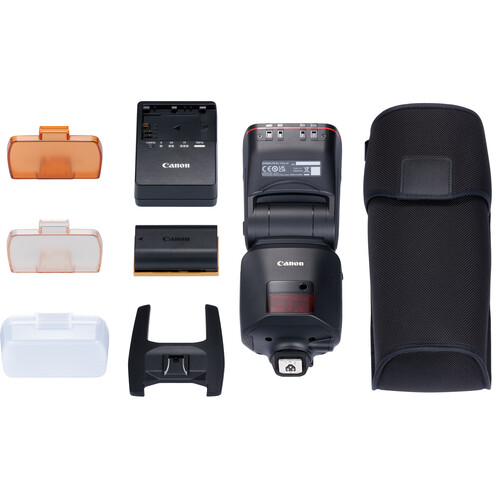
I didn't get enough time with the amazing Canon EL (Version 2) Flash, but this was all that flash with no third party modifiers.

Real-world shot 24
f/5.6 for 1/60 sec at 72 mm ISO 3200 [0 EV, Pattern metering, Flash fired, Aperture priority with RF24-105mm F4 L IS USM]

It's heavy, and its expensive, but the battery makes it a always ready when you need it super performing flash. If I was shooting event photography, I'd definitely buy this flash. Click the photo to open the original size 👆

After taking a photo with my iPhone, I decided to see if I could improve upon it by getting a shot that the iPhone would never get - a sharp focus on the brush as paint is applied.

Real-world shot 25
f/4 for 1/60 sec at 96 mm ISO 160 [-0.67 EV, Pattern metering, No flash, Manual with RF24-105mm F4 L IS USM]

Spot autofocus saved the day and I got the shot that I was hoping to get. Click the photo to open the original size 👆

Unhappy with the darkness of the last shot, I tried again and once again spot AF had no problems getting my desired result.

Real-world shot 26
f/4 for 1/100 sec at 105 mm ISO 320 [0 EV, Pattern metering, No flash, Manual with RF24-105mm F4 L IS USM]

In retrospect I wish I would have tried this shot at f/9 to get both the brush and hand in better focus together, but that's all on me not the camera. Click the photo to open the original size 👆

Notice how in-camera HEIF (.HIF) files render in Lightroom versus the CR3 thumbnail/default rendering.

Real-world shot 27
In-camera generated HEIF files don't look good in Lightroom Classic (in my testing)

I’m not sure if this is a Lightroom issue or a camera firmware issue from not being on the latest version. Leave a comment if you have more details on this issue. Click the photo to open the original size 👆

4K Video Example - Northwest Stream

If the player doesn’t load here, watch on YouTube.

1080p 120fps Slomo Video Example - Northwest Stream

If the player doesn’t load here, watch on YouTube.

Observations

Battery Life & Ergonomics

In mixed stills shooting (with occasional bursts and LCD use), I got about 2000 images (about 1000 shots) per LP-E6NH charge—solid for a mirrorless body. Grip is comfortable for long sessions, weather-sealing held up in light rain/Northwest drizzle, and the EVF is bright and clear. IBIS makes handheld low-light easy.

Still Worth It in 2026?

Launched in 2022, the R6 Mark II now often sells new for ~$1,999 body-only (or less refurbished/used around $1,800). It’s a fantastic value for EF lens owners avoiding a full system switch. If you want the absolute latest (better buffer, sensor readout, video endurance), the R6 Mark III is the step-up—but this one still punches way above its age for sports, events, and family action.

Difference between the Mark II and Mark III (AI Generated)

Image Quality & Resolution

The most notable difference is the sensor. The Mark III offers a 32.5MP sensor compared to the Mark II's 24.2MP, providing greater flexibility for cropping and larger prints. This extra resolution, however, can result in slightly more noise in high ISO scenarios compared to the Mark II's clean low-light performance.

Video Enhancements

The Mark III is a significant upgrade for videographers. It introduces internal 7K RAW recording and Open Gate recording, which uses the entire sensor area for flexible aspect ratio cropping in post-production (e.g., for social media vertical video). It also adds a full-size HDMI port, Canon Log 2, and professional tools like waveform monitoring. The Mark II is a capable everyday video camera with crop-free 4K 60p, but lacks these advanced features.

Speed & Buffer

Both cameras shoot at an impressive 40fps with the electronic shutter. The Mark III pulls ahead with its CFexpress card slot (alongside an SD slot), which allows for a much larger buffer capacity (around 150 RAW shots vs. 75 on the Mark II) for extended burst shooting. It also has a more robust implementation of the Pre-continuous shooting feature.

Autofocus & Stabilization

Both use Canon's effective Dual Pixel CMOS AF II system. The Mark III benefits from an enhanced AF algorithm and the "Register People Priority" feature, which allows you to prioritize focus on specific registered faces. It also offers a slight bump in in-body image stabilization, up to 8.5 stops.

Closing Thoughts

I’ll admit I was late to the game reviewing this one—it originally launched in 2022—but it’s still a very relevant camera today, especially if you’re coming from older Canon DSLRs with EF glass and have been waiting for the right moment to upgrade. If you’ve already moved to the R series, the gains here are more incremental and may not justify the cost.

That said, if you value Canon’s ergonomics and its consistently excellent in-camera JPEGs, this camera earns its keep. Autofocus stayed locked on even in ugly, low-contrast situations, and high-ISO performance was strong enough that I rarely felt forced into shooting RAW. When I did, RAW + Imagenomic Noiseware produced results that easily meet 2026-level expectations.

If you still find yourself wanting more—faster everything, more headroom, and the newest refinements—then stepping up to the Canon R6 Mark III makes sense. Either way, the Canon RF 24–105mm f/4L IS USM remains a rock-solid everyday pairing that fits this body perfectly.

👉 Click here to learn more

Tuesday, September 20, 2016

A Zen Moment with the Canon 11-24mm

Canada 2016-419

I was on a trip recently with my kids in Canada and decided to go for an outing only with my Canon 11-24mm and I immediately fell in with that lens all over again.

People often say that you can't photograph people with a wide angle lens, but I (and others) beg to differ. yes, you have to be mindful of the distortion, but the added benefit you get of including your environment is a wonderful touch to any photo - especially when out with the family.

Click here to read my review on this amazing lens.

Friday, July 24, 2015

REVIEW: Canon 5Ds–Should You Upgrade?(Part II of II)

Canon EOS 5Ds 50.6 MP DSLR Camera

If you are just seeing this two part series, please go read the first part of my review entitled Canon 5Ds (Part I of II) with Unedited Sample Photos and come back here for my additional findings.

With a smaller pixel size (4.14µm vs 6.25µm) and diffraction that starts to kick in around f/7.1 (vs f/10), some will argue that the 5Ds only has one major benefit over the 5D Mark III - 2x more megapixels. Given the reality that most users will rarely print a file that full utilizes all 22.3 megapixels of the 5D Mark III (Super B/A3+ - 13x19 inches or 330x438mm), it is true that often those extra megapixels will go to waste – but they’ll still eat up your hard drive space 2x as fast (even more so if you use Photoshop). This begs the question what’s sense does it make to spend an extra $1200 (at the time this article was written) to upgrade?

For some these tradeoffs to take a step backwards from all the benefits the 5D Mark III has to offer. For others the answer to the upgrade question will be based on an emotional desire to have the latest and greatest technology Canon has to offer. The 5Ds certainly comes with plenty of bells and whistles not found on its cheaper sibling, so perhaps that reality alone might be enough for some people.

Read on to get the low down on why I both love this camera, yet I struggle to justify a valid reason to own it.

The 50 megapixel advantage


f/5.6 @ 24mm for 10 sec at ISO 100
 with Canon 11-24mm lens
Click to see the incredible sharpness and detail in this unedited in-camera JPEG image
(Apologies for the tilt)

Does resolution make a difference even when you throw away pixels?

This is the question I kept asking myself so I decided to do a basic test that anyone could do themselves if they had the gear on hand to see the advantage of the extra megapixels.

To begin I just zoomed in to 200% and observed the amount of detail in the bookshelf image taken with the 5Ds using my 11-24mm lens at 24mm at f/5.6 and ISO 100. Notice the dithering pattern in the book spine – that’s really there but only a three cameras I’ve tested have ever captured it – the A7R, D810 and 5Ds:

5Ds Crop from 200% Zoom of Original File

Now If look at the 200% capture of the same section with the 5D Mark III using the same lens, aperture and ISO and notice it is (obviously) smaller and the detail looks smeared by comparison:

5D Mark III Crop from 200% Zoom of Original File

If I zoom in to 300% to get roughly the same size the difference is night and day:

5D Mark III Crop from 300% Zoom of Original File

The 5D Mark III isn’t able to capture the dithering details on the spine or the sharpness of the letters simply because there’s not enough sensor resolution to capture it.

This isn’t rocket science, but it does prove that if you have a lens that can take advantage of the extra resolution then the 5Ds is definitely going to take advantage of it with image details you can use.

Downsizing to 4k

Next I decided to discard the extra megapixels using Photoshop CC 2015’s Image Resizing (and yes, there are better ways like using Perfect Resize) :

Canon 5Ds Image Resize to 4k

Here’s the same thing done to the 5D Mark III image:

Canon 5D Mark III Image Resize to 4k

Below is a table that shows the results (with image links) to before and after, but you can see the results in the screen shots above already. Again, the image with more detail resizes more nicely than the one that doesn’t which also means the file size is larger after resize.


Before Resize

After Resize

Canon 5Ds

8688x5792 15.3MB

3840x2560 6.24MB

Canon 5D Mark III

5760x3840 7.43MB

3840x2560 5.91MB

While this may be proving the obvious to some, it hopefully highlights to everyone that despite the pixel size disadvantage the extra megapixels come in handy when resizing your images.

So YES, even if you end up resizing your image for use on Instagram or Facebook, people WILL be able to see the difference. They won’t be able to quantify it, but the 5Ds images will appear more detailed and sharp.

Editing – The Real High Megapixel Advantage

I’ll admit that I liked some of the advantages of this camera enough that I found myself using it for some formal shots that I’ve had on my to-do list for years. When I edited these shots I really appreciated the extra pixels which helped to give Photoshop more data for gradients, shadow detail, and overall texture. This really made fixing flaws so much easier than normal because tools like the content aware patch and healing tools had more data to sample from.

Here’s an example of an image as it came out of the camera which was quite good even with its 8-bit sRGB in-camera JPEG:


In-camera JPEG Unedited – Click for Full Size
f/9 @ 70mm for 1/125 sec at ISO 100
 using 24-70mm f/2.8L II lens
The best part about a high megapixel camera is editing details as you have so much data to fix flaws with less impact on the adjacent area. The ability to zoom in at a significantly greater level for spot healing.

Anytime I edit a photo I always start with a 16-bit ProPhoto RGB Original RAW file which immediate offers more color and dynamic range than the in-camera original JPEG. Anyone who edits their photos from the RAW originals knows that this RAW advantage still yields benefits when converting an image back to a 8-bit sRGB JPEG for display on the web.  By having the extra megapixels with the 5Ds you get even more visible of benefits from your in RAW editing workflow because you have the well-known color benefits but now you also get more detail even when you downsize your image. Here’s the editing version with all of the benefits that extra megapixels and RAW data offer:


Edited Version - Click for full size
Extra resolution made correcting flaws super easy
and the RAW image had an incredible tonal range
in the background gradients and shadows

This really hit this point home for me because all of the discarded megapixels and color data still resulted in a image that had more color and detail than I’m used to seeing from my 5D Mark III. Yes, you may end up tossing all of those megapixels but the people who see your images will still see the benefits of you shooting with them versus a camera that has less resolution.

Get used to f/7.1 or lower

To avoid diffraction you’ll have to shoot at f/5.6 or less. With a camera that has such high resolution that your depth of field will be drastically reduced, this isn’t good news for landscape photographers. In the real world I found myself satisfied with the tradeoffs of using f/7.1 as you can see here in this long-exposure shot taken on tripod using a timer and mirror lockup:


f/7.1 @ 85mm for 6 sec at ISO 100
using a Canon 70-200mm f/2.8L IS USM 

As I zoom in to 100% and explore on a PA322UHD 4K display I see that I’ve got pretty decent detail of images that the naked eye can’t even notice. Here’s a few fun examples:

100% Crop of Pacific Science Center IMAX Sign
100% crop of Pacific Science Center IMAX sign

100% Crop of Crane
100% crop of crane

100% crop of buildings in the far back section of the shot

This started to feel like the enhance scene in Blade Runner, and made me not really want to live in downtown for a fear of an invasion of privacy by 5Ds shooters!

The super high resolution means that you get more detail at the expense of a a more shallow depth of field, but with landscapes the circle of confusion calculations work in your favor.  If you are a macro shooter, this is going to be a big problem so keep this in mind.

Patient wildlife shooters on a tripod might also be able to take advantage of both the added resolution and generous extra pixels for cropping to get closer to their subjects with high fidelity than they are currently used to enjoying. This is no sports camera, but in skillful hands amazing results are certainly possible.

Bookshelf Test

The following shots are done on a tripod with all camera default settings except I also enable RAW. The full gallery of bookshelf images can be found here, but I’ve included a few noteworthy images in this article.

I’ve already covered the sharpest aperture (f/5.6) at ISO 100 earlier in this review, so I’ll move on to a discussion about ISO. Here’s the same shot taken at the maximum native ISO:


f/5.6 @ 24mm for 1/6 sec at ISO 6400

As you zoom into 100% you can see the noise level (using the Low setting) is pretty bad and the details start to get smeared:

ISO 6400 100% Crop
ISO 6400 100% Crop

For reference again, here’s the same shot at ISO 100:

ISO 100 100% Crop
ISO 100 100% Crop

With the requirement that you have to use significantly faster shutter speeds to get sharp shots hand held, this means you’ll quickly get into high ISO’s like this where the extra resolution benefits start to fade. This is one of the big reasons why I don’t think this camera is going to be for everyone as current 5D Mark III owners will feel like the noise level is a major step backwards.

For the record, this is the same level of noise problem I saw with the Nikon D800/D810, so this isn’t a problem unique to Canon. As a result, I would NOT consider any high megapixels camera like this to be suitable for vacations, parents, travel, concert or street photography.

Real World Shots

The following images come straight from in-camera JPEG’s using the camera default noise reduction settings. Most camera settings are the default with the exception of RAW+JPEG, a desired White Balance (only Shade or AWB), and a desired focus point.  I chose to use the Standard Picture Style for all except for where noted.

Click here for a full gallery of unedited images.

All images are copyright Ron Martinsen – ALL RIGHTS RESERVED. You may not save, print, edit, modify or otherwise use any images featured in this article or the gallery without expressed written permission.


f/5.6 @ 24mm for 1/125 sec at ISO 1600
 using 11-24mm lens
This was one of my many “almost” sharp shots but the slight camera shake despite shooting at over 5x the reciprocal of the focal length. As a result you can expect that hand held shooting is pretty much out of the question for most photographers.


f/5.6 @ 24mm for 1/125 sec at ISO 200

Extreme details, no matter how gnarly, are always fun to capture with this camera


f/5.6 @ 85mm for 1/100 sec at ISO 100


f/5.6 @ 24mm for 25/10 sec at ISO 100

Images like this have to be seen in print or on a 4k display to be fully appreciated
as 1080p just doesn’t cut it – too much detail is lost!

See the first part of my review entitled Canon 5Ds (Part I of II) with Unedited Sample Photos for more images as well as the complete gallery. 

What about other models?

I know many of you are probably wondering about the 5Ds R about now, and I’ll cover that camera when I can finally get my review unit from B&H. I’ve also got a Sony A7R II in the queue will be reviewing it along with the 5Ds R later this year.

Until my my other reviews are ready you can go enjoy these reviews to see what I think of some of the others super high resolution cameras:

I don’t cover medium format cameras on this blog, and I don’t have any other super resolution cameras planned for review at this time (excludes models released after this article was written).

Conclusion

I can highly recommend the 5Ds for those who are doing detail critical work AND who will be using this camera with either studio lights or on a tripod. However I started this article with the question with “should you upgrade”, so I’ll finally go against the fanboys and marketplace momentum and recommend AGAINST getting this camera if you plan to use it as your primary or only camera that you shoot unsupported.

Unless you live in the dessert where you can always shoot at ISO 100 with high shutter speeds, you’ll need shutter speeds that are 3x what you are used to using (assuming you have the latest IS, else 5x+) to avoid motion blur in your hand held images. Extra resolution of blurry images will give you poor results no matter how you slice it as many former D800/D810 owners will tell you. As a result, I consider this a specialty camera for a limited audience or for those who will be using it as 2nd body to back up their lower megapixel Canon DSLR.

This advice applies to the Nikon D810 and Sony A7R II as well. High resolution is both a blessing (when used effectively) and a curse, so “don’t be that photographer” that’s blaming the camera or lens for a bunch of blurry shots that are caused by using a high resolution camera properly. Medium format shooters already know this so when you get to these resolutions you cross into a whole new world that’s not for the beginner or casual photographer! You have been warned.

Where to order

Click here to learn more or order on the 5Ds or 5Ds R on the B&H web site.

Other articles you may enjoy

If you enjoyed this article, you may also enjoy these articles about other Canon products:

Here’s also some other articles on this blog that you might enjoy:

Disclosure

If you make a purchase using links found in this article, I may make a commission. It doesn’t cost you a penny more, but it does help to support future articles like this.