Showing posts with label G12. Show all posts

Wednesday, November 14, 2012

PowerShot Comparison: Canon G12 vs G15 vs s110–Part II

Canon PowerShot s110, G15 and G12 Front View
Canon PowerShot s110, G15 and G12

In my previous article, I began my observations of the difference between the new G15 over the G12 and G1X as well as the s110. In this article I just focus a bit on image quality using my well-known bookshelf test and a couple portrait photos taken by both the s110 and G15.

Portraits

I only had a short time to shoot a small set of portraits with this camera this weekend, but the following were done in natural light on a very gloomy and rainy day in Seattle. The images chosen were the sharpest (not necessarily the best photos) of the handheld images taken. Honestly, even under these decent conditions I really struggled to get a sharp shot. Both cameras ended up going to ISO 800 (both set to Auto ISO and Av to the minimum f/stop number for the focal length shown).

Both images are untouched in-camera JPEG originals with camera default settings shot in Aperture Priority at the minimum aperture for the zoom level chosen. Blurry shots are omitted.


s110 f4, 1/25 sec ISO 800 at 11.934mm focal length, Auto White Balance (AWB)
Click for Full-Size Original In-Camera Image

The s110 has a wider angle lens and it quickly felt like I was getting in the models personal bubble when I tried to shoot at f/2, so I settled on f/4 and the 12mm focal length. Of all my handheld test shots, this was the sharpest but I was a bit disappointed with the indoor performance.


G15, f/2.8, 1/40 sec ISO 800 at 30.5mm focal length, AWB
Click for Full-Size Original In-Camera Image

The G15 isn’t as wide as the s11, but it’s aperture range is more helpful indoors. The brighter lens of the G15 allowed me to zoom in more and use faster shutter speeds to get the shot. Overall the G15 was definitely easier to use indoors under these conditions (which are a dream for a DSLR shooter).

While I still had my share of blurry shots from the G15, I was still pleased with what this camera had to offer under these tough conditions when photographing people. Neither of these shots are going to win awards, but the image quality was decent for a point and shoot.

For those who are wondering, my subjective opinion of the much heavier G1X is that definitely does a better job at shots like this (especially at ISO 800), but I’d still prefer my X10 in conditions like this over all the Canon models.

Bookshelf Test

Click for 100% Zoom Image
Close examination of the text “Her Family” showed that the G15 had a pretty clear advantage at detail preservation at higher ISO’s over the s110

You can see more images and pixel peep to your heart content at the following galleries:

My high level subjective observations were as follows:

  • The s110 lens outperforms the G15 when wide open (f/2 and f/1.8 respectively), but at f/4 the G12 appears to be sharper than the s110.
  • ISO performance has improved over the G12 for both the G15 and s110, but the G15 as a slight edge at higher ISO’s.
  • Both the G15 and the s110 outperform the G12 at higher ISO’s, but it’s also clear that they use a more aggressive noise reduction algorithm that doesn’t seem as good at preserving detail as what you’d find in Noiseware or Dfine. As a result, I’d probably not exceed ISO 1600 on the new cameras (which is equivalent to ISO 800 on the G12).
  • The dynamic range of the s110 seems to be the best, even though I expected them to be identical.
  • Overall none of the Canon point and shoots are high ISO top performers, so don’t count on these cameras for your low light shooting needs.

Conclusion

There was less image quality progress made on this generation of camera updates than I expected. That’s a shame too because Canon used to be a trusted name for compact cameras, but there’s so many competitors like Fuji and Nikon that are really trying to up their game. As a result I’d give them a mediocre image quality rating, but the s110 has such great portability that it might make it worth while to sacrifice some image quality.

If a friend asked me on the street what point and shoot they should get, I’d still say the Fujifilm X10. If they said, what Canon should they get I’d say I’ve switched camp from the G series that I loved in the past and now favor the smaller s110.

s series camera owners have a lot of reasons to justify an upgrade, but G series owners should stay put. I wouldn’t tell them to rush out and buy a G1X either as I think that camera is just too big and bulky without the benefit of significantly better image quality.

Where to Buy

B&H loaned me the gear for this article, so I suggest you show them your appreciation by placing your order for a s110 or G15 with them. Click here to order the s110 or click here to order the G15.

Adorama has a kit version of the G15 and a kit version of the black s110 as well as a kit of the white s110.

Other Articles You Might Enjoy

Disclosure

B&H loaned me the new gear for this article but the G12 was my personal camera that I paid full price for myself. If you make a purchase using links found in this article, I may make a commission.

Friday, November 9, 2012

PowerShot Comparison: Canon G12 vs G15 vs s110

Canon PowerShot s110, G15 and G12 Front View
Canon PowerShot s110, G15 and G12

For years I’ve been a fan of the Canon G-series camera and have had reviews on my blog for every version since the G9, but when the s90 came on the scene many Canon faith jumped ship to the smaller and more compact cousin to the G series. I wasn’t impressed with the S series cameras despite their great form factor, so I’ve shunned them in the past. Read on to see why I’ve started to have a change of heart and why my G12 is going up for sale!

Oh, and in case you are wondering there was no G13 or G14 for superstition reasons.

What’s New and What’s Different

Mouse over to see before, mouse out to see after
Canon PowerShot s110, G15 and G12 Rear View

The s110 and G15 get upgraded to feature the latest LCD’s and image processors from Canon to give you the best image quality that Canon has offered to date on this series camera. You can learn more about the s110 here and the G15 here on Canon’s website. This article will instead focus on some of my observations as a long-term G series owner and a previous s95 and s100 user. I’ll drill into these details in the following sections.

To help illustrate the high-level differences I’ve take some shots that show these cameras side by side. Sadly, I didn’t have a s100 to include in the mix, but you can visualize how much more compact the G15’s become and how smaller still the s110 remains over its sibling.

Canon PowerShot s110, G15 and G12 Overhead View

G15 vs G12 & G1x

During my testing I actually found the G15 to be much closer to the closer to G1X than it was to the G12 in terms of ergonomics. Fortunately the G15 is much thinner thanks in part to its lack of an articulating LCD that I enjoyed on both the G12 and G1X. Of course the advantage to removing this feature is that it not only makes the camera thinner, it also allowed for a much larger display (3.0 vs 2.8 on the G12). To that end, the rear LCD goes up to 922,000 pixels vs only 461,000 on the G12 so it’s a substantial improvement in image quality. The G1X is on paper the same size and pixel density but for some reason the G15 just feels bigger to me. All said though, I really enjoyed the ability to protect the LCD and move the LCD around with the G12/G1X design, so I’m disappointed to see that feature go away. 

You can see from the pictures what the major differences are so I won’t rehash hall of them here, except to say that I miss the rotating ISO knob up top. However, the addition of a record button is a nice improvement but I’m bummed about losing quick access to the timer as well. For those of you who have a pocket tripod and do macro work with the G series, this is definitely a much less user-friendly macro camera due to the LCD and button changes.

The only other change worth mentioning is the move from a fixed to a popup flash. It’s good that its farther from the lens, but bad because its now a mechanical part that makes it easier to break. This design consistent with other cameras in this class, so I’m not losing much sleep over this one – it’s still painful using the built-in flash, so the hot shoe with a 270EX II or 320EX is your best bet if you use a flash frequently. Fortunately the higher ISO range and performance of the G15 reduces the need to use the flash as often as was required on the G12.

Functionality-wise I found the G12 and G15 to be mostly the same with the biggest feature difference being the Full HD (1920x1080) support added to the G15 and the max ISO jumping from 3200 to 12,800.

s110 vs G15

As I mentioned, I didn’t have a s100 to compare against, so I can only draw from what I have on hand. The biggest differences between the two begin with the obvious – there’s a lot more physical buttons on the G15 which makes it faster to adjust the controls. However, the s110 does add a jog wheel to its lens which gives you quick access to some additional features (which one depends on the role you set for that control). It still features the tiny battery that dies too quickly, and all of its electronic do-dads like Wi-Fi support only serve to drain it even faster than ever. This unit does feel better in my hands than prior s series, and it’s the first defect free s series camera I’ve used for the entire review period (all previous models had some serious issue by the end of the review).

The big WOW feature of the s110 has to be its touch screen which really helps it to overcome its lack of buttons. The ability to touch and focus like an iPhone is awesome and really makes it easier and faster to use than a G15 which oddly enough does not have this super helpful feature.

In the past the s series has always been able to boast the advantage of having a faster lens, but for this generation Canon stepped up and gave the G15 a f/1.8 lens that maxes out at 2.8 when zoomed to 30.5mm as opposed to the f/2.0 lens that maxes out to 5.9 at 26mm on the s110. This is a significant shift from the past and definitely gives a big advantage to the G series – especially in low-light zoom conditions.

I’ve always loved the form factor the s series cameras, but I’ve been disappointed by its usability. However, the G series has lost enough features and the s series has gained enough “exclusive to the s” features (like Wi-Fi) that the gap between them isn’t as tremendous as it once used to be.

Wi-Fi vs Eye-Fi

The addition of integrated Wi-Fi support on s110 was pretty exciting when I first started to review it. Once setup (which is still a bit of a geek experience – even with WPS), it became even more obvious how this is so much more than Eye-Fi. What you end up with is a device on your network that you can pair with your phone, printer, computer and more for an integrated wireless experience. Here’s an example of how my iPhone 5 would see my photos despite the fact that there were no cables between them and the files were still in my camera:

Thanks to this feature you can leverage your phone’s GPS for doing GeoTagging:

I could integrate with Canon’s software on my computer to wirelessly transfer the files to the computer:

Or I could see my device on the network in Lightroom and import files directly with no wires or drive letter assigned (at least on Windows 7):

Overall I was impressed, but then in practice I ended up being disappointed with the performance and ultimately rolling back to Eye-Fi. Eye-Fi seemed to be less of a drain on the batteries and do everything I need without the headache of the camera being locked for certain operations or having to re-pair the camera to the target device. While I liked this feature more than I expected, I’d say it’s only meaningful for those who don’t have an Eye-Fi yet. If you do, I think you’ll still prefer your Eye-Fi (Pro or greater so you can transfer RAW).

Real World Sample Images

100% Crop of a G15 Flower Shot
ISO 80, straight out of camera with zero modifications

I should note that these images were taken with the camera default settings which include noise reduction which find to be horribly over aggressive. Setting in-camera noise reduction off or reducing it to Low and then using a product like Noiseware or DFine will give you much better results. Naturally processing from the RAW is even better, but to avoid human error and additional software variables, I use the in-camera JPEG’s for all of my reviews. In practice, I use the RAW’s.

Here’s a link to the G15 gallery, and here’s a few images you’ll find there (originals in the gallery):


ISO 80, straight out of camera with zero modifications


f/4 ISO 100 – I’m impressed – feels like G1X caliber images


f/2 at 1/80 sec ISO 400 – gotta love the P&S depth of field for macros!


ISO 1600 is much improved!


ISO 4000 is destroyed by horrible in-camera noise reduction
For kicks and giggles, go compare this to a similar image at ISO 5000 in my D600 review <g>

Here’s a link to the s110 gallery, and here’s a couple images you’ll find there (originals in the gallery):


f/2 ISO 200 – wow – insane depth of field due to the tiny sensor


ISO 10,000 is usable

NOTE: Some images were at ISO 10,000 due to an accidental ISO change in-camera that I’m still not sure how it happened – especially given how ISO is buried on this camera.

I still have to do my infamous (or dreaded – ha, ha) bookshelf test with all three cameras, and I hope to get more exciting images with these cameras this weekend.

Conclusion

For the Canon faithful I’ll draw some lines in the sand here. For starters, the s110 is much improved over the s95 that I reviewed back when the G12 came out. The touch screen helps it to overcome some of my past gripes, and the Wi-Fi support plus big rear display really up its value beyond just being compact. As a result, I feel a lot more comfortable recommending the s110 as a nice pocketable point and shoot.

The G15 on the other hand has made good progress getting smaller, but I honestly think it’s lost some of the things that made the G12 so great in the process. While it is smaller and lighter, I still don’t think people will consider it any more pocketable (and truth be told if you can fit a G15 in your pocket, you most likely can a G12 too – both fit in my back jeans pocket). It’s also disappointing to not see some of the s110’s features on the G15 which make it feel a bit dated by comparison.

At the end of the day, I still prefer my Fujifilm X10 as my every day point and shoot camera, and I see little value in upgrading it over G12. However, if you are in the market for a camera of this class I think a great deal on a used G12 is a better investment than the G15. Sure, there’s some image quality improvements in the G15, but not enough to warrant the price difference and not really enough to compete with superior cameras like the Sony NEX-7, Fujifilm X10, and the host of micro four thirds in the compact class. As a result, I’d say if you had to pick then go with the s110 or go outside the Canon brand for a camera that offers more bang for the buck. The G15 is just too overpriced for what you can get elsewhere these days.

Where to Buy

B&H loaned me the gear for this article, so I suggest you show them your appreciation by placing your order for a s110 or G15 with them. Click here to order the s110 or click here to order the G15.

Adorama has a kit version of the G15 and a kit version of the black s110 as well as a kit of the white s110.

Other Articles You Might Enjoy

Disclosure

B&H loaned me the new gear for this article but the G12 was my personal camera that I paid full price for myself. If you make a purchase using links found in this article, I may make a commission.

Monday, March 5, 2012

Using the Canon G1X in the Real World vs the Fujifilm X10

I know dead center, is dead wrong :-)
Canon G1X has gorgeous auto white balance color

Recently I took the new Canon G1X out for some real-world shooting the way I would use this camera – with my family. I shot with it and my wife (who is your typical “mom” user) shot with it the way normal people would use this camera. I prefer to test this way because it always annoys me when I see a review of shots from a point and shoot camera that look like they belong in a magazine. When I hand a camera of to my wife it needs to “just work” and get great shots, and let’s face it – most cameras disappoint when you shoot this way. Shooting around the house without any aids beyond what the camera comes with is rarely impressive, so honestly I think it’s the best “real test” of what a camera can do.


Shutter Priority at 1/1000 (f/5.8 @ ISO 250) made this possible,
but it’s a tough shot for any camera

These aren’t choreographed or staged shots that are designed to make the camera look it’s best. They are literally real-world shots where you live your life and say “hey honey, hand me the camera so I can get a shot of that”. They are in-camera JPEG’s that are shown as they came out of the camera with no edits, and in most cases are shot using the in-camera default settings. In short, these are shots anyone can get and if you put any effort into it you can probably do a lot better than this!

Click the images to view their originals or on my smugmug gallery. All images are copyright Ron Martinsen and may be viewed for personal use, but many not be used otherwise without expressed written permission.


Not sure what my wife was thinking with his shot, but I loved the detail in the branches.
The G1X certainly has a nice sensor – no doubt!


Using the in-camera ND filter mode , ISO 100, and f/16 (max f-stop) I was able to get to 1/6 sec
Not perfect, but pretty good for P&S on a bright day with no real ND filter


The dynamic range of the G1X is well beyond any previous Powershot


This was a manual exposure where I wanted to go closer,
but the minimum focus distance stopped me


f/2.8 on bigger sensor makes shots like this possible


Minimum focus distance issues makes shots like this tough to get,
but when you do you are rewarded with decent bokeh for a point and shoot


You have to be arms length away from your subject to get focus,
but shallow DOF is quite possible

HDR Mode – Support 100% Required

Newer cameras coming out with built-in HDR are hot, but you wonder if it really works. Well Canon Powershot shooters know that with support this feature works okay, but without it you’ll be frustrated by blurry shots. While the G1X has more dynamic range to give you a much better final result, the algorithm for blending the images remains unchanged from the s100 so you’ll need to check out my tripod recommendations or pick up a Flip Cage Pro if you want a usable end result. Without support the shots are unusable and sadly you can’t choose a shutter speed range that is fast enough to help compensate with this issue. Here’s an example:

Mouse over to see the in-camera HDR, mouse out to see the normal exposure. Click to see a larger normal exposure.

You can click the image above to see the original, and it turned out quite nice. The shadows are a bit dark which the in-camera HDR addresses (hover over to view), but the resultant shot is blurry as you can see here.

Mouse over to see the in-camera HDR, mouse out to see the normal exposure. Click to see a larger HDR exposure.
Mouse over to see the normal exposure
Mouse out to see the HDR exposure

Once again the HDR version gets the best exposure as you might expect, but it’s a totally useless image due to poor merging issues (click for the original HDR version).

Fujifilm X10 vs G1X Head to Head

These aren’t the only head-to-head shots I will do, but they are the only ones from this past weekend that are apples to apples enough to compare. If you compare my G1X gallery to my X10 gallery you’ll see other shots that seem similar, but they were done by two different shooters from points of view so they aren’t similar enough to draw a fair comparison.

Portrait Example

I snapped a shot of my wife with my iPhone that I really liked, so I decided I’d try again using the point and shoots. While I got a horrible expression on my wife’s face here, this was the best technical result I could muster with the G1X. This camera hates being up close, so out of 6 attempts this was the only shot that was in focus:


G1X f/2.8 1/640 sec @ ISO 800 (Program Mode, AWB)

The X10 allows me to get in as close as I want without any focusing issues (unlike the X100), so I got a more pleasing composition using the EXR Auto mode (which detected the portrait scenario and compensated for that). What you see by her head is good old fashion (and intentional) lens flare from the sun shooting directly into the camera. For those paranoid about white disks with the X10, look above or click here to see how the G1X handles a direct shot into the sun.If that’s the infamous “white disk”, then I think it’s sexy and I know it! <g>


X10 f/2.5 @ ISO 100 (EXR Auto)

The X10 just nailed this one. Now some may find the color wonderful and others may hate it, so the downside to the X10’s EXR mode is that you don’t get a RAW image so you’ve gotta live with the color it gives you. Sure you can adjust it some or go to B&W, but RAW is more flexible that way. However, I can totally live with X10 result without doing anything else to it. I’d delete the G1X shot even if the composition was better because I hate the up close distortion I got in that shot.

Extreme Exposure Example

Now this is an impossible exposure, so the results you see below from the G1X are about what you’d expect. The image itself is super crisp and it might be saved in RAW, but it’s going to be a lot of work. I also don’t think there’s going to be enough detail in the raw to bring back the blown areas, so odds are this is a lost cause.


G1X f/16 1/30 sec @ ISO 800 (Aperture Priority & AWB)

The X10’s EXR mode loves tough exposures, but this is a rare case where even EXR can’t fix this in one shot. Sure the grass in the back is way better but the rocks are still pretty blown. Since there is no RAW (in this mode – available in other modes) you’d be stuck with this:


The X10 EXR mode does a better job, but is still overblown in the back
F/11 1/10 sec @ ISO 100

The G1X’s HDR mode nails the exposure, but despite getting the identical support as the previous two shots the image is totally useless due to motion blur.


G1X HDR mode – Camera held identical to the others
Much better exposure, but motion blur make the photo unusable

More “Real World” Photos

Go to my Canon G1X gallery to see more shots and check out my X10 gallery to see some shots taken the same day. Keep in mind that while some shots are similar they may have been shot from different lighting angles (i.e., glass sculptures) so a fair side by side comparison isn’t possible.

The G1X gallery contains some compositionally horrible personal shots (like the flash test shots), but hopefully you’ll get a feel what this camera is really like.

I updated the gallery of real world photos on 3/19/2012 - click here to see the latest shots (and be sure to read the captions).

Where things stand right now

So far my first impressions haven’t changed much. The G1X has great glass and a nice sensor, but it’s really an overweight regression from the G12’s size and feature wise is basically an s100 inside. I think point and shoot users and pros alike will find it too bulky & heavy. The minimal focus distance is horrible – simply unusable for close up scenarios like cross-table photos of dinner guests, so that’s a big regression from the s100 and G12 which had good minimum focus distances.  The AI focus seems to be lacking and overall, I think the focus system is just messed up.

Despite the GX1 having a battery that is twice as thick as the s100 or X10, it suffers from the same problem as the s100 where it can’t survive the day without a recharge. If you get a G1X you must own a second (and charged) battery to get in a full day of shooting.

The bar for this class of camera has gone up quite a bit, and so far I personally think the Fujifilm X10 is a much more livable camera on a daily basis. Stay tuned though to see if I change my mind after more hours behind the G1X.

I’ve tinkered with video a bit and the G1X is awesome, but I have only taken personal videos of my son. Again, the AF system sucks but the IQ rivals a HDSLR.

Order your G1X now from B&H where I got mine or if they are out of stock then consider Adorama too.

More Like This

If you liked this article, you might enjoy these:

Disclosure

If you may a purchase using links found in this article, I may make a commission. Thank you for supporting my blog by using my links when you order!

Friday, March 2, 2012

Comparison: Canon G1X vs Fujifilm X10 vs Canon G12 (UPDATED: 3/16/12)


Canon PowerShot G1X
Canon PowerShot G1X

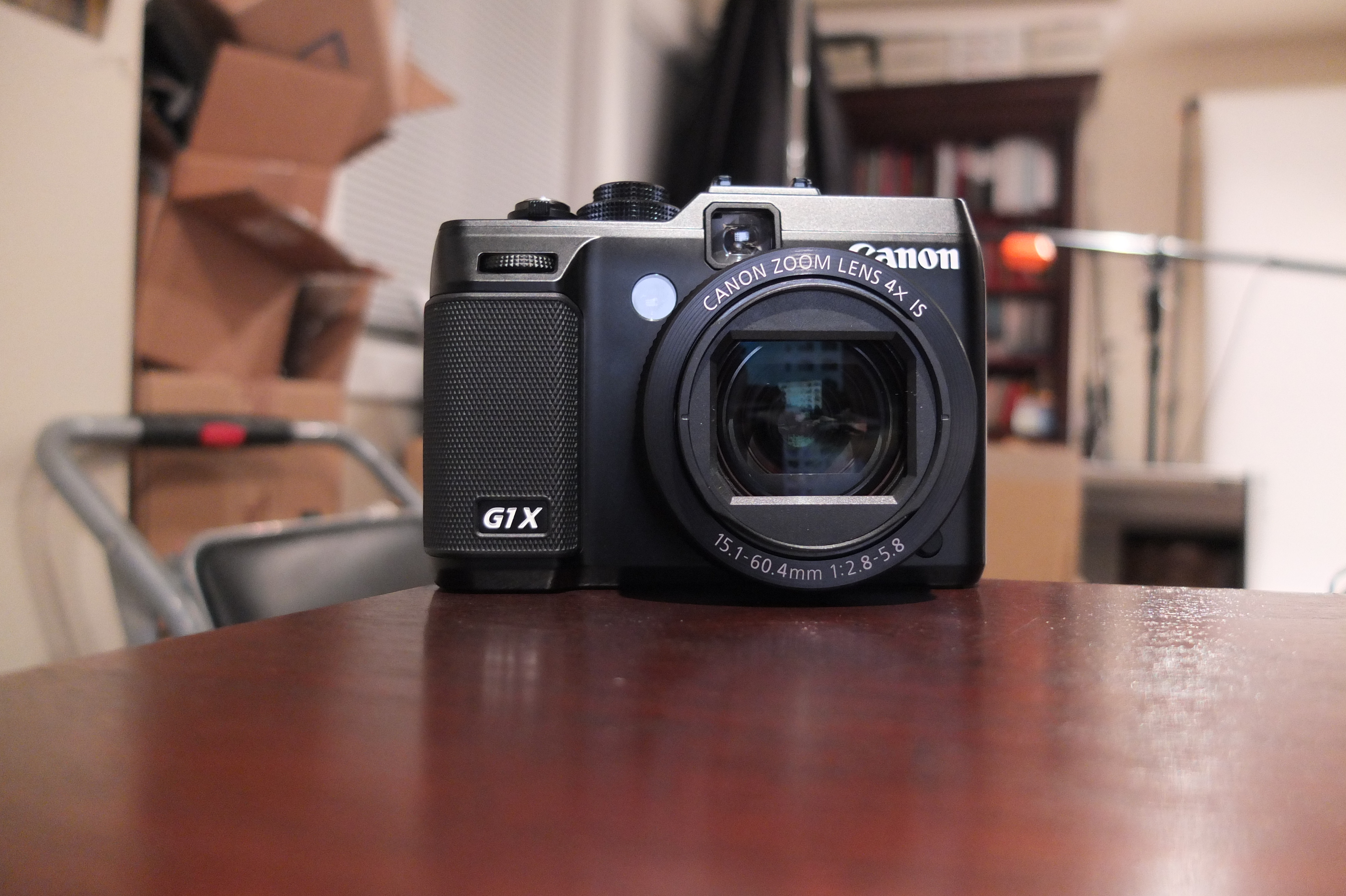
Yesterday among all of the anticipation of the 5D Mark III release I was jazzed to find that my order for the Canon PowerShot G1X from B&H had arrived. Until I fell in love with the magic of the Fujifilm X10, I had been a loyal G series user dating back to the G9. My G12 (click for review) had started to collect dust so it was good to see what its replacement would finally be.

First Impressions (vs the X10 & G12)

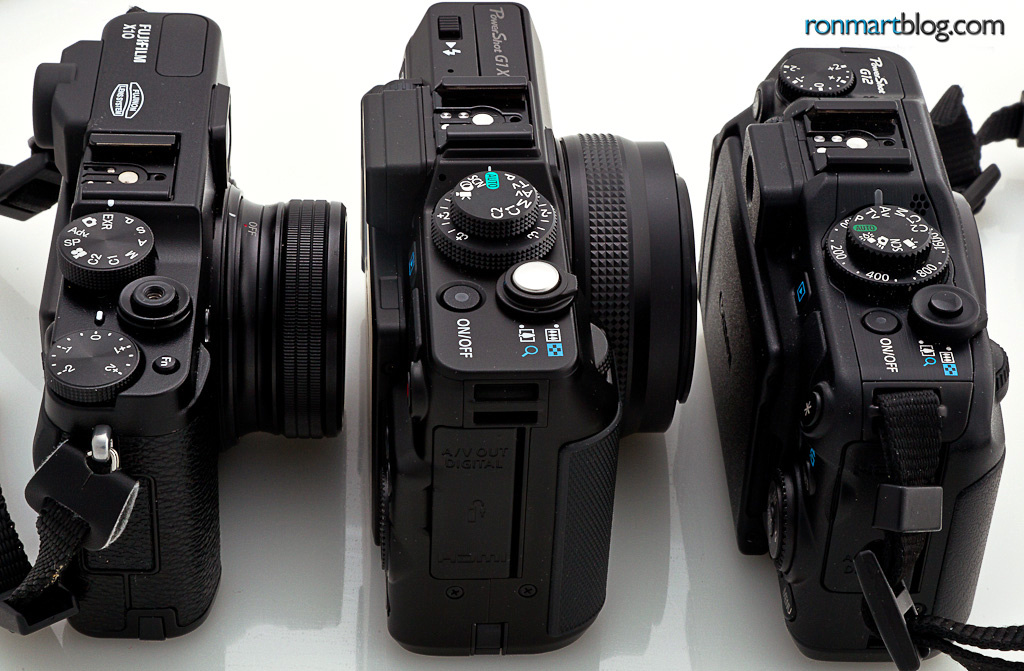
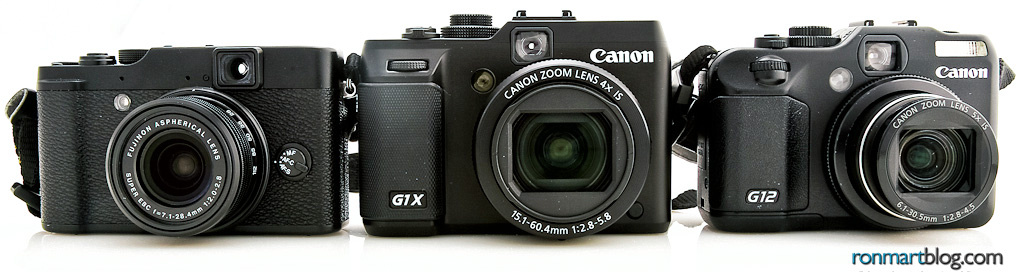
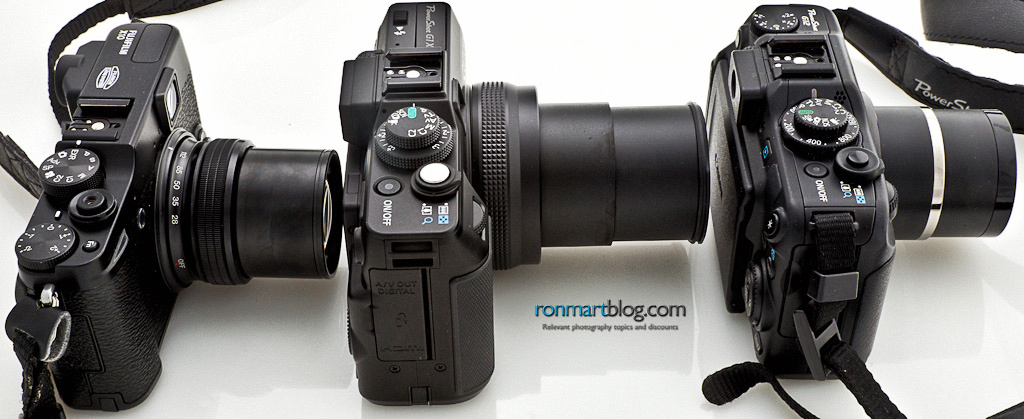
X10, G1X and G12 – Thickness Comparison

With a bigger sensor in the G1X comes bigger weight it seems as the already bulky G12 now gets super-sized to be come the heaviest “point and shoot” I’ve ever held. It’s heavier than the X100 and Nikon 1 V1, so right off the bat I was a little concerned about its bulk. I’ve defended the size of the G series for years because I liked the control layout and the weight was tolerable to me, but the new glass in this body definitely brings the bulk. In fact, the picture here makes them look close, but in your hands it seems to be in a weight/size class of its own compared to the other cameras here.

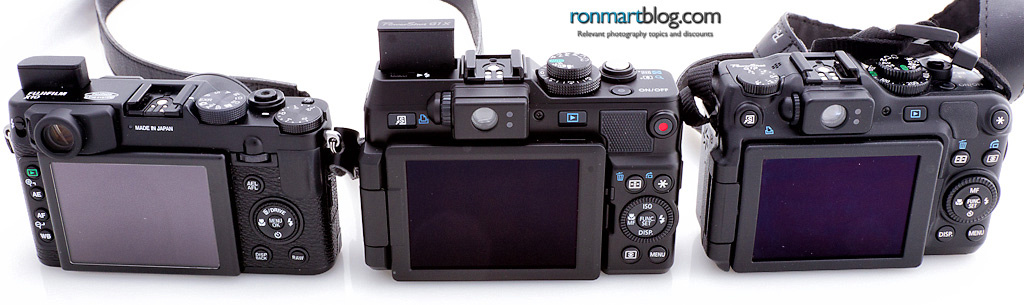
X10, G1X and G12 LCD Comparison
LCD’s seem roughly the same size and all perform about the same

From the rear screen the all look about the same when turned off. Performance-wise the X10 and G1X appear to be the same to my eyes with perhaps a little better contrast ratio for the G1X. The G12 is about the same but seems slightly less crisp, but in practice I’d call this an even draw.

X10, G1X, & G12 Front View
Head on you see the lens/sensor difference

Head-on is where you really notice the big lens and sensor that goes behind it for the G1X. The cool thing though is that this seems like a nice piece of glass compared to the others here, so it feels like the stud of the group. It certainly seems to have a more justified price compared to the other cameras.


At full zoom, the G1X feels like a mini-DSLR

Zooming in and out is where you notice that the G1X is a big boys toy designed for much better image quality than you typically get out of something this size. In fact, in my early testing I’ve been very impressed the with the ability for this camera to conjure up a shallow depth of field on command – something the others (especially the G12) have a little more challenge doing.

Ergonomics

As previously mentioned, this thing is heavy! Features-wise it feels like a s100 that needs a diet, but the image quality on the G1X is a ton better than the s100. The control layout is familiar for previous G series and S series owners, so only thing I found myself needing to get used to was the pop-up flash (the G12 has a built-in, but the X10 pops up too).

The biggest change I noticed was the addition of a lens cap instead of the self-enclosed design of the G12 and s100. The Fuji X10 and X100 have one and I keep losing them, so I’m bummed that there’s another cap to keep track of. The good news is that I can manage to get it work with my Hufa Lens Cap Holder, so hopefully I won’t lose it as easily as the X10’s which won’t fit in the clip.

In-Camera JPEG’s

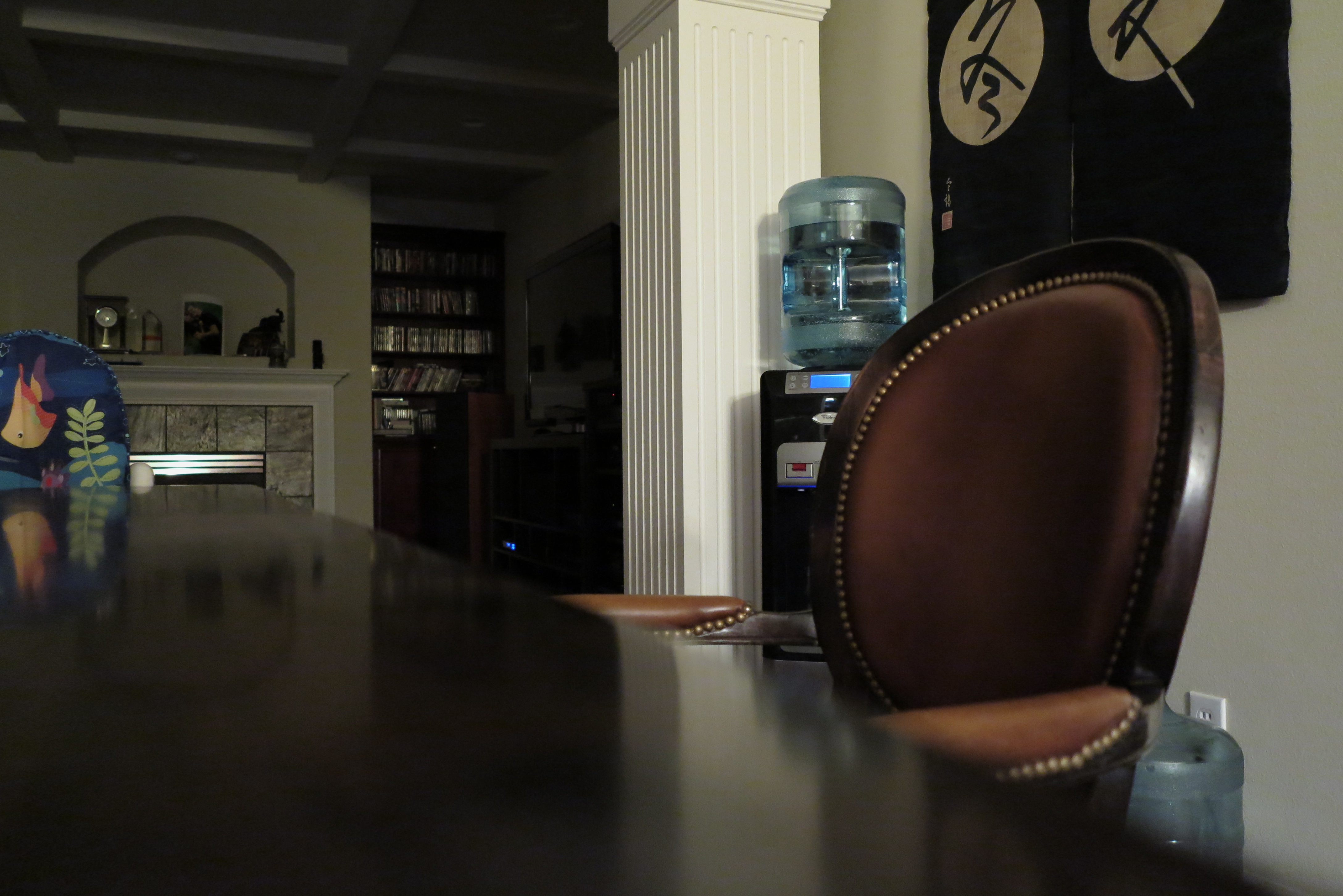
This was unboxing day, but with all of the stuff related to launching the 5D Mark III, I really only had a chance to fire off a few frames with this camera. I decided to test it in a room that was nearly pitch black (only a trio of lights above the kitchen island were on) to see how it did. Here’s the results:


G1X 15mm f/2.8, 1/2 sec, ISO 3200 Custom White Balance (using an envelope)
Click for original unedited in-camera JPEG

I was pretty pleased with the result. The exposure is dark, but given the fact that this room was near pitch black this is a lot better than what I could see with my eyes. I did use the table as support and the timer to avoid shake, but overall it did ok here.

A quick test of the flash proved it was pretty powerful, but I didn’t tinker with flash exposure compensation which was sorely needed in this case:


G1X 15mm f/2.8 1/60 sec (handheld), ISO 12,800 Flash White Balance and Auto Flash
Click for original unedited in-camera JPEG

I was impressed that even with a flash I was able to clearly make out some OOF bokeh which is something you don’t typically see in a shot like this for a camera of this side. With more background separation you see that it’s actually a quite pleasing bokeh (something totally new for the G series!):


G1X 29mm f/4.5 1/5 sec ISO 1600 AWB
Click for original unedited in-camera JPEG

G1X 15mm f/2.8 1/20 sec ISO 1600 AWB
Click for original unedited in-camera JPEG

The G1X quite honestly sucks for close-up work. The shots you see above are literally the minimum focus distances for the respective zooms – BOOOOOOOO!

Overall the image quality was way better than the G12, but other than the pleasant bokeh I’m not feeling like I made a bad choice to get the X10. Granted these are crappy unboxing test shots so time will tell how I like it when I put it into practice for real shooting.

Here’s a shot from the X10 which has a great minimum focus distance (and it can get much closer than this but I wanted to show its bokeh by comparison):


X10 7mm f/2.0 1/15sec ISO-640 AWB Velvia Film Simulation
Click for original unedited in-camera JPEG

You definitely lose the sweet bokeh found from the bigger sensor in the G1X, but the dynamic range and out-of-camera result of the X10 still impresses the hell out of me. I also still think that Fujifilm’s EXR is the greatest thing since sliced bread – all cameras should have it!

Ron’s 2 Cents – First Day Takeaway

After doing some basic experiments I’ve got to say that my first quick impression is that I’m underwhelmed. Of course for me this is a secondary camera to complement my big glass, so if I want sweet bokeh I use the real cameras. However, if I want grab and go then this heavy monster seems a little too big for that. The X10 and G12 really do fit in my jeans pocket and are totally toteable, but the G1X just feels too big quite honestly. I never thought I’d say that either as I’m happy to haul a 1D Mark IV with a 70-200mm lens all day long and not complain about the weight. However, the quality of images I get from that pair justifies the bulk.

I’m extremely disappointed with the minimum focus distance and quite honestly I think there is a serious front-focus issue with the unit that I have (at least when using the user-selectable AF point). As a result I had to manual focus for the two shots of the X10 above to get the camera to do what I wanted, and again I had to be too far back to get the composition I wanted.

The good news is that the glass seems to be great and the weight makes you feel like you’ve really bought something special. The case material still seems to be the same as the G12 which makes me worry about what would happen if I dropped the G1X (something that the G12 and X10 experience regularly). The X10 definitely feels like it has a better case and is a more solid product, but it’s lens looks cheap compared to the nice glass on the G1X.

I’ve always loved the G series usability so this is much of the same. I’ve grown used to some of the features in the X10 (i.e., EXR mode and the best pano feature on the planet) so for the first time I’d say G series design feels dated.

Conclusion

After using the G1X for a while I’ve concluded that it’s a s100 in an overweight body (way more so than the G12) with a nice lens and a welcome bigger sensors. Sadly it’s weight is just too much as it feels like you are carrying Canon’s 24-105mm lens in your pocket rather than a point and shoot. I loved the G series so generally speaking I’m not one who needs tiny cameras because if I really want tiny I’ll just use my iPhone 4s. However this camera is a beast whose motorized zoom ruins the sound and picture what are otherwise good videos, and the benefits of the bigger sensor never really shine through. Here’s my other articles for this review:

My advice is to get a Fujifilm X10, unless you have a diehard loyalty to Canon. If you do then I’d say go for the s100 or G12.  If you really want the better image quality and are comfortable with the added weight, get a T3i. Sadly, I have to rule this camera as my disappointment of the year.

Order your G1X now from B&H where I got mine or if they are out of stock then consider Adorama too.

****** Fujifilm X10 & X100 Sale (limited time) ******

More Like This

If you liked this article, you might enjoy these:

Disclosure

I may make a commission if you make a purchase using links in this article.

Monday, January 9, 2012

Canon G1 X replaces G12 with 6x bigger sensor–available for pre-order now

Canon G1 X
Canon G1 X (Adorama, B&H)

Pre-orders are available now at Adorama and B&H!

Word was already on the street that a new G12 replacement was coming, but this is much cooler than I expected. I’m probably in the minority but I’m VERY GLAD it is not a interchangeable lens camera as I love the heck out of my X10’s ease of use and amazing image quality. The size on this sensor is a massive 1.5” which is nearly as large as what you’d find on a 60D (APS-C size):


Image Courtesy of Adorama

While it is still a smaller sensor than the mighty X100, you know from my point and shoot comparison article that the G12 is one of the most user friendly cameras on the planet for a pro, and the X100 is probably the most UN-Friendly (but still cool <g>).

I can see this camera hurting Rebel sales for smart shoppers who realize that they want better quality but not the expense and hassle of a DSLR. The question is – will this camera make me want to sell my beloved 2 month old Fujifilm X10? I’ll let you know in my upcoming review.

Check out the in-depth articles from Adorama and B&H.

Here’s the press release from Canon for this and some new Elph’s…

LAKE SUCCESS, N.Y., January 9, 2012 – Continuing to revolutionize the digital camera market, Canon U.S.A., Inc., a leader in digital imaging solutions, today announced the introduction of a new flagship PowerShot model, the PowerShot G1 X, in addition to two stylish PowerShot ELPH models, the ELPH 520 HS and ELPH 110 HS.  The PowerShot G1 X camera will feature a 1.5-inch, 14.3-megapixel CMOS sensor, the largest sensor to date for a PowerShot model, delivering approximately nine times more light sensitivity and helping to produce amazing depth-of-field and high-quality images in tough low-light conditions.  For those users looking for a camera with advanced features in a compact form both the PowerShot ELPH 520 HS, the world’s thinnest 12x optical zoom with a 28mm lens1, and PowerShot ELPH 110 HS feature a sleek design and compelling creative capabilities.

“The new additions to our PowerShot lineup further demonstrate Canon’s commitment to delivering users innovative imaging products,” said Yuichi Ishizuka executive vice president and general manager, Imaging Technologies & Communications Group, Canon U.S.A., Inc. “These sleek and compact cameras bring together powerful features, intuitive controls and unrivaled portability while maintaining high image quality.”

The Power of DIGIC 5

Living up to its reputation as a leader in the digital camera marketplace, Canon has incorporated the DIGIC 5 image processor into the HS SYSTEM for all three models.  Achieving better quality images in low-light settings, boasting faster operation and providing improved color accuracy, the DIGIC 5 image processor ensures users are able to produce high-quality images in the most difficult of lighting conditions. The processor will also enable the PowerShot G1 X camera to utilize the High-Speed Burst HQ2 feature allowing photographers to shoot images at high speeds at full resolution to capture the perfect moving shot.  Additionally, to ensure images are crisp and clear, advanced noise reduction and a smarter multi-area White Balance can be utilized to achieve accurate color reproduction for a balanced image.

Advanced Smart AUTO

Advanced Smart AUTO, available in the PowerShot ELPH 520 HS and ELPH 110 HS, can detect up to 58 scenes varying from non-human moving subjects to people, landscapes, pets and vehicles, helping the camera determine the best mode of shooting.  This technology has been enhanced to include a new Face ID feature, allowing users to register up to 12 people on the camera and have the camera recognize and prioritize each person. When registering individuals on the camera, users can take up to five images of a subject at various angles or facial expressions and enter their name and birth date. This allows the camera to make one of three age distinctions: Babies (0 to 1 year old), Children (2 to 12 years old) or Adults (13 years or older).  Based on these different groups, the camera will give focus priority to the youngest recognized group in the frame and makes the images searchable as well with the ability to view only those images of a particular person.

Further additions to this new feature are Smile Recognition and Sleeping Face Recognition. With Smile Recognition, the camera will take three consecutive shots of a scene such as a smiling baby or of grandparents at a family get together and select the best out of the three for the final image. For Sleeping Face Recognition the flash, assist beam and sound is turned off for that precious moment to be captured while not disturbing one’s sleep.
PowerShot G1 X Digital Camera

Ideal for photography enthusiasts looking for the highest image quality in a compact, point-and-shoot design, the Canon PowerShot G1 X camera features the largest sensor to date for a Canon point-and-shoot model. The camera has a brand new, large 1.5-inch (18.7 x 14mm), 14.3-megapixel High-Sensitivity Canon CMOS sensor, delivering shallow depth of field, a wide dynamic range, an ISO range of up to 12800 and incredible light gathering ability helping to ensure brilliant images in even tough low-light conditions. Featuring an amazing Canon lens with 4X Optical Zoom, an aperture of f/2.8 to f/16 for beautiful images when shooting portraits and amazing clarity when shooting landscapes along with wide-angle capabilities starting at 28mm, the PowerShot G1 X camera makes certain that users will have the right optics for most any situation.  Further adding to the EOS-like feature set of this new model is 14-bit, RAW+JPEG shooting and compatibility with accessories such as Speedlite, Macro Twin Lite or the Macro Ring Light flashes. HDR Shooting has been included to ensure the best possible shot is captured as well. The PowerShot G1 X camera also shoots in Full HD 1080p video ensuring memorable moments are captured in the highest quality.
The Canon PowerShot G1 X camera has a bright, large 3.0-inch vari-angle LCD with 922,000 dots of resolution providing photographers with the highest quality available in a point-and-shoot. The inclusion of the Mode Dial on the top of the camera and the Front Dial helps provide more intuitive control of the camera.

The estimated selling price of the Canon PowerShot G1 X camera is $799.99 and is scheduled to be available in February. Pre-orders are available now at Adorama and B&H!

PowerShot ELPH 520 HS Digital Camera

Canon PowerShot ELPH 520 HS Digital Camera

The feature-packed Canon PowerShot ELPH 520 HS camera resurrects the original PowerShot ELPH design with a more contemporary and radiant look and feel.  This new stylish model has a 10.1-megapixel High-Sensitivity CMOS sensor along with a 12X Optical Zoom lens, ISO range of up to 3200 and wide-angle capabilities starting at 28mm.  For photographers on the move, this camera also has Full HD 1080p video capture capabilities, a 3.0-inch LCD for easy viewing of images and High-Speed Burst mode where images are continuously captured at 6.8 frames per second.

The Canon PowerShot ELPH 520 HS camera will be available in black, silver, red and blue in March with an estimated selling price of $299.99. Adorama is taking pre-orders now.

PowerShot ELPH 110 HS Digital Camera

Canon PowerShot ELPH 110 HS Digital Camera

Canon’s PowerShot ELPH 110 HS camera comes in a variety of fun, bright colors (black, silver, red, blue, green and pink) and is the ideal camera for new photographers. With a 5X Optical Zoom lens and wide-angle capabilities beginning at 24mm, this camera provides the user with the ability to fit an entire landscape or a specific area of a subject into one shot.  The camera also features a16-megapixel High-Sensitivity CMOS Sensor, ISO range of up to 3200, 3.0-inch wide LCD and Full HD 1080p video capture for brilliant, high resolution quality. High-Speed Burst mode has also been included for continuous shooting up to 5.8 frames per second.

The Canon PowerShot ELPH 110 HS camera is scheduled to be available in February with an estimated selling price of $249.99. Adorama is taking pre-orders now.

About Canon U.S.A., Inc.

Canon U.S.A., Inc., is a leading provider of consumer, business-to-business, and industrial digital imaging solutions. With more than $45 billion in global revenue, its parent company, Canon Inc. (NYSE:CAJ), ranked fourth overall in patent holdings in the U.S. in 2010†, and is one of Fortune Magazine's World's Most Admired Companies in 2011. Canon U.S.A. is committed to the highest levels of customer satisfaction and loyalty, providing 100 percent U.S.-based consumer service and support for all of the products it distributes. Canon U.S.A. is dedicated to its Kyosei philosophy of social and environmental responsibility.

###

  Specifications subject to change without notice.

All referenced product names, and other marks, are trademarks of their respective owners.

†Based on weekly patent counts issued by United States Patent and Trademark Office.

Availability, prices, and specifications of all products are subject to change without notice.  Actual prices are set by individual dealers and may vary.

Disclosure

I may get a commission if you make a purchase using links in this article. Thanks for supporting this blog by using my links!

Tuesday, January 3, 2012

REVIEW: Black Rapid SnapR Camera Bag + Sling Strap

Black Rapid SnapR Camera Bag + Sling Strap (SnapR 35 Left, SnapR 20 Right)

BlackRapid has a great reputation for creating high quality camera straps like the RS-7 I reviewed, but until I saw their display at PhotoPlus Expo I had no idea that they also made a camera bag.  I was very impressed with the SnapR product line when I first saw it because typical bags for this size are simply plastic pouches with cheap zippers, velcro or snaps. What I really wanted for my G12 and X10 was something that was built like a ThinkTankPhoto bag, but BlackRapid took that wish to the next level and threw in even more.

Here’s a short little video that shows how this bag not only offers a rapid strap, but also a hand strap for the bag or just for the camera. The net result is a nice design that offers multiple ways to transport and protect your camera:


Play in HD

SnapR 35 – Great for Mirrorless and Micro Four Thirds Cameras


SnapR 35 with a Nikon 1 V1 and 10-30mm lens

The first SnapR that I got my hands on was the 35 which was great because I was in the middle of my point and shoot comparison testing. It could hold my biggest camera, the V1, so everything else would work too. I loved having this bag for this testing and it was awesome for the bulky V1. I could even put the 10mm lens in the side pocket:


SnapR 35 with Nikon 1 10mm lens in the side pocket
with a V1 (with 10-30mm attached) zipped in the main compartment

It was too small to hold the massive 10-100mm lens, but I suspect few V1 owners would consider this bag if they had that big lens anyway. This is really a bag for those traveling light as this bag will hold the essentials in its two side pockets.

I tend to carry my smaller flip cage in the outer pocket (but it won’t zip when I do that) so I can have a tripod on the go. The iPhone also fits nicely in the outside pocket too!

SnapR 20 – Great for Mid-Size Point and Shoots like the Canon G12 & Fujifilm X Series

SnapR 20 with Fujifilm X10 inside (lens cap on)

Since I own a Canon G12 and now a new Fujifilm X10, I decided that the SnapR 35 was a little more bulky that what I needed for my cameras. As a result I decided to try out the SnapR 20 to see if it was a better solution for my cameras. It turns out that the G12 fits perfectly and the X10 fits, but it’s a little snug for rapid insert and removals with the lens cap on. It glides in and out better without the lens cap off, but I always want my lens cap on so I’ve just dealt with the snug fit. I’ve also kept my camera strap on the X10 which really isn’t needed with this bag, so that would free up some space too. Personally I’d rather the smaller bag since it works for my X10 and is a perfect fit (with plenty of space) for my G12.

Here’s a shot of how my X10 is attached by its tripod mount to the shoulder strap for a true BlackRapid experience:

SnapR 20 with Fujifilm X10 - rapid strap connection
The built-in shoulder rapid strap means you are always connected
by the tripod mount for rapid removal, stability, and safety

Using the SnapR

The SnapR is more than just a camera bag. It’s a versatile camera strap system. You can make it as simple as a wrist strap design as shown here:


Wrist Strap Connection
Photo Courtesy of BlackRapid

Or you can leave the camera attached to the rapid strap as shown here (my preference):

SnapR 10 shown with rapid strap use in action
Photo Courtesy of BlackRapid

When you are done using the camera you just leave it attached and insert it upside down back into the case as shown here:

image
Cameras are inserted upside down while still attached for rapid and safe removal
Photo Courtesy of BlackRapid

It’s a really cool design that works better in practice than you might think.

These are great bags with a sturdy external design, strong clips, and a super soft interior that won’t hurt your LCD or lens.There’s also a quick release zipper design for the front pouch that makes it really quick to remove your camera and pull it up the rapid strap.

Conclusion

Plain and simple – if you own a camera smaller than a DSLR and you want a great case and strap for on the go action, this is your bag. I’ve seen nothing on the market that I’ve liked as much so I highly recommend this product!

If you own a thin point and shoot like a Canon s100 then order the SnapR 10, if you have a mid-side point and shoot like a Canon G12, Fujifilm X10 or X100, then order the SnapR 20. If you have a mirrorless or micro four thirds camera that’s a little bigger then order the SnapR 35.

Disclosure

I was provided with sample bags for evaluation by BlackRapid and I may make a commission if you make a purchase using links on this blog. I believe in this product and use it personally, so I can honestly say that I would have bought it even if I wasn’t provided with sample bags by BlackRapid.

I live in the Seattle area so I was actually surprised to find out that BlackRapid is actually based in the Fremont area of Metropolitan Seattle, so that kinda gave me an extra reason to like them.