Showing posts with label Point and Shoot. Show all posts

Thursday, September 14, 2017

A Point and Shoot Beats Most DSLR Portfolio Shots

All of the following photos were taken with a point and shoot (and no, it wasn't a Leica) which I serve up as evidence that it's more about the photographer than camera (although this is a pretty damn good camera too).

All images are Copyright Douglas Dubler 3 - ALL RIGHTS RESERVED. You may click to view full size versions in Google Chrome, but you may not save, print, download, link to, repost, etc... any without written consent.


"Summertime Boy" - 1/1250 at f/5 ISO 100 (-1 1/3 EV)


“Peruvian Jungle Lily” - 24mm at the closest focusing distance ( less than 8 inches) At f5.6


f/6.3 for 1/40 sec at 24mm (-1 EV)


"Lilies" - 24mm (widest) end of the zoom lens. At f4.5 at almost the closest focusing distance

And the camera was...
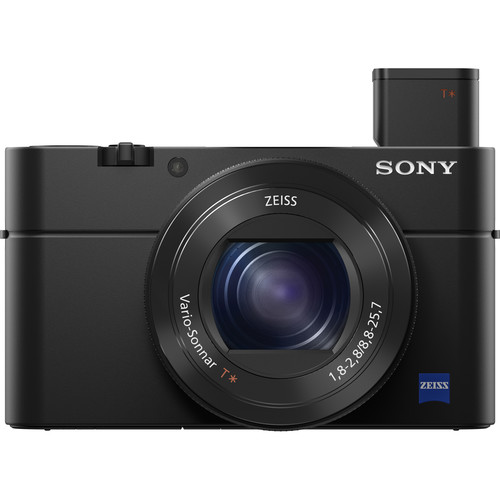

Sony RX100 IV  at B&H (review)
Also on available at Amazon

Yes, the Sony RX100 IV was used for all of those shots except the first one which was actually taken with he Sony RX100 III!

Of course, to be fair these were taken by one of the greatest living photographers of our time, Douglas Dubler (website). This legendary photographer has shot more magazine covers than most photographers have (or will have) portfolio caliber shots in their lifetime. He's also been the featured photographer for the launch of major products from Nikon, Epson and so many more. Simply put, these weren't taken by a mere mortal, but it does show off what this camera can do.

In Douglas Dubler's own words


24mm for 1/160 sec at f/8 ISO 100 (-1 EV)

Many people who are familiar with my work most likely associate me with high resolution capture and large format gallery prints. Much of this work is/was done on medium format digital backs or high megapixel DSLRs. Lately I have been exploring a different direction. Several years ago I purchased a Sony RX100 III for my girlfriend and began giving her photography lessons. As her photography progressed I noticed a look that I began to admire. 


24mm for 1/80 sec at f/5.6 ISO 100 (-1 EV)

They were done mainly at the 24mm focal length at the closest focusing distance (around 4 or 5 inches ). The small sensor gave her more than adequate depth of field at modest apertures (f4-5.6).  The wide angle lens gave just a little distortion which enhanced the subject. My best description is a hybrid of environmental and semi Macro.


24mm for 1/60 sec at f/5 ISO 100 (-1 EV)

Inspired, I began to emulate the effect with my A6500 and larger A7RII. Even with the APS-C sized sensor in the A6500 with various focal length lenses from the Sony 12-24mm ( on the A6500, a 18-36mm), to many different Zeiss,Sony and Sigma prime lenses I couldn’t get the look.  If I was shooting flowers to get the depth of field I would end up with a shutter speed that was too slow (wind vs. flowers!).  So I borrowed her camera and spent a few days at the New York Botanical Garden seriously photographing flowers. It took me one day to work out my approach but I was very happy with the beginning results.


"Maleficent Tree" - 24mm for 1/160 sec at f/5.6 ISO 100 (-1 1/3 EV) RX100 III

The next step was to make some prints, the whole point of photography.  With a little editing in my favorite Capture One V10 and of course B&W conversion done with Nik’s Silver EFex Pro 2 I was ready for the litmus test..  With my Epson P5000 and Epson’s new Legacy Platine paper I made prints that rivaled the best silver-gelatin prints.   As a test, at the beginning of one of my classes I had the students look carefully at one of  the prints and guess what camera I had used. Unanimously they declared a high resolution professional DSLR or mirrorless camera. I showed them the diminutive Sony and at first they thought I was joking. I assured them I wasn’t.


24mm for 1/60 sec at f/4 ISO 100 (-1 EV)

Since then I went out and purchased a MarkIV model which is around my neck whenever I leave my house. Even on my bike I can easily carry it in a small bag around my waist. Now no one even looks at me and I blend in with the iPhoners. I hand hold almost all of the images and as a result am able to shoot many more images. It doesn’t mean I will abandon my abstract Macro studies with the larger cameras and tripod but I have a feeling I will always have this camera hanging around my neck…

Douglas Dubler's thoughts on a couple shots


Black Dahlia - 24mm@f5.6@1/80sec, ISO 100, exp.comp.-1.3 stops

I found these two blossoms in perfect juxtaposition, full face and profile, which I am always looking for. They were the last shots out of 250 exposures that I did during my B&W class at NYBG last week.

I was actually on my way out of the garden and, in exiting, revisited the flowers I had shot earlier at around 6 P.M. I was tired after a long day of teaching but instinctively knew that those last few minutes of sublime light (exactly 7:11 P.M.) reward those who are patient. 

Processed in Capture One V10 and B&W conversion done in Nik Silver Efex Pro 2.


“Empress Lotus”

I have been trying for quite some time to get a good shot of a lotus blossom. For me that meant getting directly over the flower. Not so easy when you consider they grow in water, in this case, water that is over 5 feet deep. I surveyed all of the lotus in bloom and decided this was aesthetically my favorite. All I had to do was wait for the best light.  At around 7:10 P.M. the sun was no longer directly on the flower but was creating a beautiful soft illumination that seemed to be emanating from within the flower.

With some help from my friend Steve Titus (shown below) I was able to get an almost vertical camera angle and with the advantage of the articulating LCD could precisely compose the shot. It still took over 40 shots to get this precise uncropped composition.

Post processing, I had my friend Irfan Yonac do some digital enhancement using an “analog film” technique. It was the final step in the evolution of this photograph. Shot at 28mm@ 100 ISO @ f5.6 @ 1/200 sec, exp.comp.-1.0 stops.

Processed in Capture One software available at B&H.

Here's a funny behind the scenes shot of what it took to get this shot...


Conclusion

My review shows what mere mortals will get with this camera, but it's fun to see that in the hands of an X-Rite Coloratti Master like Douglas what is possible!

I really hope you enjoyed this guest blog from as much as I did. If so, please leave comments and check out more of Douglas's work on Instagram, Facebook,  or his website. Here's a couple more guest blogs from Douglas with his amazing work:

And here's one where Douglas breaks out the big camera that will really blow your mind:

Thanks Douglas!

Sincerely,
Ron Martinsen

Want to do a workshop with Douglas?

Contact me if you are interested in working with Douglas or doing a workshop with him in New York City.

Other articles you may enjoy

If you enjoyed this article, you may also enjoy these:

Enjoy these and more on the Reviews tab as well as Ron's Recommendations.

Disclosure

If you make a purchase using links found in this article, I may make a commission. It doesn’t cost you a penny more, but it does help to support future articles like this.

Tuesday, September 8, 2015

REVIEW: Sony RX100 IV–The Best Point and Shoot Just Got Better

Sony Cyber-shot DSC-RX100 IV Compact Camera

Due to the advances made by cellphones like the latest iPhones and Samsung Galaxy’s, the reality of the the compact market these days that it takes a lot of money and tech wizardry for a compact camera to outperform the best smart phones.

Our expectations demand that cameras like this, especially at this price point, exceed the quality we can get with our phones otherwise what’s the point? In this respect, the RX delivers by offering a Zeiss lens, a pop up flash and electronic view finder (useful for bright sunlight outdoors) that all offer advantages over anything a smart phone offers. This plus features like NFC, WiFi direct (to send photos to your phone or computer automatically), and support for custom third party apps make this a very compelling camera indeed.

The price and features of this camera clearly position it as being for the serious photographer who wants a pocketable alternative to their DSLR or Mirrorless camera.  While other companies have premium compacts, only the Fujifilm X30 offers anything close to the performance of the RX100 series – but in a much larger package. As a result, the RX100 IV enjoys an interesting position in the market of offering a camera that offers the ease of use and features a consumer would expect but at a price and quality level that more squarely targets the Leica D-LUX (Typ 109). 

Compact but still feature packed

Pop Up Flash and Electronic Viewfinder (EVF) Extended

This is one of the very few compact cameras on the market left that still warrant owning even if you have the latest high-end smart phones – even those in the future that will challenge it for image quality and ISO noise performance because nothing they do on a phone can replace the value of features like a pivoting LCD, a better flash, a larger and higher quality zoom lens, and a EVF that allows you to compose your shot better in direct sunlight. What’s more, you have complete control over your camera settings plus the benefits of cool apps that help make up for any built-in shortcomings or advantages you typically find on your phone.

For more thoughts on what I think of this camera body, please be sure to check out my reviews of the previous models at:

ISO Auto Minimum Shutter Speed Feature

ISO AUTO Min. SS Feature

One of my long-standing complaints of Sony RX series cameras was their love affair with 1/30 or 1/60 sec shutter speeds when using Program and Aperture Priority modes. The RX100 IV features at the bottom of the fourth group of camera settings labeled ISO AUTO Min. SS that address this problem by letting you specify a minimum shutter speed or use the camera defaults.

Simply put, if you are getting blurry pictures due to slow shutter speeds, this is a great setting to change from the default. Personally I like the 1/125 sec option when I’m dealing with kids indoors as kids don’t stay still for long so its rare for kids to do anything that won’t be blurry at shutter speeds below 1/125 sec. Rapid motion will naturally still is best handled using Shutter Priority for the appropriate speed to freeze the action you are shooting, but this helps with general purpose shooting where you are more distracted on the shot than the camera settings.

Real World Samples

The following images come straight from in-camera JPEG’s using the camera default noise reduction settings. Most camera settings are the default with the exception of RAW+JPEG, a desired White Balance (only Shade or AWB), DRO Auto and a desired focus point. I chose to use the Standard Creative Style for most shots featured, but I did use Vivid for some of the floral shots taken in harsh direct sunlight.

Click here for a full gallery of unedited images.

All images are copyright Ron Martinsen – ALL RIGHTS RESERVED. You may not save, print, edit, modify or otherwise use any images featured in this article or the gallery without expressed written permission.


f/1.8 @ 8.8mm for 1/250 sec at ISO 125

Unlike your typical smart phone, you can still separate your subject from the background even when zoomed to the widest angle thanks to high quality Zeiss lens


f/3.5 @ 25.7mm for 1/400 sec at ISO 125

DRO Auto and Multi Metering Mode couldn’t handle this bright flower on the dark background, but advanced users will easily get the shot with some exposure compensation like the –1EV adjustment I did for this shot


f/5.6 @ 20.63mm for 1/320 sec at ISO 125

You won’t get the creamy bokeh with the depth of f/5.6 featured here with your cell phone or a cheap point and shoot


f/2.8 @ 8.8mm for 1/100 sec at ISO 125

The color red is a torture test that separates the good sensor from the cheap one, and even with auto white balance the many shades of red strawberries are faithfully produced against black tapioca pearls (aka Boba)

Unedited 100% Crop (615x615px) of 5472 x 3648px Original
f/2.8 @ 25.7mm for 1/1250 sec at ISO 320
Unedited 100% Crop (615x615px) of
5472 x 3648px Original
This is a good sensor and lens, but make no mistake
it’s still a 1” sensor that’s no match for a
DSLR with a good lens


f/4 @ 12.64mm for 1/40 sec at ISO 3200

I was very impressed that this handheld shot still didn’t show any serious noise artifacts and was fairly detailed and sharp even on my NEC PA322UHD 4k display


f/1.8 @ 8.8mm for 1/30 sec at ISO 125
– Built-In HDR Mode
The built-in HDR mode was a joke as this small sensor didn’t have the dynamic range to handle the bright and dark extremes here. I do this test a with most cameras that I test and this was a below average result, so HDR fans simply need to do their own bracketed exposures (at > 1EV) and merge them later using something like Photomatix


f/2.8 @ 11.69mm for 1/40 sec at ISO 1600

The AF system with Face Tracking performed well even indoors with this difficult shot of my hyper and uncooperative son Kai. This is a shot that most would miss even with an average DSLR if you didn’t have a single AF point on the face.


f/2.8 @ 8.8mm for 1/640 sec at ISO 125

Any on-camera flash will blast a shower of direct light which creates hot spots, but the flash exposure compensation offered the RX100M4 means you can tone down the power of the light to get the best result possible when diffusion and off-camera flash options aren’t possible


f/2.8 @ 8.8mm for 1/200 sec at ISO 125

Despite harsh direct light, I was pleased with the color and tonal range captured. Some cameras I’ve tested in these conditions end up washing out the subject so bad that negative exposure compensation is necessary but that wasn’t required here


f/2.8 @ 23.34mm for 1/320 sec at ISO 125
Shade WB & Vivid Creative Style
Without the EVF I never could have got this shot, but the Vivid Creative Style was a bit too much when viewed in the sRGB color space such as a web browser


f/2.8 @ 25.70mm for 1/200 sec at ISO 125
Auto White Balance
Auto white balance tends to be on the bluer/colder side


f/2.8 @ 25.70mm for 1/125 sec at ISO 125

Shadow detail was good in this sensor stressing side lit shot


f/2.8 @ 23.73mm for 1/100 sec at ISO 125

Default metering did a good job in this harsh backlit scene of exposing the face well despite some lens flare challenges. Many point and shoots and cell phones would way over expose the face in a shot like this


f/2.8 @ 25.70mm for 1/250 sec at ISO 125

Kai didn’t want to be photographed, so I had to rely on face detection to get the shot when I asked him to turn around. He turned back away quickly but the camera did it’s job of getting a sharp shot with less than a second to work with


f/3.2 @ 25.70mm for 1/800 sec at ISO 125

The 25.70mm maximum optical zoom (70mm in 35mm equivalent) is inadequate in many scenarios so I found myself frustrated and wishing I could zoom more without having to resort to digital zoom


f/2.8 @ 25.70mm for 1/160 sec at ISO 125

Faithful 18% gray metering is readily apparent here in this dress that features a white background. This shot was taken at sunset with perfect light but the meter did what it was supposed with the help of what it could see in the dress


f/4 @ 8.8mm for 1/160 sec at ISO 125

I was impressed with the sharpness of this lens and the level of detail it captured throughout the scene and how well it captured the clouds in the sky on a very bright sunny day


f/4.5 @ 25.70mm for 1/160 sec at ISO 125

Despite being zoomed all the way in, it always felt like I was shooting a wide angle lens so kept wishing I had 2x more reach than what was possible

Click here for a full gallery of unedited images.

Video

SanDisk 64GB Extreme Pro UHS-I SDXC U3 Memory Card (Class 10)

The cool feature here is that you can record 4k video but it requires you to have SDXC cards which are a special type of SD cards that I don’t have. If you look very carefully you’ll probably noticed that even your 95 MB/s cards are often SDHC which is similar but not supported for 4k video recording (it’s fine for taking photos and the default 1080p video mode).  Keep this in mind if you decide to pick up one of these cameras because you’ll definitely want a SDXC card (typically found in 64GB and larger only versions).

Bookshelf Shots


f/2.8 @ 8.8mm for 2.5 sec at ISO 125

For this class of camera, the image quality is excellent with decent noise handling. Check out the full gallery of bookshelf shots starting here, and check out my reviews of the RX100 III, RX100 II, and RX100 to see how it compares to its predecessors.


f/2.8 @ 8.8mm for 1/25 sec at ISO 6400

Conclusion

This is by far the best Sony RX 100 series camera yet because it pretty much addresses almost every complaint I’ve had about the previous versions. While I wish it had a longer optical zoom for more reach for distant subjects, at least the quality of the lens is sharp and the stabilization is good. I also wish it had a touch screen LCD as Canon has proven how handy they can be for things like quickly setting your focus point and reviewing images.

People who have followed my blog know that I’m a big fan of Fujifilm so the inevitable question comes up, is this camera better than the x30? Without question, I have to say that yes it is far better than the x30 – which I actually love. While I wish the physical buttons and knobs were as easy as the Fujifilm, the flexibility of programming the RX100 IV’s buttons and ring dial means that it’s just a matter of learning new places to put your fingers to get the same results. While Sony’s menus still drive me mad, the net result is that it is a better camera is all of the things that matter the most – unless you just prefer the in-camera process results of the x30 (which I do).

For consumers who wonder if their cell phone is good enough, I can definitely say it is a lot better than a cell phone, but better comes at a price both in terms of physical size and cost. A one inch sensor with all of the limitations in image detail and dynamic range that offers compared to larger sensor cameras, but you get a lot for a compact camera that isn’t a burden to carry.

Where to order

Click here to learn more or order on the B&H web site.

Alternatives

You might also consider the Ricoh GR II, Canon PowerShot G7 X and Leica D-LUX (Typ 109) which I have not had the pleasure of reviewing yet. However, I have used predecessors to all of those models and still prefer the Sony RX 100 IV the most which is why I chose to review it and the x30 instead.

Other articles you may enjoy

If you enjoyed this article, you may also enjoy these:

Disclosure

If you make a purchase using links found in this article, I may make a commission. It doesn’t cost you a penny more, but it does help to support future articles like this.

Thursday, July 17, 2014

REVIEW: Sony RX100 III–Part I (includes Real World Shots)

Sony Cybershot DSC-RX100 III Digital Camera

I’ve reviewed the first Sony RX100 and the Sony RX100 II, and I liked both of them – but not enough to buy one. While the form factor was excellent, I struggled with the price and was frustrated by its default shutter speed choices (which often were too long to get a crisp shot). In the end, they were both a camera I loved but couldn’t bring myself to buy. Would the third time be a charm? Would this be the one that made me bite the bullet and get one? Read on to find out.

What’s new at a glance

There’s other sites that get into all of the details, but fundamentally there’s tome minor improvements in the sensor and the lens which in theory improve quality. As you read my review you can refer to my earlier reviews and see if you agree. Yes, this camera takes nice images, but I never got that “on my gosh, this is waaaay better” feeling. Perhaps my bookshelf tests in the next installment might make me feel different.

What I did like right off the bat was the improvement to the tilt feature of the LCD which now allows for 180 degree tilt which means selfie’s are now possible while looking at a live LCD preview. While I’m not a big selfie person, young couples and mom’s shared their frustration with me that the previous RX 100 models didn’t allow this functionality. Now mom can get her shot with the baby when dad’s at work, and best friends at the night club can get selfies complete with live previews of any attempted photo bombs.

Beyond this there’s some video performance improves and the inclusion of an integrated ND filter, but the thing that will get the most attention is the new pop up electronic viewfinder shown in illustration format here:

0.39" 1,440k-dot SVGA OLED Tru-Finder has Zeiss T*-coated optics

This actually works well thanks to a diopter which allows you to fine tune it for your vision. The quality is quite good and feels as natural as the rear LCD. What’s more, it uses a lot less battery life so it makes a great option when the battery starts getting low (which was a problem I never had in normal usage).

First Thoughts

While the menus haven’t improved to my liking, it was good to see that they are very familiar from other models like the a7/a7R. Features like zebra pattern and focus peaking work the same way, so people committed to the Sony platform will love this camera.

Of all of the camera systems I’ve tested, my least favorite user interface design comes from Sony. Sadly that opinion wasn’t changed here, but with the flexibility to program buttons to do what you want results in a camera that’s usable. I’d still like a “Q” menu that more closely mirrors what Canon, Nikon and Fujifilm do with their quick menus, but Sony does try with their mini version.

I still found focus point and mode adjustments cumbersome, but programming quick access to these helped. I also saw the classic Sony problem of the camera having a love affair with 1/30 sec (which if you shoot anything that moves then odds are it will be blurry). Sadly manual mode is the only solution as Sony still hasn’t implemented a minimum shutter speed or alternate feature for Aperture Priority and Program Mode to prevent this annoying behavior.

The LCD screen is as you would expect from Sony – excellent. In fact, it is so good that often times your image will look so good on the screen that you think you’ve got a fantastic shot but when you get it on your computer you realize that it wasn’t as razor sharp as you thought. What’s more, Sony hasn’t done anything to improve its built-in noise reduction feature, so it will make a nasty mess doing noise reduction on higher ISO images. As a result, I still strongly recommend users turn OFF noise reduction when using this camera and save that process for external products like Noiseware for the best results. I didn’t do that for the images below, but for any personal images I care about the in-camera noise reduction here gets turned off.

The weight and size of this camera have increased, but it isn’t going to be very noticeable to most people. It’s still an outstanding size and not unreasonably heavy in my opinion, but it’s a few ounces heavier than some of the competition so if you put it in your shorts pocket you better wear a belt!

Overall there’s lots of great photography features and geek features like the ability to install apps, do wireless image transfer and NFC. This and above average image quality and fast performance make this a camera that is very capable and enjoyable to use, which is why I’ve really enjoyed its predecessors as well as this latest version. If you bought or were tempted by previous versions of the RX100, you’ll most certainly appreciate this version which is without question the best version yet.

Real World Sample Images (Part I of II)

As always, these images ALL RIGHTS RESERVED (yes, even the lame ones <g>). You may not save, edit, print, redistribute or otherwise use them without expressed written permission.

The full set of images are available at http://photos.ronmartblog.com/sony/rx100iii, but below are a few that I wanted to bring to your attention. Click the image for the original in-camera JPEG version and view using the gallery to see EXIF information. All major settings were camera defaults unless otherwise mentioned. In most cases I’m using Aperture Priority or Intelligent Auto modes with camera defaults and Auto White Balance (except the more orange looking cave shots below where I chose Cloudy White Balance).


f/2.2 @ 8.8 mm, 1/30, ISO 125, No Flash

Definitely take the time to click the image above for the full size original so you can appreciate the level of detail this sensor will capture. The detail and dynamic range are outstanding from this camera at lower ISO’s.


f/2.8 @ 8.8 mm, 1/100, ISO 400, No Flash

While it’s tough to get a good shot of my son who bounces around like Tigger, I thought this shot had beautiful color and skin tones with great detail and bokeh for a camera of this size. Shots like this quickly reminded me why I loved the previous RX100’s I reviewed so much.


f/4 @ 8.82 mm, 1/160, ISO 125, No Flash

In this tough mixed light shot, this camera does a very admirable job of retaining detail in the shadows without blowing out the whites too bad.


f/2 @ 8.8 mm, 1/30, ISO 125, No Flash

This is a great example of one of those shots that the viewfinder made look so good that I thought I nailed the shot, but upon closer inspection I blew it. I quickly was reminded how important it is to zoom in on your shots with the camera before calling a shot “done”.


f/2.8 @ 25.7 mm, 1/80, ISO 250, No Flash

Despite being back lit, my wife was happy with how this camera handled those situations. Even the shadow areas of my oldest sons left eye under his hat turned out okay in the “Superior Auto” mode we used here. Unfortunately though, the focus and sharpness aren’t that great when you zoom in.


f/2.8 @ 15.31 mm, 1/125, ISO 640, No Flash

Thanks to the small sensor you get a lot of depth of field even at f/2.8


f/2.5 @ 10.51 mm, 1/125, ISO 800, No Flash

In-camera color is very accurate with only a small tasteful amount of color enhancements


f/1.8 @ 8.8 mm, 1/320, ISO 125, No Flash

The shadow detail is extremely impressive from this camera, so the Dynamic Range Optimizer feature did a great job with this difficult lighting condition


f/2.8 @ 21.79 mm, 1/125, ISO 125, No Flash

From the texture of the skin, to the detail in the eyelashes, I was very impressed with the Zeiss lens on this camera. The bokeh was also very good for this size sensor at f/2.8.


f/2.8 @ 14.3 mm, 1/40, ISO 4000, No Flash

Shooting handheld in a cave using my wife’s iPhone 5s gave us lots of blurry and poorly exposed images with terrible color, but I was impressed with how well the Sony did. The in-camera noise reduction made the camera look worse than it really was but shooting RAW+JPEG gave me the option to fix that using the raw image.


f/1.8 @ 8.8 mm, 1/500, ISO 3200, No Flash

Panos haven’t changed from the predecessor, but my test unit frequently gave me a grey bar at the end of the pano no matter how slow or fast I went when shooting.


f/1.8 @ 8.8 mm, 1/13, ISO 800, No Flash

The color is different for this shot because I used the Hand held twilight SCN mode feature which reverted back to AWB. It did an okay job and managed to stay at ISO 800 for this shot.


f/2.8 @ 23.53 mm, 1/20, ISO 6400, No Flash

While the noise reduction really destroyed a lot of detail in this shot, this camera did an admirable job (for a handheld shot(with the camera resting on a round pipe-like railing)

I’ll have more images in the next installment, but hopefully you can see that this is certainly better than your average cell phone or point and shoot. Yes, there’s a reason why this camera is expensive, despite its size, but will that be enough to convince me to ditch my x20?

Conclusion

See part II - Sony RX100 III - The Best Quality Point and Shoot I’ve Ever Tested (Review Part II of II).

Where to order

Click here to learn more or order the Sony RX100 III on the B&H web site.

Other articles you may enjoy

If you enjoyed this article, you may also enjoy these:

Disclosure

If you make a purchase using links found in this article, I may make a commission. It doesn’t cost you a penny more, but it does help to support future articles like this.