Showing posts with label PRO-1. Show all posts

Tuesday, December 27, 2016

REVIEW: Canon PRO-1000 - Part I of II

Canon PRO-1000 - Click to learn more or buy today
Canon PRO-1000 11 Color + Chroma Optimizer Pigment Ink Printer

I'm a printing geek who loves getting those digital images off hard drives and on to paper, so when I do I want the highest quality possible. What's more, when I sell those prints to clients I want to do it once and be sure they'll be happy with the quality of that print for the rest of my lifetime as well as theirs. With the PRO-1000 printer I can create beautiful vivid prints that can stand the test of time as well as look great in a wide variety of lighting conditions. The reason for this is thanks to Canon's Chroma Optimizer technology which at first seems just like another ink, but when you see it in action it's more like magic.

What is Chroma Optimizer and how does it work?

If you search the web you'll find this definition:

The Chroma Optimizer reduces the difference in ink droplet height to form a flat and smooth ink layer. The result is evenly reflected light, deep blacks, and bright, saturated colors.

However, I found this obscure video to be a lot more accurate at explaining and actually showing how it works in real life:

The colors and blacks - especially in black and white prints - just pop thanks to this miracle of modern printing technology.

So this is the secret sauce that makes these prints look great, but like any printer a good print always requires a combination of a outstanding ICC profile and correct usage of the application and and printer driver settings to get the best result.

Hardware Observations

Canon PRO-1000 Paper Trays - Click to learn more or buy today 

Physical Size & Weight

At 28.5 x 17 x 11.2" (72.4 x 43.2 x 28.4 cm) and 70.5 lbs (32 kg) this isn't some tiny desktop printer - it's substantial so you'll want to put it on a very solid surface and leave a little room behind it for the steep angle of the paper guide. What's more, if you don't have a strong back and arms then you'll want help getting this printer placed in your house.

It's a real imagePROGRAF

For those who have used Canon printers in the past, the PRO-1000 is a proper imagePROGRAF printer which means it's a professional quality archival printer meant to do the highest quality jobs for fine art prints - despite it's consumer division name.

Not to be confused with the PRO-1, PRO-10 and PRO-100 printers all of which were consumer grade printers with tiny ink cartridges and lower price points, this is a pro duty printer that tries to build on the success of the PRO-1 as well as addressing its many usability shortcomings.

Canon is also trying to align with its professional "L" lenses which use the famous red strip to indicate that they are for the pros, so this is how you end up with a name that seems like it could be worse than the PRO-100 (the lowest of the consumer photo printers). Confused, yeah, me too but ignore all that because what you get is a printer that looks awesome in real life and feels very well built.

Control Panel Operation

Canon PRO-1000 Control Panel - Click to learn more or buy today

While it lacks the touch screen from the PRO-2000, from a usability standpoint this printer has been a pure delight to use. What's more, they have taken one feature from the consumer side that some might appreciate and that's the ability to print templates for things like graph or staph paper  really easily. This does add some value in the household setting where you just have one multi-duty printer.

The buttons operate with a good tactile feel, the menus have been easy to understand, and it's got the right amount of access to stuff geeks care about.

Paper Handling

Tasks like paper loading have been great - to date I've not had one negative experience or  print ruined using a wide variety of papers from as small as 4x6 to as large as 17x22 through the sheet feeder. I've tried plain paper up to hearty ILFORD GALERIE Prestige Smooth Pearl Photo Paper (12mil 325 gsm) and there's been no head strikes or scratches and no issues with ink being too heavy for plain paper.

Performance

I haven't done hard performance testing, but I will for my long-term report. For now a complex letter sheet size print is taking about 4 minutes to print out when doing one job at a time. It also takes the printer about 54 seconds to get going if it has been sitting idle and energy saving features have kicked in (longer if in full-sleep mode).

Software Observations

On the software side of things, everything just works for the most part so I've been quite happy.

Setup

PRO-1000 Setup Connection Method

Setup was brilliantly smooth and just worked without ever having to connect a cable or go through any hoops.

PRO-1000 Setup Wireless Connection Method

If you want to bypass the router for a faster direct connection you can, but I didn't find that necessary as overall performance has been reasonable.

PRO-1000 Additional Software Options

After your printer is set up it offers you some tools that assist you in your printing tasks.

Documentation

Online docs

After installing the printer you see the above page which looks nice and seems very helpful, plus you eventually end up here at the online manual which seems promising as well. Finally, there's even a bunch of video here that all inspire confidence. However, in practice it seems that Canon's attempt at trying to serve the needs of many printers with a limited amount of actual content behind the pretty buttons often results in documentation that leaves you wanting for more info.

With that said, most things "just work" so fortunately this isn't a huge issue in practice.

Interoperability

Canon PRINT iOS App

I've printed via the Canon Print app, AirPrint and Google Cloud Print as well as via Windows 10 using the regular and XPS drivers, and everything has "just worked". In fact, wireless printing has been so good that I haven't bothered to set up wired Ethernet or USB even though it supports both.

Accounting Manager

Canon PRO-1000 Accounting Manager

This has always been one of my favorite features of Canon printers because I love being able to see detailed job data, and in this case if I plug in the consumables cost then I can see exactly how much a print cost.

It works well and I love it. What's more, now I can see both my PRO-1000 and PRO-2000 jobs together or filter down to just what I want to see.

I love this and it is great for answering the question - what is my exact cost for this print?

Compared to the PRO-1

PIXMA PRO-1

My Canon PRO-1 printer was capable of making nice color prints and excellent black and white images, and its introduction of the chroma optimizer was a big deal. When I had clients in my studio and showed them prints from my Epson and PRO-1, they generally preferred the PRO-1 results thanks to its warmer tones and rich blacks.

With that said, the lack of an LCD made it a pain in the buns to figure out what was going on when things were out of sorts. What's more it loved to drink ink fast from its ink tanks that seemed like they were about the size of a pixy stick.  Lastly, it's lack of wireless support made it a dated printer in the modern world not too much longer after it was released. Despite it's superior image quality, I still preferred the ease of use of my PRO-10 so my PRO-1 didn't see as much use as it would have if it was wireless with bigger ink tanks.

Now that I have my PRO-1000, I have no use for this printer anymore. Sure, it still produces great prints, but the PRO-1000 is just so much better in every imaginable way.

Compared to the Epson SureColor P800 

Epson SureColor P800

I've really enjoyed the PRO-1000 much more than I thought I would. I'm a huge Epson SureColor P800 fan boy so when I saw the specs for this printer I thought that Canon was playing catch up to build a 3880 with wireless networking support.

In practice I can honestly say that I like the prints I get from this printer more than I do from my Epson P800. Those are big words because I still really love my Epson P800 and didn't think this printer could outshine it. However, this printer has better software, a network wireless connection that doesn't break when you reset the router, and most importantly phenomenally good prints!

With what I have in my studio today, if I had a job to print $500 and up prints then they'd definitely go on the PRO-1000 - the prints are just too good not to do that.

Print Studio Pro

Print Studio Pro was designed for advanced users who wanted all of their driver settings in one easy to use view with layout management options available. In theory it all sounds good, but in practice I've found this app to be slow and cumbersome to use.

If I want to do complex layout I'll use QImage on the PC or fight with Lightroom on the Mac. If I want color management then I'll use Photoshop or Lightroom along with the driver, so while I appreciate the intention here - the execution of this app leaves me wanting for something more (and faster!).

That said, after wrestling with it you can get good prints and it's consistent between the PRO-1000 and PRO-2000 so that's handy if you are trying to train someone to print with both printers.

What's more you can do cool things like the imagePrograf series Export Module from Photoshop used to do like Pattern Print (aka variations) to test get a test sheet of thumbnails that illustrate what impact certain settings will have on the print without wasting a lot of ink and paper as shown here:

There is an even more advanced example here too, so this app offers value - I just wish it was faster.

ColorByte ImagePrint v10.0.17 & up (SOLD SEPARTELY)

Get better than Epson prints on Epson paper with ColorByte ImagePrint 10.0.17 & up
Print on Epson paper with ColorByte ImagePrint 10.0.17 & up

ColorByte Software makes a RIP for this printer that is worth mentioning, despite it being a separate and significant expense. ColorByte Software has supported Epson printers for years, but it hasn't been until recently here that they finally supported their first ever Canon printer - the PRO-1000 (requires version 10.0.17 and up). In fact, I can easily say that the best prints I've seen come out of ImagePrint are the prints from the PRO-1000!

This product offers a wealth of custom paper profiles that have been optimized for various daylight conditions which means you can not only get a perfect color print, but you can also make sure it's going to look its best in the lighting conditions in which the print will be displayed (and yes, they have mixed condition profiles too). They also have profiles optimized for black and white for the best tonal range you can get out of this printer.

The quality of their paper profiles are outstanding and that alone would be worth the price when you consider the cost of a profiling kit and the hours you spend creating each profile. However, this product goes beyond that and controls the printer at the droplet level to yield the best tonal range possible for every paper type that it supports (and that's a lot and more are possible upon request).

I'll have more info on this product in an upcoming review.

Get 10% OFF ImagePrint

I have worked a special arrangement with ColorByte to offer you the first ever discount that has been made available for a blog. ColorByte is offering a 10% off discount to readers of this article when you contact JVH Technical, LLC by phone or email. You can not get this discount through the web or ColorByte directly, so you must contact JVH and you MUST mention this blog in order to get the discount. If you have any questions or concerns, don’t hesitate to contact JVH, ColorByte or contact me directly about this discount program.

Conclusion

In case you haven't noticed, I love this printer. It does what it sets out to very well - it prints gorgeous archival quality prints on sheet paper and doesn't' try to be anything more than that. It also does it in a "it just works" fashion which is greatly appreciated these days.

Yes, I wish it had a roll adapter like the P800, but other than that I think they are on equal footing with the PRO-1000 having the edge thanks to the chroma optimizer.

My only negative that I've noticed thus far is that compared to the PRO-2000 the images are slightly more yellow even when using the same exact paper and ICC profile. I suspect that despite having the same print head and ink set, there's some additional factors that are coming into play at the hardware level that cause the slight variation. I wouldn't say it is a negative thing as I tend to like warmer images anyway, but it's something to consider if you were thinking you could save time by using one profile for both the 1000 and it's larger siblings - you can't.

I definitely highly recommend this printer based on my experience so far, but let's see how it does with the long-term test. .

MORE TO COME in Part II and be sure to check out MINI-REVIEW: Canon PRO-1000 & PRO-2000 for more info

Where to Buy?

CLICK HERE to learn more or buy today at B&H or click here at Amazon.

To see how much ink costs CLICK HERE.

Other articles you may enjoy

If you enjoyed this article, you may also enjoy these:

Disclosure

If you make a purchase using links found in this article, I may make a commission. It doesn’t cost you a penny more, but it does help to support future articles like this.

Wednesday, November 30, 2016

MINI-REVIEW: Canon PRO-1000 & PRO-2000


Canon PRO-1000 17" Photo Printer

If you've followed my printing series, you know that I love printing quite a bit and that I've got a lot of time invested in both Canon and Epson printers. Both brands have their strengths and weaknesses, but I'm so excited about my two new printers that I had to write a quick blurb before the reviews are ready.

PRO-1000 Early Thoughts


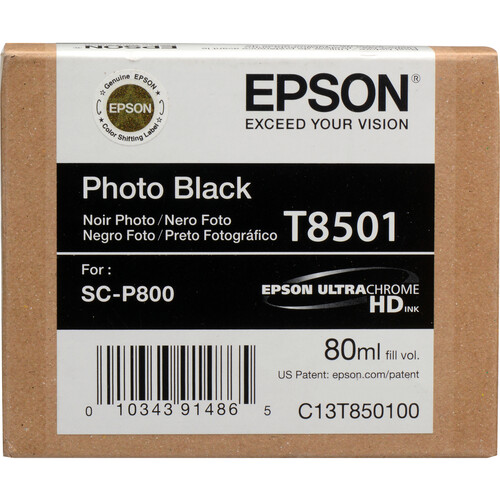
Epson 80ml ink


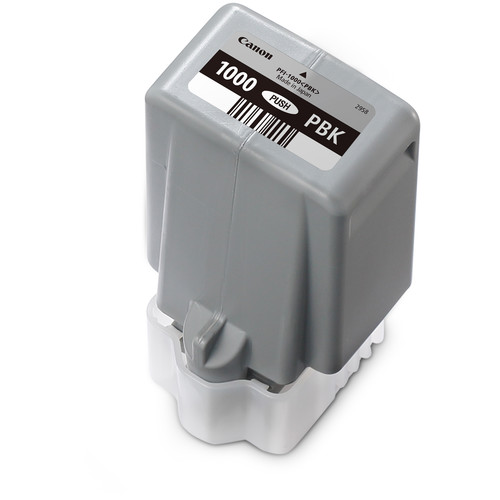
Canon LUCIA PRO 80ml ink

While I am disappointed that it lacks the roll support that my Epson SureColor P800 offers, and the larger ink set on the Canon (12 vs 8) means higher ink costs, so far that's where my concerns have ended. With excellent build quality, a much more durable finish that looks fantastic, and most importantly gorgeous prints sent seamlessly over wifi, I've been very happy in my early testing with this printer. 

All of the ICC profiles I've tested for this printer from Canon, Red River Paper, and Ilford have been excellent so far.

PRO-2000 Thoughts 


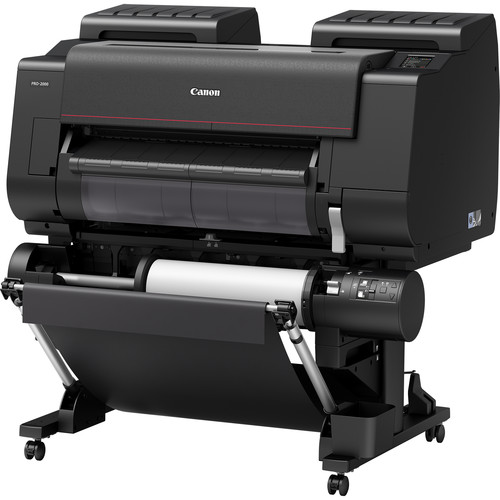
Canon PRO-2000 24" Photo Printer with Optional Multi-Function Roll

I loved the prints I got from my iPF6300 and I loved the hard drive feature of the iPF6450, but the quality of the ICC profiles created for the 6450 never matched the quality that I enjoyed with the 6300. This meant that if I wanted a good print, I had to go through the effort of generating the profile myself.

For the PRO-2000, the print quality has been excellent and all of the ICC profiles I've tried so far have been very good. I did have one for the Ilford Galerie Prestige Smooth Pearl 310gsm paper that was slightly darker than I think it should have been, but the PRO-1000  profile was great so I think this was an anomaly.  All of the Canon and Lexjet profiles have been great too.

The optional multi-function roll support has been fantastic and loading sheet paper has gone very well so far. However, the biggest news here is that the phenomenally improved unibody construction makes this printer significantly more stable (and heavy) resulting in less movement and noise than its predecessors. This is a good thing and the looks of this printer just puts a smile on my face every time I walk into my studio - it's stunning to look at!

Features Video

Here's a great video that Canon did that shows how sweet these printer are, and much more is to come from me when I do my official reviews:

Black & White

Black & White support is on par with Epson Advanced Black & White (ABW)

One thing that Canon has always done an excellent job with is black and white prints, and the chroma optimizer makes those blacks look even more incredible.

The new Print Shop Pro software is like a scaled down RIP that replaces my beloved Canon Export Module, but you get to this one off the Automate menu in Photoshop to create print jobs with more features than the export module supported. Sadly it lacks the roll preview feature, but I'm getting used to it despite some quirks.

Pattern Print (aka Print Variations) lives on in both color and B&W

Initially I thought my beloved variations / print pattern feature was gone, but it's alive and well in both color and black and white modes. As usual it does better with big prints vs smaller sheets, but I got up to 45 thumbnails on a letter size sheet (not that you can see squat but it's possible).

PRO-1000 almost equals the PRO-2000

Other than size, ink capacity and roll support, these printers seem to behave identically in every way. The software and print results have been identical which is a good thing for people who like to have a dedicated sheet printer to go with their big roll printers (which is great if you can afford it as you don't have to fight the curls on smaller prints).

Both supported easy to setup wireless and wired network printing. The PRO-1000 does have the added support for integrating with Google Cloud print and AirPrint, so that makes it handy for every day jobs as well. The PRO-1000 also features a night mode to make it a little quieter at night, but neither one made enough noise to wake my 13 month old daughter in an adjacent room with the doors open, so I wouldn't consider either model to be noisy.

I'm thrilled to have this combo in my studio!

Conclusion

I'm quite excited about both of these printers which is why I'm doing this early sneak preview. I've got a couple dozen prints under my belt with them but need more testing before I can draw any official conclusions. I can say that it's everything I liked about the PRO-1 print quality with the amazing LUCIA PRO ink set and the fantastic Chroma Optimizer has been very, very good so far. The Canon faithful should be extremely pleased based on what I've seen so far.

See my full PRO-1000 review here and my PRO-2000 review here.

Where to Buy?

Here's where you can learn or buy your own:

Other articles you may enjoy

If you enjoyed this article, you may also enjoy these:

Disclosure

If you make a purchase using links found in this article, I may make a commission. It doesn’t cost you a penny more, but it does help to support future articles like this.
Wednesday, November 6, 2013

REVIEW: Canon PRO-10 (vs PRO-1 & Epson R3000)

Canon PIXMA PRO-10 Wireless Professional Inkjet Photo Printer

Recently I concluded my review of the PRO-1 with my long-term report where I said:

… make this printer have a smaller footprint, weigh less, add wireless networking and large capacity print tanks. With these issued addressed, I think this could be a compelling choice for people retiring their older Epson printers.

Well the PRO-10 answers all of those requests, except for the larger capacity ink tanks. In fact, this printer is so similar to the PRO-1 that I urge you to read my PRO-1 review for lots of info about features and software that are also featured on this printer.

Setup

imageSNAGHTMLb24f541

SNAGHTMLb257b03

I did a wireless setup with the printer in a separate room from my computer. After installing the disc into my computer I never had to get up to go to the printer as everything “just worked” wirelessly. The R3000 did a great job with this, but the PRO-10 had much better information in the wizards and was overall more suited for normal people versus geeks.

AirPrint just works with no apps
No lame app was needed – native AirPrint just works with the PRO-10

My Epson R3000 requires an app to print from my iOS based devices, but the PRO-10 supported native AirPrint. As a result, I just had to choose the printer from my iOS device (on the same wireless network) and everything “just worked.”

Black & White Performance


Test Image #1

When printing this image as color, I expect the image to have a slightly brown tone to it. The PRO-1’s extra inks prove valuable here as it is able to print this more faithfully to the real color than the PRO-10 can (using identical Canon Luster paper and driver settings). The shadow detail was also much better on the PRO-1 than the PRO-10, so I was a little disappointed in the results from the PRO-10 on this image.

The differences could just be the quality of the ICC profile of the PRO-1 over the PRO-10, but I wouldn’t be happy with this result so I’d have to generate my own profile or choose a different paper with a better profile.

x
Test Image #2

Surprisingly conducting the same exact test with this image (which doesn’t have a color cast) resulted in very similar results on the PRO-1 versus the PRO-10. I was happy with the PRO-10 result.

I’ll do more testing, but for the several other monochrome images I printed without a color cast (printed as color via the driver) I found the PRO-10 to do a good job. The PRO-1 is clearly the better black and white printer, but I wasn’t as concerned with the differences on the second test image as I was with the first.

Color Print Performance

Treehouse
Treehouse

The PRO-1 and PRO-10 both created what appeared to be nearly identical results to my eyes and preferable to results I get from my Epson printers. I loved the results from both and felt no need to tweak the image or reprint as this one was just nailed perfectly on the first try by the PRO-10.

Haruka
Haruka

For this image the PRO-10 was significantly more accurate than the PRO-1 I think because the PRO-10 had a superior color profile in the yellow tones. The PRO-1 version was a little too yellow, but it was identical to the PRO-10 otherwise. Both printers had a little too much black, but it’s something that only I’d notice as I’ve had to print this image hundreds of times for my printing series. I felt that my Epson and large format Canon (i.e., iPF6300 & iPF6450) printers do a better job with this particular image than the PRO series printers, but I suspect that’s due to superior ICC profiles.


New York

For this image I’m looking for tones in the red, and the PRO-10 did a fantastic job as did the PRO-1. The richness and slightly warmer tones actually made me prefer the prints from the Canon printers way more than comparable Epson printers – for this image. The blacks were excellent on this image as well!

4x6 prints straight from my Canon in-camera jpeg’s (with no edits) printed via Lightroom were excellent as well – with no hassle.

Compared to the PRO-1

Canon PIXMA PRO-1
Canon PIXMA PRO-1
(review)

The PRO-1’s ink cost is slightly more than the R3000, but contain more ink so the ink prices for the PRO-10 will be half of the PRO-1. This makes the out of pocket expense when replacing inks cheaper for the PRO-1, but the large capacity inks are always cheaper over time.The PRO-1’s two extra inks also give it a better tonal range.

The PRO-1 is also better suited for thicker paper (like those typically over 380 gsm), but I rarely print on paper that thick and heavy on this size printer (I use the iPF6450) so it’s a non-issue for me.

Software and driver-wise they are identical, so those looking to have multiple printers should find the PRO-10 to be a nice complement to the PRO-1. What’s more the PRO-10’s wireless and AirPrint support make it much more family friendly. Thanks to this feature I actually store my PRO-10 in the laundry room (the former home of my R3000) so that it’s out of the way, but easily accessible to my wife and kids. It’s smaller footprint (compared to the PRO-1) make that possible, and easy wireless setup means that the PRO-10 never has to be connected to a computer (if you have WPS compatible router like my Netgear R6300). AirPrint “just works” from my iOS devices as well which isn’t true of any other device I’ve tested to date.

My advice is that if you are going to be doing more frequent printing for your business then a PRO-1 makes sense, but for personal or family use the PRO-10 is the much better choice.

Compared to the Epson R3000

Epson R3000
Epson R3000
(review)

The R3000 is an outstanding printer that makes gorgeous prints. Its print head technology allows for drops that are half the size which seems to create an advantage over Canon when I carefully inspect prints. However, I have a trained eye and see things that most photographers wouldn’t see - and definitely customers will never see. The R3000 also prints faster than the PRO-10.

What you will see with the Epson is a more finicky printer driver (more on Windows than Mac) and print cartridges that cost twice as much ($31.99 on Nov 2013) as the PRO-10’s ($14.99 on Nov 2013). The R3000 also wastes a lot of ink when switching between photo black and matte black inks which isn’t an issue on the PRO-10 due to dedicated lines for both black inks. As a result, I’m expecting the long-term operating costs of the PRO-10 to be less than the R3000. For the casual printer, these difference could prove to be significant.

As much as I love my R3000, I’ve retired it as my everyday photo printer in favor of the PRO-10 so I can do more exhaustive long-term testing. Check back for my long-term report in 6 to 12 months from this article to see which one wins me over as the better daily printer.

Paper Compatibility

Canon has even made it easy to find information about compatible third party papers and included links to get paper profiles from third parties here. It’s not perfect since some of the third parties don’t direct link to where you need to be, but it’s a good start – especially for the novice printer user.

B&H Screaming Deal (Expires Nov 10, 2013)

You can get one of these printers for as little as $299 until November 10th using the instant and mail-in rebate offers:Canon PRO-10 Rebate Info

Using Bill Me Later you can also get no payments for 6 months, so this is a killer deal if you are in the market for a great photo printer.

Conclusion

The wireless and AirPrint support make this printer a real joy to use not only for me, but also for my family. It’s basically everything I love about the Epson R3000 without any of the hassle (thanks to a superior print driver on Windows and real AirPrint support). It also creates excellent prints that are good enough that almost as good as the PRO-1. As I result, I can say that I am satisfied with the print performance, but like any printer the best icc profiles will be needed to get the best possible results.

This is the perfect personal / family printer that can not only do a great job for your photos, but serve well for your every day jobs (i.e., printing out emails, pdf’s, boarding passes, etc…). It’s tiny inks means it won’t be cheap to operate, but that’s true of every printer in this class (as that’s business model of the industry).

The PRO-10 is a joy to use and features everything I love about the PRO-1 – and more. As a result I can easily say that it is highly recommended for your personal printing needs. For professional printing, I’d still favor the PRO-1, simply due to its larger ink set and support for thicker papers.

Where to order

Click here to order or learn more about the PRO-10 on the B&H web site. My friends at Adorama have it available here.

Other articles you may enjoy

If you enjoyed this article, you may also enjoy these:

Disclosure

If you make a purchase using links found in this article, I may make a commission. It doesn’t cost you a penny more, but it does help to support future articles like this.
Wednesday, September 25, 2013

Long-Term Report: Canon PIXMA PRO-1 (Review Part II)

PIXMA PRO-1
Canon PIXMA PRO-1 Photo Printer (Adorama, Amazon, and B&H)

Today is the 1 year anniversary date that I’ve been using my Canon PIXMA PRO-1 printer, so I thought I’d follow up with a long-term report about how I’ve enjoyed this printer over the last year. Here’s the first two articles I’ve done about this printer in case you’d like to catch up on the prior articles before reading this sequel:

New Firmware & Drivers

If you’ve are a PRO-1 owner and haven’t upgraded your firmware yet, now is the time to do so. Readers in the United States can update here:

http://www.usa.canon.com/cusa/consumer/standard_display/PRO-1_firmware_upgrade

This update adds better default color, increased printable area (5mm closer to the paper edge), Canvas media setting, and improve messaging about the ink levels.

After your firmware is updated, nice links are included to get all of your drivers and software up to date as well.

Living with the PRO-1

While this isn’t the speediest printer in the world, I enjoyed using this printer. It’s been reliable with no clogged print heads which even included a long-term endurance test where I did not run the printer for 6 months (due to testing of other products). I was able to fire the printer up, replace a few inks that were low, print a test pattern (which came clean) and print without any problems. I can’t go a week without massive head clogs in my Epson 4900, so this is a really big deal!

It’s Ink Thirsty

The ink consumption never improved on the second set of inks, so I’d classify this as a thirsty printer when it comes to ink. It’s small cartridges mean that you are going to go through one to two boxes of ink each year in what I’d call light duty usage. The inks don’t deplete evenly either, so you’ll want a box of all inks handy at all times. This makes this a rather expensive printer to operate compared to models with larger ink tanks.

Great Profile Availability

Even more so than most other printers, you’ll want to always use printer profiles for your papers rather than choosing “Printer Manages Color”. I felt the printer managed color was too green and not to my liking.

One area where Epson rules is the availability of great paper profiles for nearly every paper on the planet, but Canon has done a phenomenal job of working with paper distributors to have great printer profiles readily available. In fact, during my year of testing there wasn’t a single case where I had to generate my own paper profile for third party papers. This was a pleasant surprise for a printer that hasn’t been on the market all that long.

Photoshop CC

PRO-1 Printing in Photoshop CC

Using the latest firmware, I had no problems printing from my Windows 7 system using both the XPS and standard OS driver in the latest version of Photoshop CC (14.1.1 x64) at the time this article was written. I had printed using my Macbook Pro with Snow Leopard with the previous driver and had no problems, but I didn’t test on the Mac with the latest firmware simply because the Mac is not part of my standard print workflow.

My preference was for the standard OS driver and most often I was pleased with Perceptual as the rendering intent (whereas on my Epson’s I use Relative Colormetric most often). I saw no obvious advantage to the XPS driver.

Lightroom 5 Support

PRO-1 Printing in Lightroom 5

Using the latest firmware, I had no problems printing from my Windows 7 system using both the XPS and standard OS driver in the latest version of Lightroom (5.2) at the time this article was written. I had printed using my Macbook Pro with Snow Leopard with the previous driver and had no problems, but I didn’t test on the Mac with the latest firmware simply because the Mac is not part of my standard print workflow.

4x6 Prints

One area where the cheapo small printers shine and larger printers tend to fail is in handling small 4x6” prints. I’m pleased to say the PRO-1 makes printing this size paper fairly hassle free. Here’s an article that shows you how to do it:

Conclusion

Overall I’ve been happy with my Canon PIIXMA PRO-1 printer. It’s been reliable and produces great results on the papers using the sizes that I care about.

It’s a very large printer so I’ve had to put it on the floor of my studio instead of a more ideal desktop location. This seems to translate into great build quality though as this printer is built like a tank.

The absence of a front panel LCD really bugs me when I’m changing inks, but the rest of the time the software tools for alerting me to matters that need my attention have been fine. I still wish Canon would add a small and cheap display, plus throw in wireless to make it as easy to use as the Canon consumer multifunction printers.

As a print master with both Epson and Canon printer experience, I’ve been very satisfied with both the color and B&W prints made with this printer. They are every bit as good as what I get with my Epson and large format Canon printers.

My future feedback for Canon would be to make this printer have a smaller footprint, weigh less, add wireless networking and large capacity print tanks. With these issued addressed, I think this could be a compelling choice for people retiring their older Epson printers.

Where to order

Please support this blog by buying your Canon PRO-1 Photo Printer at Adorama, Amazon, or B&H using links from this blog. NOTE: Your cart must be empty before clicking the links for me to get credit. Thanks for your support!

You can also now purchase the PIXMA PRO-1 direct from Canon and get FREE shipping when you use the coupon code SHIP75 and order more than $75 USD worth of products. Click the image below and search for PRO-1 to learn more:

Other articles you may enjoy

If you enjoyed this article, you may also enjoy these:

Disclosure

If you make a purchase using links found in this article, I may make a commission. It doesn’t cost you a penny more, but it does help to support future articles like this.
Monday, August 5, 2013

Getting Great 4x6 Prints Without Any Hassle–Part I of II

Epson R3000 4x6 Borderless Print Settings for Lightroom
Honey, can you “just” make a 4x6 print of this for me?

One of the most dreadful things many photographers today hear from a loved one or friend is “can I just get a 4x6 print of that shot?”. It sounds like a simple request, but reality kicks in when its time to execute that request. Here’s how things typically go down after a request like this:

  1. I don’t have my own printer, so I’ll have to send it off to <insert your print service here>. Doing just one print is pretty expensive because of shipping costs and everything, so I’ll need to add your shot to my next big batch of 4x6 prints (which most photographers these days never bother to do).
  2. I have an awesome professional photo printer, but it can’t do small 4x6 prints very easily. Can I give you a big print instead? No? Crud! Okay let me try to do one for you. Now hours, and sometimes days pass as you fight with your printer to get what ends up being a VERY expensive 4x6 print that you still have to cut so heaven forbid you should screw up that final step! If you get it all right you are usually rewarded with – “hey would you mind doing these <insert large number> images too?”
  3. I normally send my stuff out, but I’ll try to do one for you on my business ink jet printer. <time passes> Okay, here it is – yeah, sorry that the colors are totally wrong and that it’s so dark but that’s the best I can do. This is usually followed up by a comment about how the print doesn’t really feel like a photo like they were expecting, so here’s where you have to admit that your bargain paper kinda sucks, and you warn them to make sure they don’t get it wet because it will get ink on everything.

Responses #2 & #3 usually end up resulting in the print service response in #1 over time because you realize that it’s not cost effective to do #2 and #3 doesn’t make anybody happy.

Having déjà vu yet?

Despite being a print master myself with a lot of experience using both Canon and Epson printers, I found myself dreading the request for a 4x6 print. It was just too small for my equipment, and I didn’t want to waste letter size sheets for a one off print. It always ended up being both a lot of hassle and expense. However my wife, mother-in-law, mom, etc… “just” wanted a 4x6 print right now, so they were baffled why “Mr. Printing Series” couldn’t just give them what they wanted – very quickly.

This scenario was quite embarrassing to be quite honest, and I quickly found that other photographers with large printers had also shared my disdain for the 4x6 print request.

The Solution

When I reviewed the Epson Stylus Photo R3000, I fell in love with how easy it was to use. I quickly requested that Epson send me some 4x6 paper so I could try to see if this was finally my solution to the dreaded 4x6 request.

I’m happy to report that it was. Of course, some might think “no duh”, but it’s funny how many people I’ve talked to who have never printed on QUALITY pre-cut 4x6 paper using a printer that was DESIGNED to to 4x6 prints (especially one that can take more than a couple sheets at a time).

Notice the two words in capitals in that last paragraph. I emphasized those words because many times people who try to do 4x6 will either get cheap 4x6 paper that doesn’t have a good ICC paper profile and results are horrible – even on a great printer. Those who seem to overcome the penny pinching trap often find themselves on a printer that jams if you try to do more than one or two sheets at a time, which again makes the task of printing out a dozen shots of the grandbaby for Mom a huge headache.

This is why I HIGHLY recommend buying a printer like the Epson R3000 and using ONLY Epson paper or the Canon PRO-1/PRO-10 and using ONLY Canon paper. These models come with 1decent paper profiles and printer settings that “just work” to give you very good results directly from Photoshop or Lightroom.

The Papers To Make Your Life Easier

Here are the papers I use most often for my quick 4x6 print jobs with my Epson and Canon printers:

Epson Ultra Premium Glossy Photo Paper - 4x6" - 100 Sheets

Canon Photo Paper Plus Glossy II (4 x 6") 100 Sheets

Click here for part II where I show screen shots of my printer settings for both Windows and Mac using Photoshop and Lightroom so you can be sure to get great results.

But Ron, I don’t like glossy prints

You may not like glossy prints, but 99% of the time the person who is requesting 4x6 prints will prefer glossy prints. In fact, if you print glossy and non-glossy, it’s rare to see “normal” people (i.e., non-photographers) not choose the glossy print. If you think you know better, and insist on a less glossy paper then here’s my next best recommendations:

Epson Premium Semi-Gloss Photo Paper for Inkjet 4x6" - 40 Sheets

Canon SG-201 Photo Paper Plus Semi-Gloss - 4x6" - 50 Sheets

Neither of these papers from Epson or Canon are as good as their glossy equivalent in my opinion, but these will get the job done with a final print that is closer to a Luster finish.

But, but, but…

Some people love to argue and subject themselves to torture, so it’s not uncommon when I share my 4x6 advice to hear comments like:

  • But the quality of prints on the letter size (and up) papers that I use are better than these… – yep, you are correct – the larger papers offer a better selection of higher quality papers but guess what – the people you’ll typically give a 4x6 print to won’t notice or care.
  • But I can just cut my letter size papers… – ha, ha – yeah, go for it. Let’s see how much you enjoy doing that and how much fun you have trying to get good borderless 4x6 prints. If you factor in your time and the inevitable miscuts, you aren’t really doing yourself any favors here.
  • But Ron, you have a good article on printing a strip of 4x6 prints without wasting paper– yep, I created that out of necessity but the truth is that time wasted and hassle with cutting those isn’t as cost effective.
  • But I already have a big printer, and I can’t fit/afford a small printer too… – this is one of my favorite excuses because anybody who takes self-printing seriously is going to have a big selection of paper and they are going to spend more than the cost of a R3000 or PRO-10 on ink for their larger format photo printer. People who’ve made an investment in a good printer often have very expensive gear, so this excuse is often just that – an excuse.

Conclusion

The ability to quickly and easily do a one off print that pleases your loved one is very satisfying. The instant gratification and lack of hassle make it well worth the investment. It can also be a business expense as you can more easily have your client or model leave your studio with a proof print in hand with very little additional cost to you.

If you haven’t done your own self-printing, then this is a good place to get your toes wet. See my advice on printer shopping and check out my Printing 101 eBook if you want to get started in what I think is the most exciting part of photography!

CLICK HERE for part II where I show screen shots of my printer settings for both Windows and Mac using Photoshop and Lightroom so you can be sure to get great results.

If you must print with a large printer, then here’s a couple articles I highly recommend:

Where to order

Click the links in the article to order the printers (most of which have killer rebates right now) and paper.

Other articles you may enjoy

If you enjoyed this article, you may also enjoy these:

Disclosure

If you make a purchase using links found in this article, I may make a commission. It doesn’t cost you a penny more, but it does help to support future articles like this.

Wednesday, February 27, 2013

Which Printer Should I Buy? Epson or Canon?

Years ago when I decided to take on the challenge of learning all there is to know about photography printing, I swore that I’d never pick sides. I’d just state my opinions and I saw them and try to encourage people to get their images off their computers and into their hands via printing. I still believe in that mission and still feel strongly that both Epson and Canon make outstanding products.

This article started out as a simple post about Henry Wilhelm’s comments in the next section, but evolved into this long overdue discussion where I put my cards on the table about what I really think. This blog has always been about open and honest feedback like I’d tell a personal friend with no sugar coating or bullshit.

In this article I share my advice based on my daily experience with the 5 professional printers I keep in my studio. I love all of my printers and they all have their strengths and weaknesses, but I realize that my readers can’t afford to own so many so you just need someone to give you the facts as they see them. I hope to accomplish that in this article and hopefully my comments will be taken to heart by both Canon and Epson so they can make their products better.

With that said, let’s stir the pot by referencing a August 3, 2012 Canon video interview with Henry Wilhelm about the history of photography, print permanence, and "the look and feel" of silver-gelatin and inkjet prints. (NOTE: I say good things about Epson later too <g>)

Canon PIXMA Pro-1 Printer – The Best Black & White Printer Ever Made? Henry Wilhelm Thinks So!

PIXMA PRO-1
Canon PIXMA PRO-1 Photo Printer (Adorama, Amazon, and B&H)

Henry Wilhelm is a very well respected name in the photo printing industry. In fact, when I first started doing my printing series I frequently heard my Epson contact reference Henry and his Wilhelm Imaging Research web site as the source for the best and most accurate print permanence ratings. Henry also claims to be an apprentice to Ansel Adams when he was younger, so I took pause when I watched this video where Henry raves about the Black & White performance of the PIXMA PRO-1 printer:

Canon HD video interview with Henry Wilhelm about the history of photography, print permanence, and "the look and feel" of silver-gelatin and inkjet prints  (low bandwidth version)

In this video he states that:

The Canon PIXMA PRO-1 printer which uses the 12-ink LUCIA system with 4 level black gray inks and a clear Chroma optimizer ink is the first printing system that to me has fully solved [the problem of differential gloss]. It produces the most beautiful black and white prints ever made on an ink jet printer.

If Ansel [Adams] were alive today he would absolutely love the PIXMA Pro-1 Printer – I have no doubt about that!

Those are some bold words (and honestly dems fightin’ words :-) in the photo printing community where Epson is the alleged leader of the industry. According to one source, total printer sales put Canon in a higher spot, but that includes lower-end printers and copiers so from what I’ve seen Epson does appear to be the golden standard.

I’ve been singing the praises of my iPF6300 (review) and iPF6450 (review) printers great performance and definitive ease of use over the 7900 (and definitely over the clog prone 4900). However, the Epson fanboys would have me tarred and feathered for speaking such blasphemy!

The truth of the matter is that I do still agree that Epson and Canon both make very, very good products. I also think that in the photography community Canon’s are highly underrated and Epson’s are very much overrated. In addition, while I much prefer the Epson HDR and Canon LUCIA EX inks over the Canon LUCIA inks, the Wilhelm Print Permanence Ratings for the Canon Pro-1 Printer with Canon LUCIA Pigment Inks is convincing data that proves you can trust these inks. In fact, my own independent “rain test” of the LUCIA EX convinced me that these aren’t your ordinary consumer printer inks! However, what sealed the deal was this report:

CANON iPF8300 with LUCIA EX Pigment Inks and CANON Media Receives High Permanence Ratings (Report) From Wilhelm Imaging Research (Press Release)

It should be noted that the iPF6400, iPF6450, iPF8400 and iPF9400 (and their predecessors the iPF6300, iPF6350, and iPF8300) all use the same exact ink and print head technology, but the image quality has improved in the newer models (see my comparison). This means that you can expect the same permanence ratings when paired with the same paper used in the test.

SIDEBAR: Canon PRO-1000 Review coming in 2016

Canon imagePROGRAF PRO-1000 17" Professional Photographic Inkjet Printer

As of December 2015, I’m being told that Canon is working to get me a review unit of this printer but I haven’t been able to test it yet. I have high hopes as on paper it address most of the shortcomings I had with the PRO-1 (which made fantastic prints) . With improved inks now in 80ml cartridges, this could give the P800 a run for its money. Stay tuned!

What does all this mean?

It means don’t buy into the Internet malarkey that Epson printers are superior to Canon. They aren’t. Sure if you pixel peep various images you can create results where one printer shines over the other – especially if you use third party printing software like ColorByte ImagePrint with Epson printers – you can find that Epson printers perform very well. However, if you get Canon print masters together than can show similar examples where the Canon’s come out on top. In my own testing the screening technology of the Epson’s do seem to have an advantage, but the new LUCIA EX based Canon printers released last year close that gap. The PRO-1 certainly has outstanding screening technology as well!

The Canon printers using LUCIA and LUCIA EX inks are excellent printers, so don’t let the naysayers scare you away. I’m not as fond of the cheaper printers that use the cheapo ChromaLife 100+ inks though, so keep in mind that all printers aren’t equal. In fact, even Epson has this problem with its cheap dye inks (i.e., Claria® Hi-Definition).

Does this mean Epson printers aren’t any good?

Heck no! In fact, one huge advantage that Epson has is its HUGE fan base that has created some of the best ICC Profiles for photo printing. Printers like the Epson Stylus® Pro 3880 have no end of brilliant paper profiles for nearly every paper, so when used properly that will guarantee great results! My own testing with the new Epson Stylus® Photo R3000 also showed that it’s superior head technology gave better print results than the 3880 and was near identically to the much larger and more expensive Epson Stylus® Pro 4900! So there’s lots of great Epson printers to choose from, and their Advanced Black & White mode when used with Epson Exhibition Fiber (and other Epson Signature Worthy Papers) will create jaw dropping black and white (as well as color) prints.

UPDATE: I’m in long-term testing with the P600 and P800, and both are very good printers that are significantly better than the R3000 & 3880 (respectively) that they replace. While they are too new to have great ICC profile support – yet – that will inevitably come over the next year as 3880 and 4900 owners are moving to these printers at a rapid pace.

Ron, just tell me which one you like best!

Epson SureColor P800
Epson SureColor P800 (B&H and Amazon)

I wish I could, but this is like comparing Nikon to Canon cameras – again, both are great products but there’s a lot of variables that come into play when deciding which is right for you. The same holds true here. The Canon PRO-10 and Epson SureColor P600 are the best starter printers on the market and they are sure to make you fall in love instantly! The Epson SureColor P800 kicks it up a notch to give you pro performance without the massive footprint of the 4900. Canon’s new imagePROGRAF PRO-1000 is very likely going to be a great alternative to the P800, so it’s a great time for printing!

I can also state, without hesitation, that I think the Canon LUCIA/LUCIA EX models and Epson K3™/UltraChrome HDR models are the best photographic printers on the market – PERIOD! I do find the Canon printers to be MUCH easier to use and I’ve never had any clogging problems (whereas I can’t use the 4900 without spending 30 minutes addressing clogging problems).

In addition, as I stated earlier, I think Epson has the advantage in both screening technology and availability of great printer profiles (although the PRO-1 marketing team did a brilliant job of getting a ton of fantastic profiles for third party papers for it too). There’s also better third party RIP software for the Epson printers (3880 and up), so if that is important to you then Epson is the way to go. Products like like ColorByte ImagePrint also make brilliant prints, offer free great paper profiles and fantastic features like hot folders which make it a great solution for the office environment where you want drag and drop photo printing.

Canon iPF6450
Canon iPF6450 – Large Print Heaven!
iPF6400, iPF6450, iPF8400 and iPF9400 at B&H
iPF6400, iPF6450, iPF8400 and iPF9400 at Amazon

Please check out my printer reviews and printing series page for more information. Here’s my reviews so far:

If I could only pick one it would have to be the P800 simply because it produces near 4900 quality prints via a easy to use wireless configuration that was a snap to setup. It’s just stupid easy to get going making fantastic prints. If the Canon PIXMA PRO-1 was wireless, then it would have easily been my first choice due to its outstanding color and black and white performance – so I can’t wait to review the  new imagePROGRAF PRO-1000. With all of these new printers, Epson loses it’s edge in a mature ICC paper profile base, so it’s domination will certainly be challenged by Canon in the next couple years.

My next choice would probably be the iPF6450 because it’s go large, or go home! The Canon LUCIA EX ink set is fantastic, and this printer is a dream to use (the Photoshop Export Module and Accounting Manager are brilliant)!.

For Black & White prints on the PRO-1 (Adorama, Amazon, or B&H) are delicious so if I was a black and white only print master then I’d be hard pressed not to own the PRO-1 (mainly due the advantage of the clear Chroma optimizer ink). As a result, I’m suspecting the new  imagePROGRAF PRO-1000 will do very well in this category despite the fact that P800 is extremely impressive too.

If I was doing fine art sheets of cut paper (which I prefer) then there’s really nothing better than the 3880 (Amazon, B&H or Adorama), so I’m in the process of doing part II of my SureColor P800 review (due in early 2016) to share my verdict on how it compares to the 3880. It’s too early to call this one, so for right now I’ll refrain from making a recommendation.

So yeah, I love both platforms and think you can’t go wrong with either! Seriously!

Conclusion

As I state in my Printing 101 eBook, these are exciting times in photography and the experience of controlling the process from capture to physical output is a blast. Printing doesn’t have to be a pain in the ass and cost you a fortune creating prints that look terrible compared to what you see on your screen. This is why I dedicated over a year of my life to adding content to help people enjoy the world of self-printing like many film photographers enjoyed developing their own prints.

Happy Printing!

P.S. One last note – NEVER, EVER buy third party inks. I can’t stress enough how stupid it is to not use the OEM inks by Canon and Epson in their printers as that’s one of the most important factors in getting great results. Putting generic ink or doing refills is like buying a Ferrari and putting an old Yugo engine in it! It just makes ZERO sense! Cut corners on paper if you must, but DO NOT USE third party ink – PERIOD!

Where to order

Please click the photos or article links mentioned in this article to learn more or order your printer. It helps to support this blog and it really encourages me to add more printing related content.

Other articles you may enjoy

If you enjoyed this article, please check out my Printing Series.  You may also enjoy these Canon articles:

and these Epson articles:

and be sure to visit the bottom of my Printing Series page for a bunch of great articles that apply to both platforms. You will also appreciate my discount coupon code page where I occasionally have printer paper special offers.

Disclosure

If you make a purchase using links found in this article, I may make a commission. It doesn’t cost you a penny more, but it does help to support future articles like this. Canon and Epson have also both provided printers, paper and ink for my review, but neither have paid any monetary compensation or for advertising.