Showing posts with label D4s. Show all posts

Wednesday, December 28, 2016

REVIEW: Canon 1DX Mark II - I'm no longer lusting for a Nikon (Part I - Opinions of a Parent)

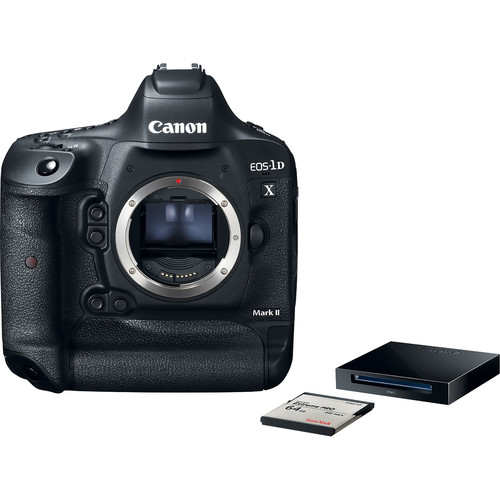
Canon EOS-1D X Mark II Body with CFast Card & Reader

When I did my Nikon D4s vs Canon 1D X review, I declared that the D4s had the best autofocus system I had ever tested. As a result, when the D5 came out, I was very eager to get my hands on it and see what improvements Nikon had made.

As  Canon 1D X owner, I was expecting to be blown away by the D5 so much that I'd finally switch over to the Nikon camp. However, my D5 testing reminded me of an old saying amongst the Nikon faithful - don't get the D series until the D*s model comes out. Sadly, this would be the case again as the D5 disappointed me greatly with its poor and inconsistent metering behavior, and an AF system that took a step backwards from the flawless performance I experienced with the D4s.

Canon has underwhelmed me for quite some time with its sensors, so I was expecting to be very disappointed with the 1DX Mark II. However, I was extremely surprised to discover that this time they seemed to make some improvements to dynamic range.

About this review

There will be plenty of people doing reviews that focus on the sports aspects of this camera, and that makes a lot of sense. However, I'm taking a different approach for this installment where I focus on the everyday use of this camera.

While I do shoot sports, a good portion of what I also shoot are pictures of the kids and things that grab my eye in every day life. I like the performance features when photographing my kids, and I love the control I have over my camera for pretty much every subject matter you can imagine. This is the unsung value of pro camera bodies that goes far beyond the glamourous sports photographer usage.

Camera Body Thoughts
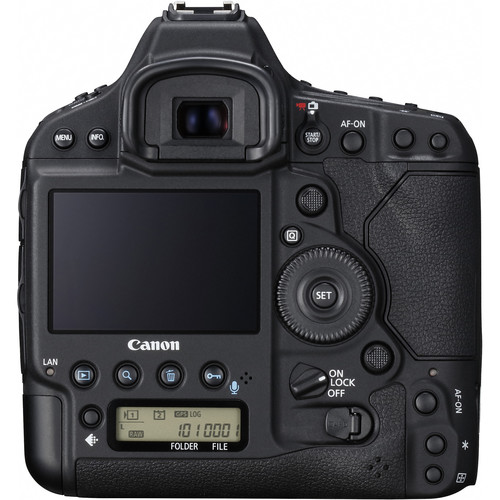
Canon EOS-1D X Mark II Rear View

Nikon D5 Rear View
Nikon D5 Rear View

While these camera bodies look slightly different, they are functionally very similar. Canon users will appreciate and be more familiar with many things that will cause them to gravitate to the 1DX Mark II and Nikon users will do the same with the D5. With that said, both have a wealth of new features that only previous pro body users from both camps will understand initially - and both thankfully mostly mirror their excellent predecessors.

I appreciate that Nikon locates the row of buttons to the left of the LCD instead of under it as shown above on the Canon, but Cano's wheel is a huge improvement over Nikon's thumb pad - especially its touch sensitive feature for video.

Batter performance and features are excellent on both, so my experience was both was that they are a delight to use day in and day out. Really the only gripe that can be made is about the weight, but they are built like an old Mercedes so you feel armed with a tool that definitely seems to be optimized for Gulf War photojournalism duty.

Where both bodies shine is where you can control the range of many settings and show/hide features to get your configuration set up exactly the way YOU work . You can even dial in exposure compensation in-camera for the meters so the 0EV performance matches your preference - not the choice of the engineers that built it. Basically it is tweaking to your hearts content, so if you've ever been unhappy about a feature in a lesser camera body - this is the camera that will allow you to dial in things the way you want it. This also includes reprogramming the buttons to different things beyond what their labels imply.

Canon Fails

Copyright Ron Martinsen - ALL RIGHTS RESERVED
f/2.8 @ 200mm for 1/1000 sec at ISO 1250 [UNEDITED]
Not necessarily a fail shot, but a good fail face

Whereas Nikon learned from the D4/D4s that trying to combine Compact Flash with XQD was a stupid idea, Canon didn't get that memo and foolishly opted to force users to only one CF slot and only one CFast slot. This means if you don't jump on the CFast bandwagon, you are limited to one card. However, if you do, you still need a CF if you want to use that other slot. This is super frustrating because the rollover from card 1 to card 2 slots means a drop in performance if you use CFast and it means card switch time if you don't. Dumb, dumb, dumb, dumb, dumb!

Another thing that is annoying is that Canon didn't match Nikon's touch screen which has twice the resolution and support for swipe and pinch to zoom on playback. Since Canon offers a touch screen, hopefully this functionality will come in a firmware update.

Lastly, Nikon stumbled in its implementation but I commend them on shipping the AF Fine Tune feature (video in this article). This feature attempts to make setting the AF micro adjustments much easier, but Canon didn't try that here. Given the price of both bodies, you want each to do everything possible for their mega price.

Canon Surprises

Copyright Ron Martinsen - ALL RIGHTS RESERVED
f/4 @ 67mm for 1/320 sec at ISO 160 [UNEDITED]

Because I am a Canon shooter, I tend to notice the faults and take its strengths for granted. The D5 reminded me once again that while Nikon may have some advantages in high ISO performance, their metering is child's play compared to what you get with Canon.

While shooting RAW will save the Nikon from ruining a shot, the out of camera result I get with a Canon 1D X Mark II is print worthy whereas the D5 always requires white balance, curves and vibrance tweaks.

This won't matter to web trolls, but photojournalists and event/wedding photographers will appreciate how the Canon will give them something they can deliver to a client straight out of camera - especially if they tweak the picture styles to their desired output.

To minimize high ISO usage, I typically limited my shutter speed to a maximum of 1/1000. This introduces some occasional motion blur, but that's not the fault of the camera.

Nikon has Picture Controls for this same functionality, but I find that more challenging to dial them in without also having the camera in the correct white balance mode (often shade) and manually adjusting the exposure just right (since the in-camera meter often fails to do what I want like the Canon does).

Excellent focus performance

Copyright Ron Martinsen - ALL RIGHTS RESERVED
f/2.8 @ 135mm for 1/1000 sec at ISO 1000 [UNEDITED]
Click for original to see how the eye is still in focus despite the foot distraction
This was taken using default camera settings and single point AF

As a former Canon 1D Mark III and up owner, I've invested a ton of money while Canon has learned how to build a proper focus system. After testing the Nikon D4s, I was frustrated that Canon could have made it that easy to use, but now they finally have.

While the Canon has more options to dial in your desired preferences, it also means it is easy to shoot yourself in the foot. However, the defaults are almost as good as the D4s defaults. With basic tuning (i.e., setting focus as a priority over speed), you can get performance that noticeably outshines the 1D X.

In full auto with face detection is was about as good as I could do with a single point on  Nikon D3s or 1D X. Using a single-point AF with no pre-focusing (i.e., half press shutter button for a half second) using a default speed priority, I could typically get all but the first two shots in perfect focus. If I did a focus priority shot with pre-focus, then I got D4s autofocus performance (which is superior to D5 in my opinion).

ISO 25,600 is definitely usable

Copyright Ron Martinsen - ALL RIGHTS RESERVED
f/4 @ 70mm for 1/80 sec at ISO 25600 [UNEDITED]
While my white balance was off here (user error),
the in-camera jpeg high ISO quality was definitely usable

I'll discuss more about image quality and ISO in part II, but I found the high ISO performance to be very good at 25,600. This is every bit as good as ISO 6400 just a few years ago, so I'd have no issues with printing images shot at this ISO. For on-screen display I'd probably run Noiseware on the RAW and sharpen it.

Real World Shots

Work duties have kept me from getting out and enjoying this camera as much as I would like, but I did manage to do some casual shooting here and there. As usual, the images featured are straight out of camera and you can click on them to see the full-size in-camera JPEG originals. Unless noted, the photos are taken with default camera settings except for the exposure settings. I also favored the Auto Selection AF in AI Servo Case 1 using the EOS iTR AF (Face Priority) setting for most of my shooting.

You can view the images while you are viewing this article in your browser, but please delete them afterwards. No permission is granted for reuse, printing, editing, redistribution, etc... without signed written consent.

Click here to see the gallery for other images not shown..

Copyright Ron Martinsen - ALL RIGHTS RESERVED
f/8 @ 24mm for 1/160 sec at ISO 1250
Despite shooting in a dark black interior, the improved dynamic range and metering managed to balance the scene well to still get decent outside color and detail while still preserving details in the shadows of the floor mat area

Copyright Ron Martinsen - ALL RIGHTS RESERVED
f/5.6 @ 67mm for 1/2000 sec at ISO 1000
I included this candid shot of my 7-year old playing because his face was transitioning from sun (here) to shade (below) during the burst mode. I was impressed with how the meter compensated perfectly for the two adjacent frames taken in the fastest burst mode

Copyright Ron Martinsen - ALL RIGHTS RESERVED
f/5.6 @ 67mm for 1/2000 sec at ISO 1000
The D5 I tested would have failed miserably exposing this series.

Copyright Ron Martinsen - ALL RIGHTS RESERVED
f/4 @ 70mm for 1/250 sec at ISO 1600
Improvements in the red tones are obvious
for Canon users 

Copyright Ron Martinsen - ALL RIGHTS RESERVED
f/4 @ 70mm for 1/320 sec at ISO 3200
Again, I was very satisfied with color of the flower being very close to its real life appearance

Copyright Ron Martinsen - ALL RIGHTS RESERVED
f/4 @ 70mm for 1/400 sec at ISO 2500
Yellow tones were also good even when back lit

Copyright Ron Martinsen - ALL RIGHTS RESERVED
f/5.6 @ 70mm for 1/80 sec at ISO 8000
A default exposure showed great improvements in dynamic range
over what I've seen from my previous Canon cameras

Copyright Ron Martinsen - ALL RIGHTS RESERVED
f/5.6 @ 70mm for 1/200 sec at ISO 5000
When I compensated by -1EV to bring the colors out in the sky,
I was impressed at how much detail on the golf course remained

Copyright Ron Martinsen - ALL RIGHTS RESERVED
f/2.8 @ 130mm for 1/1000 sec at ISO 640
Kai is never predictable, yet this camera got him nearly time

Copyright Ron Martinsen - ALL RIGHTS RESERVED
f/2.8 @ 130mm for 1/1000 sec at ISO 800
It's common for AF to focus on that hand, but not the 1DXM2

Copyright Ron Martinsen - ALL RIGHTS RESERVED
f/2.8 @ 200mm for 1/1000 sec at ISO 1600
See comment below

Click here for a link to a series of 45 shots taken in burst mode using the aforementioned settings.A few shots had minor focus misses, but that's pretty good for a face detection fully auto mode!

Click here to see the gallery for other images not shown.

SIGMA 85mm Art Series


f/9 @ 85mm for 1/200 sec at ISO 100
Want to be able to count the pours, facial fuzz and eyelash textures? Check!

This camera really shines when paired with good glass and so far the best glass I've tested it with has been the amazing SIGMA 85mm Art Series lens. Click here to see my review and click here to see my 2nd bonus review which features 4k video and some cool outdoor shots like this:


f/16 @ 85mm for 1.3 sec at ISO 100
Yet even at f/16 this lens and camera combo is incredible!

Conclusion

I'll be back for more in part 2 with more thoughts and photos, but so far the hype for this camera seems to be true. I'm glad given the price!

Check out the Comparison: Canon 5D Mark IV vs 1DX Mark II article too!

Learn more or buy

Click here to learn more or buy your own via B&H.

Other Articles You Might Enjoy

Disclaimer

If you make a purchase using links found in this article, I may make a commission. Thank you so much for supporting this blog by coming back here and using my links when making your purchase!

Wednesday, May 18, 2016

Nikon D5 First Look

Nikon D5 DSLR Camera

I’ve been a fan of the Nikon D series pro bodies going back to the D3, and the D4s was one that I loved so much that I almost sold my 1D X to switch to the Nikon camp. As a result, when I heard the D5 announcement I quickly made arrangements to review it even before the Canon 1DX Mark II. Would this be the one that makes me switch camps? Read on to get my initial thoughts.

The AF system is scary good and the range at which you can move your focus point across the 55 physical points (but the system has 99 cross-type points for tracking). What this means you can easily put your AF point where you want it – especially at all rule of thirds points where most cameras fall short – and once you are in continuous mode the AF system will track your subject extremely well.

The touch screen support is pretty comical as its primary value seems to be in playback mode for swipe and pinch to zoom. In live view you can tap the screen to move your focus point, but it doesn’t actually focus until you press the shutter button. As a result, I don’t see much value in the touch to focus point feature other than the fact it might save a millisecond or so.

Thankfully the body is an evolution over its processor in that it offers more programmable buttons without removing all of the features D series bodies users have come to love. A fast 1000 Base-T (Gigabit) Wired LAN port, USB 3 and HDMI port (for the 4K UHD 3,840x2,160 / 30 fps video support) means its well equipped to interface with your accessories, but wireless still requires the optional  WT-6A Wireless Transmitter.

I haven’t tried out the ISO 3,280,000 yet, but I was playing around when I unboxed it and got this ISO 14,400 shot that impressed the heck out of me given how crazy low the noise was as well as how readable the text was – handheld in low light at 200mm standing about 6 feet away:


f/2.8 @ 200mm for 1/400 sec at ISO 14,400

Normally I’d delete a garbage shot like this, but this is definitely an impressive case of real world performance of the in-camera noise reduction being very impressive.

Here’s a better real world shot where ISO 5600 is as clean as some cameras minimum ISO setting:


f/2.8 @ 130mm for 1/2000 sec at ISO 5600

I was also aiming at Kai’s left eye when he jumped and the AF did a good job of staying focused on his eye despite his arm creating a distraction that would trip of older AF systems.

Automatic AF Fine Tune Feature

I was planning on doing a video on this feature but this one on YouTube was very good so I decided to point to it instead:

In theory this is how things are supposed to work, but in practice it was finicky and difficult to make it happy enough to get the shot with the 70-200mm that I’m testing with. I finally got it to work with the camera body on a firm surface on the floor pointing at a Datacolor SpyderLensCal Autofocus Calibration Aid, but that wasn’t as easy as what you see in the video. Granted, I was indoors so I’ll do more testing outdoors on a sunny day and see if that helps.

I’m very excited about this feature as AF microfocus adjustments are a pain even with some of the advanced software that’s out there like Reikan FoCal, so this is a game changing feature I hope they can perfect with firmware updates. In the meantime, FoCal, is still the way to go!

Real World Shots – A Walk In The Park

This is just a tiny sample of what’s to come, so check the gallery to see my latest uploads both now and after the final review is published.

These photos were taken during a casual walk through the park with my kids at the end of a sunny day. While the target demographic for D5 is sports photographers, any parent can confirm that keeping up with the kids will show the flaws of even the most advanced pro camera bodies. As a result, I’m impressed with what I’m seeing so far:


f/2.8 @ 200mm for 1/200 sec at ISO 280

At first you might be thinking, why are you showing me this fat baby shot?
The answer is because I pushed the stroller and let it roll on a flat surface, then I raised the camera and took the shot pointing at her left eye WHILE WALKING – at 1/200 sec!!!
I quickly saw the AF system was good, but this was ridiculous – I’ve never had a camera pass this test – until now.


f/2.8 @ 78m for 1/2000 sec at ISO 5000

Kai was hyper and jumping off the rocks, but it was no problem for the D5
as every frame I took came out with sharp focus


f/3.2 @ 80mm for 1/2000 sec at ISO 900

As a Canon shooter, I always struggle when I do my D series reviews at first because the metering doesn’t work the way I’m used to it performing with the Canon bodies. As a result, the images were darker than hoped, but you see 14 frames starting here that came in perfectly focused while shooting RAW+JPEG. I did this test 5 times and got identical results each time – all in focus.


f/3.2 @ 200mm for 1/2000 sec at ISO 1800

Same with the running test where I repeatedly got 42 shots in focus time and time again – also shooting RAW+JPEG. This indicates a very big and fast buffer to keep up with 14 frames per second even with the dual CF option I chose over XQD.


f/2.8 @ 200mm for 1/2000 sec at ISO 3600

Kai is unpredictable so when he randomly decides to jump on a swing the wrong way and gives me a funny shot like this, I was delighted that the D5 nailed it before I even knew what was happening. This is true point and shoot!

All of the shots featured in this article are unedited and come from the in-camera JPEG, but RAW’s were taken at the same time. No processing (not even cropping) has been performed on these images.

All images are copyright Ron Martinsen and may not be used in any way beyond viewing in conjunction with viewing this article. Downloading, printing, copying, editing, linking, etc… is prohibited.

Conclusion

Click here to check out my review.

Where to order

Click here to learn more or order on the B&H web site. I opted for the dual CF version, but an XQD version is available at no extra charge.

Other articles you may enjoy

If you enjoyed this article, you may also enjoy these:

Disclosure

If you make a purchase using links found in this article, I may make a commission. It doesn’t cost you a penny more, but it does help to support future articles like this.

Monday, October 20, 2014

REVIEW: Nikon D750 with 24-120mm Lens with Real World Images (Part I of II)

Nikon D750 DSLR Camera with 24-120mm Lens

The Nikon D750 has been a highly anticipated and long rumored camera. The D700 was a huge hit and when the D600 came out the rumors immediately began that the D700 replacement would soon follow. With the D4, D800, D7100, D610, D4s, & D810 announcements you could almost sense the frustration from the Nikon faithful that while the announced camera was cool, that’s NOT the one they were hoping to see announced.

The D700 was effectively a D3 in a cost effective package, so it’s no wonder that people were hoping for the same with the D750. However, the camera I’ve been using really feels to me like the D610 on steroids. Personally I feel this camera takes everything that is great about the D610 and addresses most of the weaknesses to result in a camera that I personally would really like to own!

Hands On Thoughts

Nikon D750 Rear View

This is an awesome camera body that features the creature comforts normally reserved for consumer cameras and frustratingly omitted from pro cameras like an articulating LCD. While you won’t be using it to do selfies, you will be able to get better live view or video shots with the camera above your had and down low, so there’s definitely value in that!

Unless I missed something, it was disappointing to see that there are no shooting banks. This allows you to switch between a set of custom configurations for the camera quickly and is typically found on models like the D4s and D810. This would indicate that this camera is targeted more to the consumer than the pro. The  articulating LCD and scene & effects modes on the mode dial certainly confirm this too. However, I do not think this is a bad thing because what I love about my 5D Mark III is that it has consumer features (like HDR that will keep the originals) not found on my 1D X (and insufficient on cheaper models because it doesn’t keep the original files). As a result this is a camera that I think the pro enthusiast will love, but they could hand it to their spouse or event photography assistant and still have a camera that is approachable and usable by mere mortals.

I’m used to pro bodies like the 1D X and D4s that are machine guns, so the D750 feels slow to me. However, it’s good for its class and price point. I also noticed that with a fast memory card it will go on for a long time at a reduced speed without filling the buffer even when shooting RAW+JPEG fine. I think this will please wedding and event photographers who can’t afford to have a buffer to fill prematurely. I still wouldn’t classify this as a pro sports camera, but it should do fine for soccer parents who want a fighting shot at  capturing sports without investing in a D4s.

Real World Pictures

If you are new to my blog, what follows are in-camera JPEG’s with no modifications taken through the course of a normal day. The camera is mostly set to camera defaults but I do chose my AF single point and adjust the white balance as I see fit. Most shots are aperture priority but a few are manual mode as well. All but one shot in the gallery were also taken handheld all using the 24-120mm kit lens.

You may view the photos for your pleasure, but please delete them and/or remove them from your cache when done. You may not edit, print, or otherwise use these photos. All rights are reserved. The full gallery can be found at http://photos.ronmartblog.com/nikon/d750.


f/5.6 @ 120 mm, 1/125, ISO 320, No Flash
, Shade White Balance
Reds and oranges are tough but I thought this sensor did a great job of showing a broad spectrum of reds and oranges. This is a fun camera to have for the fall!


f/7.1 @ 120 mm, 1/200, ISO 800, No Flash

Here the limitations of the kit lens become obvious because I think with a better lens the detail of this shot would be awesome. Even still, I was quite satisfied with what I saw overall.


f/5.6 @ 82 mm, 1/100, ISO 450, No Flash

Again, the wide dynamic range means a gorgeous spectrum of color


f/11 @ 50 mm, 1/640, ISO 280, No Flash

Shooting into the sun is the ultimate torture test but this camera did an excellent job of capturing a wide tone of colors and retaining a respectable amount of shadow detail. NICE!


f/7.1 @ 110 mm, 1/250, ISO 800, No Flash

Here’s another one that few cameras can capture this well. The alternating tones of the trees are captured very faithfully with the vivid richness coming from the shade white balance.


f/4.5 @ 105 mm, 1/30, ISO 100, No Flash

Ok, I didn’t really need to include this one (or the f/7.1 version in the gallery) but I was just having too much fun with this camera


f/4 @ 120 mm, 1/200, ISO 720, No Flash

At parks you’ve gotta photograph at least a duck or goose right? :)
The goose $hit was captured with such accuracy – ha, ha


f/7.1 @ 24 mm, 1/25, ISO 5000, No Flash

The great shadow detail means textures really come to life


f/4 @ 85 mm, 1/100, ISO 12800, No Flash

Here’s one place that the color sucked, but that can be blamed on ISO 12800, so keep that in mind if you shoot high ISO’s. The phone cover here is really bright red in real life. There was an abundance of natural daylight here so a better lens sure would have helped too.


f/4 @ 58 mm, 1/125, ISO 6400, No Flash
, AWB
While it’s impossible to have identical conditions, it’s interesting to note that my shot like this with the D600 was way better at ISO 5000 @ f/5.6. I should manually dropped down a stop and adjusted the white balance but I was getting over confident about what this camera might do on its own. This is faithful to real life but it could have been better.


f/4 @ 120 mm, 1/125, ISO 7200, No Flash, Poorly Handheld - sorry

This statue has a strong light beam on it so many cameras require spot metering to avoid exposing properly for one part of the scene while botching the other. The default metering mode did a beautiful job with the AF point on the face. This is almost what the human eye sees the scene as in real life – sweet!


f/5.6 @ 35 mm, 1/125, ISO 12800, No Flash

If I had to pick the one thing that really impresses me is how well the metering handles complex scenes like this. With the great meter and awesome dynamic range, a shot like this goes from requiring HDR in the past to just point and shoot now (single exposure – no HDR).


f/4 @ 24 mm, 1/50, ISO 7200, No Flash

I included this one because this is a case where the dark ceiling means that you usually only get detail where the lights are. However, notice how much detail you can see in the ceiling. I think this is the best I’ve seen from a camera for this common test shot that I do.


f/4 @ 46 mm, 1/50, ISO 6400, No Flash

While I screwed up and had the AWB still on, what’s impressive is how much detail and tonal range from the statue and the wall behind are picking up. This is definitely a good sensor boys and girls!

I’ll have more photos to come, but suffice it to say that I’m sufficiently impressed with my early testing. The full gallery can be found at http://photos.ronmartblog.com/nikon/d750.

Conclusion

I’ll render my full conclusion when I’m done testing, but you can tell from my comments above that I love this camera. In fact, I was going to review other products first, but this one got such a wow out of me that I had to get my first part on the web early.

I’ll have more to come, but basically my current opinion is that if you are considering a Nikon and you can’t afford a D4s (who can right?) then this is the one you want. Sure the D610 is a great compromise if your budget is tight, and the D810 is the megapixel king but who cares though right? This is the best all-around, use it for anything, general purpose camera has right now. It’s definitely a great answer to the Canon 5D Mark III, so if your in the Nikon camp and have been lusting for a 5D Mark III then know that this is the camera you really should buy. If you are in the Canon camp, I still say don’t switch camps if you have invested in more than one L lens, but if you haven’t then I think from an image quality standpoint this might be the camera to own.

In short, is this camera worth the money and/or is it worth upgrading to? Heck yeah!

Please read my final conclusion in - REVIEW: Nikon D750–Yeah, it’s better than my 5D Mark III (Part II of II)

Where to order

Click here to learn more or order the D750 on the B&H web site.

Other articles you may enjoy

If you enjoyed this article, you may also enjoy these:

Disclosure

If you make a purchase using links found in this article, I may make a commission. It doesn’t cost you a penny more, but it does help to support future articles like this.

Thursday, May 29, 2014

SIGMA 50mm f/1.4 Art Series vs Canon, Nikon, Zeiss Otus, Sony & Fujifilm Comparison (Review Part II of II)

SIGMA 50mm f/1.4 DG HSM Art Series

If you’ve been a long time reader of my blog then you know I was pretty much a SIGMA hater for many years. The SIGMA 35mm Art series changed all that and made me start to look at their products differently. If you read the first part of my review, then you know that I actually like this lens quite a bit. However, the inevitable question becomes – with all the great 50 – 56mm lenses on the market, how does it compare? While this is no super scientific comparison of every possibility, it is a reasonable (albeit anecdotal) comparison that I performed with what I’ve tested thus far. Take away from it what you will, but I’ve seen enough here to form my personal opinions based on what my eyes see from these results. You are free to disagree, but hopefully you’ll enjoy the data presented.

My Favorite SIGMA 50mm Shot
My Favorite SIGMA 50mm Shot (edited)
Canon 1D X 1/4000 sec at f/2.8, ISO 200 (min ISO due to Highlight Tone Priority)

While I’m sure pixel peepers will probably find other images in the gallery that are technically more interesting than this shot, this was one of my personal favorites from my two weeks with this lens. This shot was taken without the aid of a flash or reflectors so I had to do a little post-processing work to save it (see the unedited original). However, it’s been one that has been well received because I think it tugs at the heartstrings of parents. The vibrant colors and sharpness which were possible due to a great starting point of the RAW image captured using this lens.

Methodology

All RAW images were converted using the 2012 process and Adobe Standard profile

The bookshelf comparison images in this article have all been processed identically using Adobe Photoshop Lightroom 5.4 from their original RAW image file. In the Camera Adobe Standard Raw – some exposure adjustments, but nothing else – no profile corrections. No lens corrections or white balance adjustments were made.

Default sharpening and noise reduction were used as shown here:

Default sharpening and noise reduction were used

Exposure Adjustments

All of images in this test were shot under identical conditions of the same subject there are variables which can cause the aperture priority setting of the camera to render some images brighter and some darker than others. When the exposures vary in brightness it is harder to accurately compare them so some images have been adjusted in Lightroom to have a relatively balanced exposure using the same camera settings of f/5.6 at ISO 100.

The SIGMA 50mm had a -0.25 exposure adjustment to help balance its image with the rest of the shots in this series. The Nikon 50 needed a -1.00 exposure adjustment, and the Canon 50 needed a +0.50 exposure adjustment. Both the Zeiss Otus 55mm and Sony were unmodified from their in-camera RAW exposure.

About the sections that follow

For each of the comparison sections that follow there is a screen capture taken at 100% with the SIGMA 50 on the left and the comparison image as the Candidate on the right. These are the RAW images being compared as if you were looking in Lightroom on your display. If you click the image you can see the 100% version that I captured from my system.

Below each image is a brief discussion of my opinion (you are free to disagree) of the results and links to the original image that is being compared on the right. CLICK HERE to download all of full-size images below that have been RAW converted to JPEG as previously discussed.

All images in this article are Copyright © Ron Martinsen – ALL RIGHTS RESERVED. You may download and review for your personal use, but you must delete them when done. Printing, editing, storing, republishing, rebroadcasting or modifying in any way is strictly prohibited.

vs Canon 50mm f/1.2L 

SIGMA 50mm vs Canon 50mm f/1.2L
Click to see a larger version of the above image
CLICK HERE to see the full size version of the SIGMA 50mm image
CLICK HERE to see the full size version of the image on the right

This one isn’t much contest, the SIGMA 50 blows away Canon’s best that cost $600 more (before rebates and sales). This is my own personal lens that I purchased in December (for the 3rd time) and recently had serviced by Canon, so I’m definitely feeling buyers remorse for this lens again. Yeah, it’s a good lens and it does f/1.2, but it’s getting a little long in the tooth by today’s standards!

vs Zeiss Otus 55mm f/1.4

SIGMA 50mm vs Zeiss Otus 55mm f/1.4Click to see a larger version of the above image
CLICK HERE to see the full size version of the SIGMA 50mm image
CLICK HERE to see the full size version of the image on the right

Given the fact that the Otus manual focus ONLY Zeiss lens cost $3000 more, I’m not seeing enough of a difference to justify the cost of the Otus (or you could say the SIGMA 50 is a phenomenal bargain). However, to my eyes I see the Otus as definitely being marginally sharper in the center and definitely better overall across the whole spectrum of apertures – especially at the edges. Yes, I do think the Otus is better, but not $3000 better – more like $300 better when you consider image quality. Construction-wise, the Otus is phenomenally better but it’s also big and heavy which could also be considered a negative. At the end of the day though, if you want the absolute best (especially for Nikon D800/D800E users) and can afford the price then Otus is the way to go.

vs Nikon D4s 50mm f/1.4G

SIGMA 50mm vs Nikon 50mm f/1.4GClick to see a larger version of the above image
CLICK HERE to see the full size version of the SIGMA 50mm image
CLICK HERE to see the full size version of the image on the right

Again, I think it’s no contest here – the SIGMA 50 on the Canon 1D X definitely bests the Nikon 50mm f/1.4G (on a D4s). However, in this case the Nikon is about $500 cheaper so the question becomes a matter of what more do you get for the extra money. Personally I found the SIGMA 50 to be much faster focusing and consistently sharp across the entire aperture range which makes me think the smart money is on the SIGMA 50. I think the SIGMA 50 will hold its value much better and be a lens that works nicely with newer sensors in the future, whereas I consider the 50mm f/1.4G to be a reasonable bargain alternative. D800 series users should probably for the SIGMA 50 as the superior resolution will no doubt be more noticeable.

Others for Fun

It’s impossible to do exact compares for the following due to different sensor sizes and focal lengths, but just for fun I included these comparisons I did for my own personal curiosity. I figured you might enjoy seeing them too, but strictly speaking these are apples to oranges comparisons. 

vs Fujifilm X-E2 56mm f/1.2 R

SIGMA 50mm vs Fujifilm X-E2 56mm f/1.2RClick to see a larger version of the above image
CLICK HERE to see the full size version of the SIGMA 50mm image
CLICK HERE to see the full size version of the image on the right

As a lens, I think the Fujifilm 56mm f/1.2R is probably sharper but I think the sensor is superior on the 1D X. As a result, I don’t think this lens compares as favorably as it would if I could do an apples to apples comparison of both lenses on the same camera body. It’s clear the Fujifilm lens is just about as sharp with the X-E2 sensor, but I think a better sensor would make this lens look even sharper.

Please note that the color difference was because I used the Adobe Standard Camera Calibration Profile in Lightroom 5.4 RAW processing to treat all images as equal as possible. If I had I chosen the Camera PROVIA/STANDARD profile with a white balance adjustment I would get a warmer tone image like you see from most of the others in this article. Here’s where you can change that setting for your own photos:

Camera Calibration PROVIA/STANDARD Profile

vs Sony a7R Zeiss 35mm f/2.8 ZA

SIGMA 50mm vs Sony a7R 35mmClick to see a larger version of the above image
CLICK HERE to see the full size version of the SIGMA 50mm image
CLICK HERE to see the full size version of the image on the right


Now this is the most invalid comparison, but since the a7R is one of the sharpest high resolution sensors I’ve tested I couldn’t help but take a peek at how it compared. I didn’t have the 55mm, but I did have the RAW image from the super sharp 35mm that I tested. In this comparison, to my eyes, the Sony is sharper. To be fair I didn’t scale the image down to a matching size which has some impact on the results. Feel free to ignore these results, but for me this just reminded me how good the a7R image quality and lenses are.

The takeaway here should be that if you like the SIGMA 50 results you are seeing, then you’ll probably like the a7R with the 55mm f/1.8 ZA which is rumored to be at least as sharp as the 35mm for a price that is competitive with the SIGMA 50.

Bokeh

Once you get below f/4 people start wondering how great the bokeh is for a given lens, and this one is definitely buttery smooth as you can see below. I slightly over exposed these images to help make the dark background objects pop a little more. The shots below allow you to see the progression from wide open at f/1.4 to completely stopped down at f/16. It’s especially interesting to see the green dot turn into the oven clock LED at f/16! It’s also noticeable at the extreme apertures that there is some mild, but generally acceptable vignetting.

Click any of the images below to see the in-camera JPEG shots (unmodified – processed from RAW in-camera):


f/1.4

f/1.8

f/2.8

f/4.0

f/5.6

f/8

f/11

f/16


Conclusion

Overall I think the Internet buzz might have exceeded reality a bit, but it’s a fact that the SIGMA 50mm f/1.4 DG HSM Art is a fantastic lens. If I had the spare cash I’d probably get one of these – it’s that good.

If you’ve used SIGMA lenses in the past and been disappointed, then let me assure you that this is NOTHING like the SIGMA lenses of old. This is a high quality lens that is built like a Zeiss and reminds me more of that level of quality than older SIGMA lenses. In fact, when I hold this in my hand next to my Canon 50mm f/1.2L I feel that the SIGMA is better built – and that’s something I NEVER thought I’d ever say about a SIGMA lens.

Yes, SIGMA you’ve made a believer out of me – the new silver dot Art Series lenses are are great stuff and worthy enough for the best of photographers – even those with unlimited budgets. What’s more, they are also still a reasonable value for what you get too!  As a result, I HIGHLY RECOMMEND this lens.

Where to order

Click here to learn more or order any of the FOUR camera mount versions of this lens on the the B&H web site. My friends at Amazon have it available here, and Adorama has it available here.

Other articles you may enjoy

If you enjoyed this article, you may also enjoy these articles/reviews:

Disclosure

If you make a purchase using links found in this article, I may make a commission. It doesn’t cost you a penny more, but it does help to support future articles like this.

SIGMA did loan this lens to me for two weeks so that I could share my opinion of it with you. I was not compensated in any way for this work.