Showing posts with label guest blog. Show all posts

Thursday, September 14, 2017

A Point and Shoot Beats Most DSLR Portfolio Shots

All of the following photos were taken with a point and shoot (and no, it wasn't a Leica) which I serve up as evidence that it's more about the photographer than camera (although this is a pretty damn good camera too).

All images are Copyright Douglas Dubler 3 - ALL RIGHTS RESERVED. You may click to view full size versions in Google Chrome, but you may not save, print, download, link to, repost, etc... any without written consent.


"Summertime Boy" - 1/1250 at f/5 ISO 100 (-1 1/3 EV)


“Peruvian Jungle Lily” - 24mm at the closest focusing distance ( less than 8 inches) At f5.6


f/6.3 for 1/40 sec at 24mm (-1 EV)


"Lilies" - 24mm (widest) end of the zoom lens. At f4.5 at almost the closest focusing distance

And the camera was...
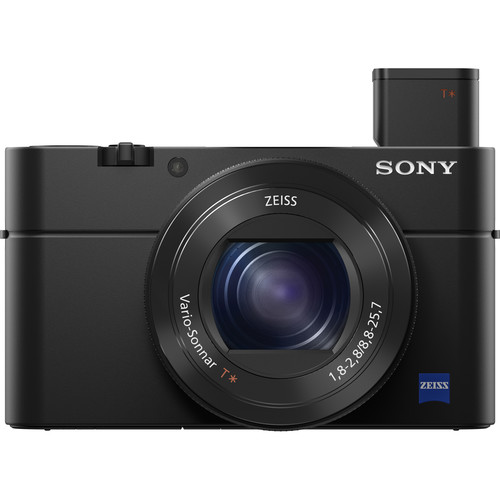

Sony RX100 IV  at B&H (review)
Also on available at Amazon

Yes, the Sony RX100 IV was used for all of those shots except the first one which was actually taken with he Sony RX100 III!

Of course, to be fair these were taken by one of the greatest living photographers of our time, Douglas Dubler (website). This legendary photographer has shot more magazine covers than most photographers have (or will have) portfolio caliber shots in their lifetime. He's also been the featured photographer for the launch of major products from Nikon, Epson and so many more. Simply put, these weren't taken by a mere mortal, but it does show off what this camera can do.

In Douglas Dubler's own words


24mm for 1/160 sec at f/8 ISO 100 (-1 EV)

Many people who are familiar with my work most likely associate me with high resolution capture and large format gallery prints. Much of this work is/was done on medium format digital backs or high megapixel DSLRs. Lately I have been exploring a different direction. Several years ago I purchased a Sony RX100 III for my girlfriend and began giving her photography lessons. As her photography progressed I noticed a look that I began to admire. 


24mm for 1/80 sec at f/5.6 ISO 100 (-1 EV)

They were done mainly at the 24mm focal length at the closest focusing distance (around 4 or 5 inches ). The small sensor gave her more than adequate depth of field at modest apertures (f4-5.6).  The wide angle lens gave just a little distortion which enhanced the subject. My best description is a hybrid of environmental and semi Macro.


24mm for 1/60 sec at f/5 ISO 100 (-1 EV)

Inspired, I began to emulate the effect with my A6500 and larger A7RII. Even with the APS-C sized sensor in the A6500 with various focal length lenses from the Sony 12-24mm ( on the A6500, a 18-36mm), to many different Zeiss,Sony and Sigma prime lenses I couldn’t get the look.  If I was shooting flowers to get the depth of field I would end up with a shutter speed that was too slow (wind vs. flowers!).  So I borrowed her camera and spent a few days at the New York Botanical Garden seriously photographing flowers. It took me one day to work out my approach but I was very happy with the beginning results.


"Maleficent Tree" - 24mm for 1/160 sec at f/5.6 ISO 100 (-1 1/3 EV) RX100 III

The next step was to make some prints, the whole point of photography.  With a little editing in my favorite Capture One V10 and of course B&W conversion done with Nik’s Silver EFex Pro 2 I was ready for the litmus test..  With my Epson P5000 and Epson’s new Legacy Platine paper I made prints that rivaled the best silver-gelatin prints.   As a test, at the beginning of one of my classes I had the students look carefully at one of  the prints and guess what camera I had used. Unanimously they declared a high resolution professional DSLR or mirrorless camera. I showed them the diminutive Sony and at first they thought I was joking. I assured them I wasn’t.


24mm for 1/60 sec at f/4 ISO 100 (-1 EV)

Since then I went out and purchased a MarkIV model which is around my neck whenever I leave my house. Even on my bike I can easily carry it in a small bag around my waist. Now no one even looks at me and I blend in with the iPhoners. I hand hold almost all of the images and as a result am able to shoot many more images. It doesn’t mean I will abandon my abstract Macro studies with the larger cameras and tripod but I have a feeling I will always have this camera hanging around my neck…

Douglas Dubler's thoughts on a couple shots


Black Dahlia - 24mm@f5.6@1/80sec, ISO 100, exp.comp.-1.3 stops

I found these two blossoms in perfect juxtaposition, full face and profile, which I am always looking for. They were the last shots out of 250 exposures that I did during my B&W class at NYBG last week.

I was actually on my way out of the garden and, in exiting, revisited the flowers I had shot earlier at around 6 P.M. I was tired after a long day of teaching but instinctively knew that those last few minutes of sublime light (exactly 7:11 P.M.) reward those who are patient. 

Processed in Capture One V10 and B&W conversion done in Nik Silver Efex Pro 2.


“Empress Lotus”

I have been trying for quite some time to get a good shot of a lotus blossom. For me that meant getting directly over the flower. Not so easy when you consider they grow in water, in this case, water that is over 5 feet deep. I surveyed all of the lotus in bloom and decided this was aesthetically my favorite. All I had to do was wait for the best light.  At around 7:10 P.M. the sun was no longer directly on the flower but was creating a beautiful soft illumination that seemed to be emanating from within the flower.

With some help from my friend Steve Titus (shown below) I was able to get an almost vertical camera angle and with the advantage of the articulating LCD could precisely compose the shot. It still took over 40 shots to get this precise uncropped composition.

Post processing, I had my friend Irfan Yonac do some digital enhancement using an “analog film” technique. It was the final step in the evolution of this photograph. Shot at 28mm@ 100 ISO @ f5.6 @ 1/200 sec, exp.comp.-1.0 stops.

Processed in Capture One software available at B&H.

Here's a funny behind the scenes shot of what it took to get this shot...


Conclusion

My review shows what mere mortals will get with this camera, but it's fun to see that in the hands of an X-Rite Coloratti Master like Douglas what is possible!

I really hope you enjoyed this guest blog from as much as I did. If so, please leave comments and check out more of Douglas's work on Instagram, Facebook,  or his website. Here's a couple more guest blogs from Douglas with his amazing work:

And here's one where Douglas breaks out the big camera that will really blow your mind:

Thanks Douglas!

Sincerely,
Ron Martinsen

Want to do a workshop with Douglas?

Contact me if you are interested in working with Douglas or doing a workshop with him in New York City.

Other articles you may enjoy

If you enjoyed this article, you may also enjoy these:

Enjoy these and more on the Reviews tab as well as Ron's Recommendations.

Disclosure

If you make a purchase using links found in this article, I may make a commission. It doesn’t cost you a penny more, but it does help to support future articles like this.

Tuesday, October 25, 2016

Killer iPhone Photography Guest Blog by Clifford Pickett

Copyright Clifford Pickett - ALL RIGHTS RESERVED
Clifford Pickett shows you just how amazing the iPhone can be!

My best friend in New York, Clifford Pickett,  has been blowing everyone away with his amazing iPhone photography, so I asked him if he could join us for a guest blog to share his images and some of his story.

I hope you enjoy it as much as I do!

Gear, Sex and Money

by Clifford Pickett

Copyright Clifford Pickett - ALL RIGHTS RESERVED

It’s easy to say it’s not about the gear.

Gear is no different than sex and money, it’s only important when you don’t have it. Maybe in that order too, if you’re a photographer. However, sometimes all of that gear ends up being a distraction. I’m no different, you should see my man cave! And many of you reading this, if your honest with yourself, you can probably relate to what I'm saying. After all, how many times have you been fiddling with gear and missed a shot while your significant other captured it with a cell phone?

I’m not preaching here, I’m leveling with you so please hear me out.

I just spent the past week at the Photo Plus Expo, which I highly recommend to those have never been to one. There were beautiful prints on display, created by amateurs as well as some of the biggest names in the business. They were stunning! These galleries were spread throughout the show, some presented by Canon and Nikon, some by paper manufacturers and others by the event space itself.

Let’s be honest though, that’s not what the show was for – it’s exists to sell you photography products. That’s cool, but noticeably missing underneath many of those beautiful prints were any details about how the photo was made, what camera, what lens, what settings, and more importantly, actually how the photo was made.

Copyright Clifford Pickett - ALL RIGHTS RESERVED

It makes you ask yourself, "What was Joe McNally thinking when he shot that image and why?". Where was Jay Maisel standing? What was thought process? Which lens did he use? However, this info was often missing, but why? The answer is that these photos stand on their own, so no one really cares what gear they used. The gear was necessary, but It’s not important for the viewer of that image.

Buying a Nikon SB-910 won’t help me shoot like Joe and buying a D5 won’t help me shoot like Jay. It’s all about the image!

Of course, I’m not the first one to say this, I know. But seriously, some of the most amazing images ever made for the past decades were taken with cameras much less sophisticated and capable that what we carry around in our pocket.

It feels like capability has given way to complication. It distract us. It gets in the way. Scientists have proven a direct linear correlation between the number of buttons on a camera and our ability as artists to create a meaningful piece of art. (Just kidding, they haven’t <g>). But what if we only had one camera? One lens? One button?

Apple Challenged Me

Copyright Clifford Pickett - ALL RIGHTS RESERVED

Last year, Apple reached out and asked me to give a presentation on photography at their Grand Central Store. My mission, if I chose to accept it, was to inspire people to go out and take photos of the fall season.

My first thoughts were to showcase how I use my iPhone as a tool; to navigate, to geocache, to call my girlfriend and explain why I’m not home yet, to determine locations and times of day to shoot, to look up the weather so I can call my girlfriend to explain why I’m not home yet. Then I thought, what if I use my iPhone as a camera? Honestly, never considered it.

It turned out to be the perfect timing as the iPhone 6S came out with a much better camera in it, so I took to trip through New England with my A7R and my iPhone, shooting both. I was using my Sony, but I was also seeing just how far I could push my iPhone as a camera. After reviewing my images, I was shocked just how well the iPhone performed! The results were seriously impressive and were a big hit at the Apple store.

I had a gallery show shortly after and printed several pieces from the iPhone, and people couldn’t believe it. Seriously, they wouldn’t believe it!

I found myself having long conversations with strangers about how capable it is and how much fun it was to shoot, sort of convincing myself while convincing them that it’s not about the gear. It was strange because they weren’t photographers and didn’t care, but they appreciated the enthusiasm. However, I was a photographer and I did care!

Time to put skin in the game

Copyright Clifford Pickett - ALL RIGHTS RESERVED

Over the last year I’ve been having more fun, working lighter and faster, and shooting more. I was thinking about photography in an entire new way, and shooting with with my phone.

No, it doesn’t matter what phone you're using either, so long as it’s the brand new iPhone 7 or the Google pixel phone - ha, ha, just kidding!

Copyright Clifford Pickett - ALL RIGHTS RESERVED

Since my debut with Apple, I’ve shot commercial campaigns, done gallery shows, licensed images around the world and of course even taken pictures of my two cats. The best part though, and the reason why I’m writing this article, is to share how much fun it was!  I want you to know how much I learned about photography by, you know, doing it!

Spoiler Alert

Copyright Clifford Pickett - ALL RIGHTS RESERVED

The pictures you see in this article are not as sharp or clean as those I wouldn’t have taken with my big boy camera, but that's not the point. The point is that the only reason I took those picture at all, was because I was out shooting. I was focusing on what mattered, and not obsessing about noise, depth of field, etc... I was deep into the experience of making a photography and focusing on the light, color, composition, and most importantly – the experience.

I should note that I do spend time in Lightroom to help give my images that professional look, but I don't spend nearly as much time as you might think thanks to my fine-tuned workflow.

Responsibility sucks

Copyright Clifford Pickett - ALL RIGHTS RESERVED

Gear is critical up to a point because we do need a minimum dynamic range, an acceptable noise floor and a reasonable degree of sharpness – but only up to point. After that it's a distraction because rest of what makes a photograph is on us, the photographer.

What I really learned while shooting with the iPhone was how to focus on what really matters. The experience and then color, light, gesture and composition. After that, at the very bottom, just below taxes and my dentist, the aperture, shutter speed and ISO. You begin to focus on what’s in front of you, not how to capture it.

So this year, when Apple called again. I left all my gear at home and jumped in the car with nothing but my iPhone and few pair of underwear and my drone – I can’t leave home without that. You can't imagine how great it feels not to have to pack your gear, charge your batteries and struggle with which lenses you’ll bring (only to bring them all anyway).

This experience was stress inducing in a way only a photographer can understand. To stand at the shores of Nova Scotia after a 17 hour drive and find myself looking at an amazing sunrise with just my phone in my pocket. And my underwear. And my drone.

You learn a lot about your camera when it’s always with you

Copyright Clifford Pickett - ALL RIGHTS RESERVED

I have learned about the limitations of using a smaller sensor and fixed lens and how to overcome them. In future articles, if there’s an interest, I’m happy to share tips and techniques, apps and gear that I use to expand the capabilities of the iPhone. iOS Apps like Cortex Cam to stitch 99 photos to instantly to effectively remove noise in low-light situations or Pro Cam 4 to auto-bracket RAW photos to maximize dynamic range and how to stitch photos in perspective to create much higher-resolution images.

A funny thing happens when you start to seriously photograph with your phone. You take it less seriously. So do others. There’s no pressure, it doesn’t have to be perfect. It shouldn’t. There’s much less baggage, literally and figuratively. And how amazing is it to go out and shoot with nothing to carry and no bag to carry it it. I liken it to being a cook and not having to worry about the dishes. It’s all the fun with none of the compromise. 

I won’t be selling my A7R Mark II anytime soon, at least until the next hot camera that comes out that begs for me to buy it!

When I was at my last exhibit, with all of those prints on the wall at the show, I realized how odd it was that none of them were my iPhone shots. I still hadn't let go of the pixel peeping and deep analysis of what type of photo is "good enough" to go on display, but my attitude is definitely changing. It'll also be very interesting to see in a year if I've finally been able to let this go and show the world, in print, what I'm happy to show you here in this blog article.

Join Cliff at the Apple Store in Boston

Copyright Clifford Pickett - ALL RIGHTS RESERVED

Cliff Pickett will be at the Boylston Street Apple Store in Boston Wednesday, October 26, 2016, 6:30 p.m. Feel free to checkout his Instagram page as well as his web site for more info.

If you'd like to join in on a paid online webinar with Cliff, please contact me.

Other articles you might enjoy

Here's some other articles you might enjoy:

Disclaimer

If you purchase using links found in this article, I may make a commission.

All of the photos in this article were shot with an iPhone ONLY. Most were the iPhone 6 Plus and iPhone 7 Plus.

Wednesday, September 23, 2015

Getting The Shot: “Indonesian Beauty II” by Douglas Dubler 3


Indonesian Beauty II

This image was captured with a Sony A7II  at f/4 @ 1/30 sec using ISO 400 with a Zeiss Otus 85mm (using a Novoflex adapter).
Retouching by
Irfan Yonac

Here’s the story behind this image in Douglas Dubler’s own words (edited by Richard Hood):

As an art form based in “the actual,” photography has always provided a meeting-ground for both beauty and truth. In over forty years shooting fashion and beauty portraits, I have consistently sought to explore this intersection, looking for moments that define a visual tapestry, woven out of  the “why,” as well as the “who.” My photography depends upon finding the right tools, creating the right environment, and establishing the right rapport with a subject, to display something of the truth within the beauty I'm capturing.  My recent creation of a portrait entitled, “Indonesian Beauty” demonstrated the process of combining technique, technology, and timing in order to capture a compelling, and transcendent image.

In the 1990s, I visited seven Asian countries in four weeks, lecturing to photographers on behalf of Fuji film. After such an intense working experience, I decided to take a rest-and-recovery stop in Bali. There, I established a routine that involved catching the sunrise each morning from a different location,  working for an hour or so until the light got too high, then retiring for some sleep and food. I'd then go out for the sunset in a new location. I had planned to spend a week in Bali, but was so captivated by colors and culture, I remained for three weeks.

When I returned to New York I was introduced to Gde Arsa Artha, who has since become a good friend, and who has, over the years, continued to teach me about Balinese art and culture.  Just last month, Gde was responsible for my visit to the Indonesian Consulate, where we were invited to attend a fashion show  they were hosting for four Indonesian couture designers, who were in New York for the Couture Show.  Always wanting to put my best foot forward and following Pasteur’s mantra “Chance favors always the prepared mind,” I organized a mini entourage consisting of a digital tech/1st assistant, 2nd assistant, hair and make-up artist, and several others to help with the equipment. Out of this visit would come my  portrait of Chitra, the “Indonesian Beauty,” featured here in an earlier blog, and the current portrait of Sarah Azca, shown here.

Figuring on just a simple main light and one light for a background if necessary, I packed one of my Broncolor Grafit 3200 wt./sec packs with one of my “signature” Lightbar 120s and a regular Pulso head.  (over $18,000 worth of lighting equipment at retail).  When we arrived at the Indonesian Consulate, they were in the process of dressing the models and doing their walk-throughs in preparation for the show.  I took a few minutes to survey the three floors looking for the best place to set up, where I could at least take advantage of some of the wonderful available light that was entering through a beautiful domed skylight, similar to a mini-Guggenheim.

I decided that the second floor would be more central as that was where the dressing rooms were and I could capture the models both coming and going.  I had the Lightbar 120 set up and proceeded to do a few captures to check the light.

I didn’t like what I saw.

But more of an issue was the fact that no matter where I positioned the light, someone was always walking in front of it and almost tripping on the power cord or head extension.  I quickly realized that, even if I got the light worked out to my liking, the logistics were such that the decision to  light the shoot had been wrong.  In the past, this would probably have been the end of my day.  Here is where the importance of having the best tools comes to the fore:  after a few readings with my Sekonic Litemaster Pro light meter, I decided that with the super fast Zeiss lenses I had and the image stabilized Sony A7II camera, I could work with the available light, filling when and where necessary with my Roscopak silver/white reflector. 

My next objective was to find one or two models with whom I thought I would be able to work well. Initially, I had assumed  that the majority of the girls were from Indonesia. But after speaking to several of them, I learned that, in fact, most were from New York City.   My hair and make-up artist, Sylvia Pichler, while touching-up the make-up,  was alerting me to interesting looks on the girls.  One of the first models she brought to my attention was Sarah Azka, an Indonesian  who had been flown to New York by one of the designers.  Instantly, I thought she had a great look and the dress and headpiece she was wearing were a beauty photographer’s dream.  We took a few photographs on the lower floor,, where the light wasn’t to my liking so I told her that when she was done with the show I would like to take some more photographs.

I continued to work basically filing time waiting for her to be finished.  When she appeared, I immediately had my friend Gde tell her to follow me upstairs and I found a spot where the light had a beautiful bounce quality, though because it was after 3:00 P.M. my f-stop was starting to drop quickly.  I knew I had to work quickly. I changed my ISO to 400 and put the incomparable Zeiss Otus 85mm f1.4 on the A7II with the Novoflex adapter.  At f 4 I was at 1/30 sec. which was about as slow as I wanted to go, hand-holding this heavy piece of glass.  With my “previous” camera, I would have had to be at 1/320 sec. which would have increased my ISO to over 3200. A definite “quality” deal breaker.

I shot 230 images that day.  This photograph was number 227.  When I shot it I knew there was no need to continue. I had the shot!

So it all came together. I had the right tools in the right place at the right time. I had the right model, and, though there was a definite language barrier, I was able to establish that few precious moments of rapport with her, so necessary to capturing the intangible magic that makes up a great beauty or portrait shot.

Follow Douglas on Social Media

Want to follow Douglas on social media? Click on the following links and start to follow him:

Want to do a fashion photography workshop with Douglas and Ron in New York City?

Douglas is an iconic fashion and beauty photographer with hundreds of magazine covers to his credit. If you are interested in joining him in Manhattan for a workshop, please contact me and I’ll add you to the list for future workshop announcements. Exact details will be included when space for the next workshop opens up.

Other articles you may enjoy

If you enjoyed this article, you may also enjoy these:

Disclosure

If you make a purchase using links found in this article, I may make a commission. It doesn’t cost you a penny more, but it does help to support future articles like this.

Tuesday, September 1, 2015

Getting The Shot: “Indonesian Beauty” by Douglas Dubler 3

Copyright Douglas Dubler 3 - ALL RIGHTS RESERVED
Indonesian Beauty

This image was captured with a Sony A7II  at f/4 @ 1/60 sec using ISO 100 with a Zeiss Makro-Planar T* f/2 100mm (using a Novoflex adapter). 
Retouching by Irfan Yonac

Introduction

Douglas is a good friend of mine who was the driving force behind my successful Printing Series and eBook. Click here to see my printing series article about him, and you can read his latest bio at the end of this article.

In Douglas’ Own Words

The most successful photographs have at least three things in common. They are, and not necessarily in order of importance; concept, technique, and execution.

Last week I attended an Indonesian festival celebration in New York City with my Balinese friend, Tjokorda Gde Arsa Artha. The Indonesian Consulate General on 68th Street between Madison and 5th Avenue had the block closed to traffic and had food and craft vendors selling their wares to the public.

With my friend Gde’s guidance and contacts we were able to enter the Indonesian embassy where they were about to begin a “fashion” show with exotic Indonesian beauties dressed in their colorful ethnic costumes.

The first thing that caught my eye was the bright 3 P.M. sun backlighting these large pieces of red fabric that were serving as curtains for the fashion show. I quickly had my friend’s son Dalem Arsa Artha stand in front of the curtain and I did a portrait of him. The red background was like a large backlit transparency which reminded me of a technique I used in the studio years ago creating backgrounds using front and rear projection screens which gave me saturation and color palette impossible to achieve with the standard choice of seamless papers. It quickly became one of my trademarks.

Fast forward to last week. Being a beauty photographer, I immediately began looking at the 20 or so girls and women for a beautiful and interesting subject. One woman in particular, Chitra Irawan, caught my attention with the combination of her colorful costume, elaborate beaded veil and beautifully reserved demeanor. I had my Friend Gde approach her and ask her if she would pose for me. She agreed and quickly told me she had no experience as a model. I knew I would only have a few minutes to try and get a good shot. Her connection with the camera would make or break the shot. Somewhat of a tall order to expect from a non-professional.

I had her stand directly in front of the red curtain which was still backlit by full sunlight. On my Sony A7II 24MP camera I attached my superb Zeiss 100mm f2 lens via the Novoflex adapter. I set the aperture to f4 to give me about one inch or so of depth of field at the distance I was at. I used the “focus peaking” feature on the camera to ascertain that just the beads were sharp and let her face and eyes go slightly soft. I gave her a minimum of direction but she understood perfectly and in this shot gave me just the “right” look. Instinctively I knew I had the shot.

The whole process took about 15 minutes at most. I took exactly 23 exposures and every one was focused precisely where the yellow “marching ants” indicated. Remember I was doing this with a manual focus lens. With the IBIS camera stabilization and a shutter speed of 1/60 sec., I still had no problem capturing razor sharp images. Something I have never been able to do with a DSLR. Within 5 minutes the sun had gone behind some clouds and the”red” background was no more.

As an aside comment to photographers who are complaining about Sony’s compressed raw file I say get a life and take some pictures! I pushed this file .17 of a stop, not the 5 or 6 stops that apparently produces the digital artifacts that the “pixel peepers” are seeing. I come from an analog background where my typical film push was +1/8 stop. So slight that only one lab in New York City could do it.  So to me +5 or whatever is incomprehensible.

To conclude, the success of this photo is tied to my many past experiences over forty years as a photographer. When I find myself in a new situation, I usually use as a point of reference/departure one of those experiences or a combination of them. I generally make creative decisions very quickly and for the most part edit in the camera.

The lighting for me is always number one. I can’t make it in Photoshop. Next, the right choice of lens and aperture. The Zeiss 100mm f2 has that holy grail of sharpness and beautiful bokeh that you can’t get from any other lens (except my favorite Zeiss 135mm f2 APO Sonnar). Next, the perfect composition.

And last and most important, the connection with your model/subject. Without that all of the above is for naught. Of the 23 captures this is the only one with this feeling. Some people might say that I was lucky…

Color managed by X-Rite Photo software.

About Douglas Dubler

Douglas Dubler is a fashion and beauty photographer who seamlessly joins craft and creativity to produce some of the most memorable images in editorial, advertising and fine art photography. Dubler has been able to achieve this union by synthesizing right and left brain thinking. His early training in Fine and Liberal Arts at Boston University enriched him with an articulate sense of form, color, and composition. Initial experiences as a plastic sculptor and silk screen artist instilled in him a great respect for the craft and workmanship necessary to create fine art, and produced the dedication to detail that appears in his work as a photographer. Early mentors in his creative life were Ansel Adams and Isamu Noguchi.

Dublerʼs professional photographic career began in the late ʻ60ʼs in California and the Virgin Islands where he photographed underwater life. Seeking dry ground, he made the transition to studio photography in the early ʻ70ʼs. In 1976 his desire for commercial success drew him to Los Angeles where he began to specialize in fashion and beauty photography. During this period Douglas was mentored by renowned fashion photographer Neal Barr with whom he has maintained a decades long friendship. Working primarily with major motion picture studios, Douglas photographed celebrities and subsequently obtained cosmetic assignments from Max Factor and Redken Laboratories. In addition he also began working as a photographic consultant and special photographer on feature films.

Access to European editorial markets and major cosmetic accounts lured Douglas to New York in 1982. His editorial assignments brought him primarily to Italy where he spent extensive amounts of time working for Amica, Lei, and Italian Vogue. His celebrity editorial clients include Jacqueline Bisset, Jane Fonda, Shirley MacLaine, Dolly Parton, Brooke Shields, Andie MacDowell and Sharon Stone.

Dublerʼs innovative techniques and his consistent ability to reproduce accurate, pleasing skin tones with minimal retouching has produced a client list of major cosmetic companies including Max Factor, Revlon, Clairol, Coty, Redken, Avon, Charles of the Ritz, Sally Hansen, and Alexandra de Markoff. His commercial successes have been recognized by the industry with awards from the Starch Report, Communication Arts, Art Directors Club and Clio.

For the past decade, Douglas has been working as a creative director/ photographer for the majority of his clients. Prompted by his desire to be involved at the conceptual phase of a project, he finds the challenge more fulfilling and is a vocal advocate of this holistic approach to the type of images he creates. Recent clients in this phase of his career are LVMH, Paspalley Pearls, CNN, Epson, Broncolor, Nikon and Nik Software.

His personal work, unlike his commercial work, is eclectic and runs the gamut from surreal abstract to still life to architectural. His digital fine art prints are represented by Mertens Fine Art in Montecito, California and Throckmorton Fine Art in New York City. Teaching venues include The School of Visual Arts where he is a graduate instructor, Brooks Institute, International Center of Photography, Hallmark Institute of Photography, the University of Miami and Palm Beach Photographic Center.

The ability to meld technology with creative imagery has firmly established Douglas Dubler as an innovator and artist and will continue to create a constant demand for his iconographic beauty and fine art images.

Want to do a fashion photography workshop with Douglas and Ron in New York City?

Douglas is an iconic fashion and beauty photographer with hundreds of magazine covers to his credit. If you are interested in joining him in Manhattan for a workshop, please contact me and I’ll add you to the list for future workshop announcements. Exact details will be included when space for the next workshop opens up.

Other articles you may enjoy

If you enjoyed this article, you may also enjoy these:

Disclosure

If you make a purchase using links found in this article, I may make a commission. It doesn’t cost you a penny more, but it does help to support future articles like this.

Tuesday, February 24, 2015

Welcome Scott Kelby Blog Readers!

Ron Martinsen Guest Blog on ScottKelby.com - February 25, 2015

I’d like to thank Scott Kelby for giving me another opportunity to do a guest article on his blog. If you are interested, you can see my first article I did for his blog here. I’d like to welcome those of you who are coming over to check out my blog for the first time – thanks for stopping by!

If you are new to my blog there’s a few important things you should know:

  1. Pay attention to the right column ------>>>>>>>>>>>>>>>>>>>>>>>>>
    As you page down, this is where you will find an index to my:
    • Popular Posts
    • Software Reviews
    • Gear Reviews
    • Book & Video Reviews
    • Service Reviews
  2. At the top, you’ll see an aqua blue bar that looks like this:
    Navigation Tool Bar
    This is where you will find tips, discount coupon codes and my popular printing series section. It is also where you can learn more about this blog and me!
  3. I post articles a few times each week from Sunday through Thursday. Keep visiting for new content, or stay in touch on Facebook, Twitter, and Google+.

Be sure to check out my Getting Great 4x6 Prints Without Any Hassle article and if you are on a PC and want something better than Lightroom, then check out my QImage 2013 Review & Discount (see also my original QImage review).

Here’s also some more information about and a discount on the ioSafe devices I discuss in my guest blog article:

You can also get a FREE Trial and special discount on KelbyOne when you check out my review.

Conclusion

It was an honor to be on Scott’s blog, and I hope you enjoyed what I wrote. Please feel free to share comments here or on Scott’s blog to let me know what you thought!

Other articles you may enjoy

If you enjoyed this article, you may also enjoy these:

Again, there’s plenty more great content on the right side of this blog. Please page down reviewing what’s available on the right column of the blog over here. >>>>>>>>>>>>>>>>>

If you found any of my articles to be helpful, please share them on your favorite web forums, Digg, StumbleUpon, Tumbler, and your favorite social networks. It helps me a lot so that I can bring you more great content in the future!

Training

I do photo tours in Asia (see http://asia.ronmartblog.com for ideas of what you might expect, but thousands of amazing images from Japan haven’t been uploaded yet).

I also do classes, private 1:1 training, and portfolio reviews. If you think you might be interested in any of these services, please contact me for more details.

Disclosure

If you make a purchase using links found in this article, I may make a commission. It doesn’t cost you a penny more, but it does help to support future articles like this. If you can’t use my links, then donations are greatly appreciated!

Thursday, April 17, 2014

GUEST BLOG: Bella Dahl Jeans Girl by Vincent Versace

Copyright (c) Vincent Versace - All Rights Reserved - Used with permission

Copyright (c) Vincent Versace - All Rights Reserved - Used with permission

Yet another blast from the past that I found as I populate my new back-up server. THIS ONE was from the Coolpix 850. I get a call from the then  director of marketing of Nikon telling me she wants a picture for PhotoEast that they can blow up to 8 feet by 10 feet shot with the to be announced at the show Coolpix 850 and she wants me to shoot it. It is a Monday. I say "COOL".Then she says find me a very well endowed model, and I want her to be blond. I say "SURE!" (here reasoning was computer geeks and dweebs did not get out from behind the computer screen much) . She then tells me the camera will be at my studio late Friday afternoon, hand delivered from Japan. I say "OK...." She thinks some of the menus will be in English. Again "ok......." Then she's says I need camera ready art, scaled and on my desk Monday 9am EST or 6am PST. I say "........o......k......"

So I go into the office of Altamira Group, late, get yelled at for showing up late, (I was the Artist In Residence at Altamira Group, the developer of Genuine Fractals now known as Perfect Resize from onOne) I tell them the story of the morning, the the CLO (Chief Legal Officer) say "GREAT!!! My wife has just started this company called Bella Dahl Jeans, and I'm sure she will let you shoot the promo pictures (as a favor.... for no fee being the implied thought here) and your tardiness will be forgiven! 

The camera a arrives at 7pm Friday, it hat most of the menus operational. The ones that had text were 50% Japanese and 50% Spanish. No English. Japanese I get, Spanish left me scratching my head. The prototype  only shot jpeg or tif. Tiffs had a 7 second shutter lag time from pressing the trigger to the camera taking the shot and a 48 second write time to card before you could shoot again.  The model I got through an agent friend of mine would strike a modely "pose" every time she thought we were taking a picture. For the first two hours I got pouty lips and half open eyes the only thing missing was someone saying "ooo la la." So to get the shot I wanted I would tell her I was going to take the shot, she'd hold her pouty lip half eye opened ooo la la pose tell her the shutter clicked (why she could not hear it was because it was an electronic shutter, the click sound she was hearing after I took "the picture"  was the camera advancing the digital film) then she'd relax into these really cool poses which I then took the shot. I told her we had to wait a two minutes for the camera to process, so she would think I was not going to shoot her and she would strike another very beautiful natural pose while stealthily  I'd snap another frame. This went on ALL day Saturday for 11 hours.

This image was lit using a thermonuclear device (the sun) as the point light source (no batteries harmed in the production of this image) a Westcott Scrim Jim 3'x6' diffuser and a Westcott Sunlight reflector (I built my "Hollywood" lighting career with just these two light modifiers).

Other articles you may enjoy

If you enjoyed this article, you may also enjoy these:

Disclosure

If you make a purchase using links found in this article, I may make a commission. It doesn’t cost you a penny more, but it does help to support future articles like this. This image was submitted upon request by Vincent Versace and used with his permission for this article.

Sunday, March 9, 2014

COMPARISON: The Sony A7 vs A99 by Shawn Rabourn (Guest Blogger)

The following is a guest blog from one of my readers who has a long history using Sony cameras. His current primary body is an a99, so I invited him to bring his best lenses and give the a7 a test to see how he liked. What follows are Shawn Rabourn’s own words and opinions:

Sony Alpha a7 Mirrorless Digital Camera

Last week Ron posted contacted me about A-mount lenses as he had the Sony A7 and the EA-LA4 Adapter for testing, but no A-mount lenses. As it worked out, I was going to be in town, and I always have my A99 body and an array of A-mount lenses with me. I brought my favorite lenses including the new 50mm f/1.4 SSM ZA, the 85mm f/1.4 ZA, and the 135 f/2.8[T4.5] STF.

After doing some basic testing Ron asked me, as a full time Sony user, to carry the Sony A7 around and write about what I liked about it. He gave me the A7 with the LA-EA4 adapter, along with the new E-mount 35mm f/2.8 Prime lens.

I was a bit overwhelmed by the ask.  I mean, this is the A7! This is the new shiny E-mount full frame body everyone is talking about!

Let me tell you, for the most part the A7 did not disappoint. I wish I would have been able to test the Wi-Fi or the Zebra feature a little bit more, though I did try out the Zebra feature long enough to know I needed more than a couple days with it to give it justice.

The Good


Sony a7 with A-Mount Adapter at f/2.8 @ 85 mm, 1/100, ISO 100, No Flash
, handheld
Sony Zeiss 85mm f/1.4 ZA lens – click for original

Look and feel.  Regardless if the 35mm prime or my 85mm f/1.4 was adapted on the body, the A7 felt fantastic. It looked fantastic. The metal body felt like it could take a beating and it has a James Bond black metal finish to it. I was a little afraid of the smaller body with bigger lenses. For the most part, those fears were extinguished.

The Menu. The menu system is very similar to the menu in the A99 and A77 with a little better organization. More features means more menu options, however Sony does a good job with the menu. I could see how someone used to a 1DX or D4 could be a little lost, however.

The EVF. The EVF was as good, if not better than the A99 EVF with the latest firmware. Sometimes the EVF on the A99 shows more light than the surroundings have. Here was a shot I took testing the A7 in very low light.

The rear scroll wheel. I like how smooth the rear adjustment wheel is. Much nicer than the clicking wheel on the A99 or A77. However this is also a segue…

The Bad

No left pinky AF mode adjustment button or knob. The A99 and A77 have a button or knob where your left pinky finger could adjust the AF mode (or whatever you program the button to do). I don’t know if there is enough real estate for it, but I missed it.

File name sequencing. In swapping memory cards from one in the A99, the A7 resumed the file number sequence the A99 had. So when I have two memory cards writing the same file names from two bodies, things get confusing. This isn’t the first time I have had this happen as I have done this before with Sony bodies, but it is annoying nonetheless.

No focus hold button on the 35mm lens. The 35mm f/2.8 lens carries the Zeiss badge. I wish it were like all of my Zeiss-badged lenses with a focus-hold button. Maybe I am spoiled. I had to put the body in Direct Manual Focus to get the same type of focusing effect I am used to with the A-mount Sony Zeiss lenses.

No stabilization. I missed my in-body “Steady Shot” stabilization. Every A-mount body I own has it, and it makes hand-holding shots easy below about 1/50s…

The Ugly

1/60s. The A7 brain has a love affair with 1/60s with the 35mm lens (1/100s with the 85mm lens adapted). I like to shoot Auto ISO from 100-1600 and in Aperture Priority. The body used the minimum ISO possible for 1/60s. I wish there were a menu setting to accelerate the minimum shutter speed the internal A7 computer uses under these conditions. Sounds like a good idea for the next firmware rev! In all seriousness, 1/60s is probably OK for situations where you have a stabilized camera. No stabilization, you almost need to double it. For 85mm, 1/100 is a little bit better, but still slow. At least if you hold the lens right, you have a fighting chance with a still subject.

NEW (3-24-14) - Image comparisons

I had hoped to do a more comprehensive test with the A99 and A7, apples to apples, however the weather in the Pacific Northwest didn’t cooperate, nor did my work schedule. I did manage to attempt to take similar shots with the A99 and A7 while passing to meetings on separate days.

A99 85mm f/1.4

A7 85mm f/1.4 (85mm f/1.4 lens with EA-LA4 adapter)

A99 85mm f/5.6

A7 85mm f/5.6 (85mm f/1.4 lens with EA-LA4 adapter)


And in trying to compare color I took these shots with identical light. The lenses are different here, but both bodies are using Auto White Balance and Auto ISO.

A99 50mm f/1.4 (50mm f/1.4)

A7 35mm f/3.5 (35mm f/2.8 lens)

With the EA-LA4 adapter I found the A7 and A99 quality to be negligible. More testing is needed. I would expect similar results with maybe a fractional difference since the EA-LA4 adapter has a similar, but newer generation translucent mirror. I did see the third of a stop difference in metering when the 35mm prime was on versus the 85mm or 50mm primes adapted at similar stops.

Where to order

Click here to learn more or order this camera on the B&H web site. My friends at Amazon have it available here.

Other articles you may enjoy

If you enjoyed this article, you may also enjoy these:

Disclosure

If you make a purchase using links found in this article, I may make a commission. It doesn’t cost you a penny more, but it does help to support future articles like this.

Tuesday, May 28, 2013

Guest Blog: Promote Control Mini-Review by Luc Schoonjans (Updated: 5/28/2013) Discount Expires June 11th!

Promote Control
Promote Control
Actual Photo (vs the rendered view found most other places)

I shoot with a Canon 5D Mark II and occasionally dabble with HDR. If you shoot Canon too, you know that the auto-bracketing exposure (AEB) is limited to 3 exposures on all but the 1D Series bodies, while Nikon allows up to 9 exposures. So, what do you do? Short of buying a new camera, you stick to the limits provided by Canon, or you take a set of 3 exposures, change the settings on the camera, take another set of 3 exposures. This is far from ideal as this may cause misalignment between sets of exposures.

Enter the Promote control, from Promote Systems. When I heard Ron had one unit on loan, I had to ask him permission to do some field testing with it.

My first surprise is that the Promote Control is much more than just a snazzy device for taking HDR pictures. A quick run through the various modes and you realize this device does a lot more:

However, there is a little caveat for the Focus Stacking. The unit I used was loaded with firmware 2.25 (beta), which allows Focus stacking, but only for Canon cameras with the Live View feature. This is temporary though, as Promote systems will extend this feature to Nikon as well, in a future firmware release. A quick look at their website reveals that the latest firmware release is now at version 2.36 (beta, as well). Click on this link to see the details of the list of firmware and the features that are added.

The second surprise was the ease of use. It is very intuitive. For each mode you select the parameters that you want to set, hit “Start” and voila. For each mode there are a few pre-requisites for the unit to operate flawlessly. So, before reading the manual, it does pay off to watch the “Quick Start Videos” that are posted on Promote systems main webpage (and here on YouTube). They are short, but they will set you straight away on the right track.

Promote control, in its basic configuration, comes with the following:

  • The unit,
  • 1 USB cable, to connect the unit to the computer (for firmware updates),
  • 1 mini USB cable to connect the control to the camera,
  • a lanyard,
  • and a pouch.

If you shoot HDR, it is strongly recommended you buy the additional Shutter cable, for faster operations (more details below).

This review focuses (no pun intended) on HDR and focus stacking

HDR – Mini field testing

As mentioned earlier, if you want to get the best experience in this mode, get the additional Shutter cable. Among the many advantages, there are 2 that are directly relevant for HDR:

  • Enable faster shutter release
  • Enables mirror lockup functionality

This cable is brand specific, so make sure to get the right one for your camera.

The pre-requisite for this mode are the following:

  1. Set your camera on manual exposure mode
  2. Set the exposure setting on 1/3 of a stop increments
  3. Set the lens on manual focus.

This means that in the field you will want to do the pre-focusing first and then switch to manual focus.

Using the Promote Control is straightforward. Set your camera as indicated above, connect the unit to your camera, select your settings and press “start”. The combo camera/Promote Control does the rest.

What I personally liked about this unit in real life shooting is two-fold:

  1. Once you have focused and connected the unit to you camera, you no longer touch it. You can shoot the same scene using different settings and never lay hands on your camera, hence avoiding misalignment between exposures
  2. It is flexible.

The power of the Promote Control lies with the settings:

  • Number of exposures (it goes up to 29)
  • Interval between exposures are in increments of 1/3 of a stop
  • Mirror lock-up
  • Time lapse HDR
  • Sequence of exposures (from dark to bright, or the opposite)

There are additional options in the Function menu that allows you to customize your unit so that it matches your camera and your shooting style more adequately.

If there is one drawback that I can think of, it is one more accessory to carry with you. The unit is very light, weight is not at all an issue, and the pouch allows you to stow away the unit plus its cable in a very snug way. It is just “one more thing to pack and carry with you. Having said that, you can buy a tripod holder that allows you to attach the Promote Control to the tripod, and / or you can also buy the remote control unit. (I did not have either of those, so I was not able to test them).

Focus Stacking – Mini field testing


Focus Stacking Example
Notice how both the foreground and background objects are in full focus

Focus Stacking is a technique that consists of taking 2 or more pictures at different focus points and combine them later in software, in order to achieve greater depth of field. This particularly handy for situations where depth of filed is a challenge, like macro photography, but of course, this applies to any situations where you want to get the greatest sharpness you can get, from near to far (architecture, landscape …).

This features uses Live View, so in the case, you just need the USB cable that links the unit to your camera (no shutter cable required for this mode).

Click here to see a gallery that shows all 15 shots taken to create the shot above that is perfectly in focus from the rear all the way to the front of the image. Doing this by hand is a pain yet this app makes it easy to capture the images for use by your favorite focus stacking software.

Again, there are some simple pre-requisites. Your camera needs to be set in manual exposure mode, and One-Shot mode. The lens this time will need to be switched to AF. You then connect the unit and adjust the settings. Note that when you start adjusting the settings, Live View turns on automatically, and you see the effect on focus on your LCD as you adjust the settings on the unit. The Promote Systems main page has a video that explains how to use this mode in more details than I could do here, but I must say, using this mode will make you a believer.

Make sure you read the caveat above. This feature is currently available only to Canon cameras (with Live View functionality). It will be extended to Nikon in a future firmware release. With that out of the way, WOW, I would buy the Promote Control just for this feature alone. I absolutely love it.

Conclusion

This mini-review has only scratched the surface. As mentioned earlier, there are additional modes that I have not even used yet. Additionally, one feature I have not included in this review is that you can combine modes together, for instance, Time-lapse HDR, or Focus Stacking HDR. But for what I have seen so far, Promote Control is a very powerful tool. It is very flexible, and allows you to do much more than what you would normally achieve with a regular remote control, like the Canon remote release and other similar alternatives.

If you shoot HDR, Time-lapse or do focus stacking (and more), I would definitely recommend buying one. You will use it a lot.

Special Offer (EXPIRES June 11, 2013)

Click this link to place your order directly from Promote Systems, and get $15 off the total price of your order. This offer WILL NOT WORK if you don’t click the link.

You can also order from Adorama or B&H and get free shipping.

Disclosure

This unit was loaned to Ron & Luc by a reader of this blog. I may get a commission if you make a purchase using the links in this article.

Monday, May 27, 2013

5D Mark III with Motorsports - The 24 Hours of Nürburgring at the "Green Hell" by David Yowe

I often get asked, is the 5D Mark III really good enough for shooting sports? As a Canon EOS 1D X owner, I know that all it lacks from my pro camera is a faster burst mode and larger battery, so I tell people – heck yeah! This thing is no 5D Mark II with an antiquated AF system, so when one of my readers was sharing his experience with me of shooting the most awesome motorsports venue on the planet – the Nürburgring – I couldn’t resist asking him to guest blog for me.

I’m an avid amateur photographer with a passion for motorsports and have photographed several car races in the US and overseas. However, there was one race I always wanted to go to since seeing photos from Paddy McGrath at SpeedHunters.com, and that is the "24 Hours of Nürburgring". This sports car endurance race is held at the Nordschleife (the Green Hell) and GP circuit of the Nürburgring in Nurburg, Germany. About 200 cars and 500 drivers participate in this race, with each lap about 15.5 miles through the Eifel mountains. The race is attended by about 150,000 fans with most camping on site, which is something to be seen from scaffolding viewing platforms to make-shift buildings. The changing weather conditions, hilly terrain, high catch fencing, and "mud" make photography and getting around the Nordschleife part of the track challenging. But it's worth it, with great photography opportunities. The photos below were mainly shot from spectator viewing areas with a Canon 5D Mark III using a 300mm f2.8L IS II (with or without a 1.4x extender III) or 50mm f/1.2L using shutter priority and the camera settings below. The raw files were exported to the iPad (since this is all I take with me when traveling), with minimal editing using the Photo App, then imported into Pages for this blog posting. Hope the photos capture some of the experience that is the Nürburgring 24 Hours. If you would like to see more photos from this race and other races I've attended please check out my blog at http://dlymotorsportimages.com. Sorry for the short blog, but I'm in the middle of traveling back to the US. Many thanks to Ron for giving me the opportunity to post a guest blog on his website.

Camera settings
  • Metering = Spot
  • AF mode = AI servo (with back-button focusing can lock AF and use like One-stop AF)
  • AF area selection mode = AF point expansion (manual selection) 4 or 8 adjacent
  • AF Case 2 = Tracking sensitivity (-1), Acceleration/deceleration tracking (0), AF point switching (0)
  • AI Servo 1st image priority = Focus priority
  • AI Servo 2nd image priority = Focus priority
  • Selectable AF points = 61 points
  • AF point display during focus = All (constant)
  • VF display illumination = On
  • Drive mode = Single-shot (or multiple shot if needed)
  • ISO = 100 (or adjust as needed)
  • File format = RAW
  • Image recording = Record images to multiple card (CF card and SD card for back-up)

clip_image002Pre-race preparations on the front straight. Shot from the Mercedes Tribune (420mm, f/4, 1/2000, ISO 100)

clip_image004The start of the Nürburgring 24 Hrs. Shot from the Mercedes Tribune (420mm, f/4, 1/1000, ISO 125)

clip_image006A Lexus LFA about to pass a Porsche along the Tribune 5 straight. Shot from the top of Tribune 5a (300mm, f/3.2, 1/320, ISO 100)

clip_image008Audi R8 LMS going downhill in the rain at Breidscheid. Shot from the bottom of the spectator viewing area (420mm, f/4, 1/1000, ISO 100)

clip_image010Lexus LFA speeding around the corner at the bottom of Breidscheid in the rain. Shot from top of spectator viewing area. This was probably my "luckiest" shot (420mm, f/18, 1/13, ISO 100)

clip_image012Porsche 911 heading down pit lane. Was lucky to get access to the pits during night qualifying with another guest at the hotel I was staying at who had a spare pit pass. This was an experience of a lifetime to be able to go from one pit area to the next and to see the workings of teams in action (50mm, f/2, 1/50, ISO 800)

clip_image014BMW GT3 braking on the front straight before turning right into the Yokohama S in the rain. Shot from Bilstein Tribune (300mm, f/2.8, 1/200, ISO 12800)

clip_image016Audi R8 LMS about to make an outside pass on a BMW at the exit of the Wipperman S. Shot from the Brunnchen spectator area (300mm, f/2.8, 1/250, ISO 100)

clip_image018
Audi R8 LMS speeding through a right hand corner at Hohe Acht. Shot from safety car entrance to the track (300mm, f/9, 1/1000, ISO 100)

clip_image020Lexus LFA speeding down the straight between Tribunes 6 and 7. Shot from top of Tribunes. You can probably guess that this is one my favorite race cars. This car has great lines (300mm, f/7.1, 1/100, ISO 100)

Conclusion

I’d like to thank David Yowe for taking the time to share his excitement for motorsports photography at the coolest racing venue on the planet! You can see more of David’s work at http://dlymotorsportimages.com/.

Other articles you may enjoy

If you enjoyed this article, you may also enjoy these:

Disclosure

If you make a purchase using links found in this article, I may make a commission. It doesn’t cost you a penny more, but it does help to support future articles like this.